


AI Image Combiner
An AI-powered photo merger that blends multiple images into one natural-looking composition with matched lighting and perspective.
What is AI Image Combiner?
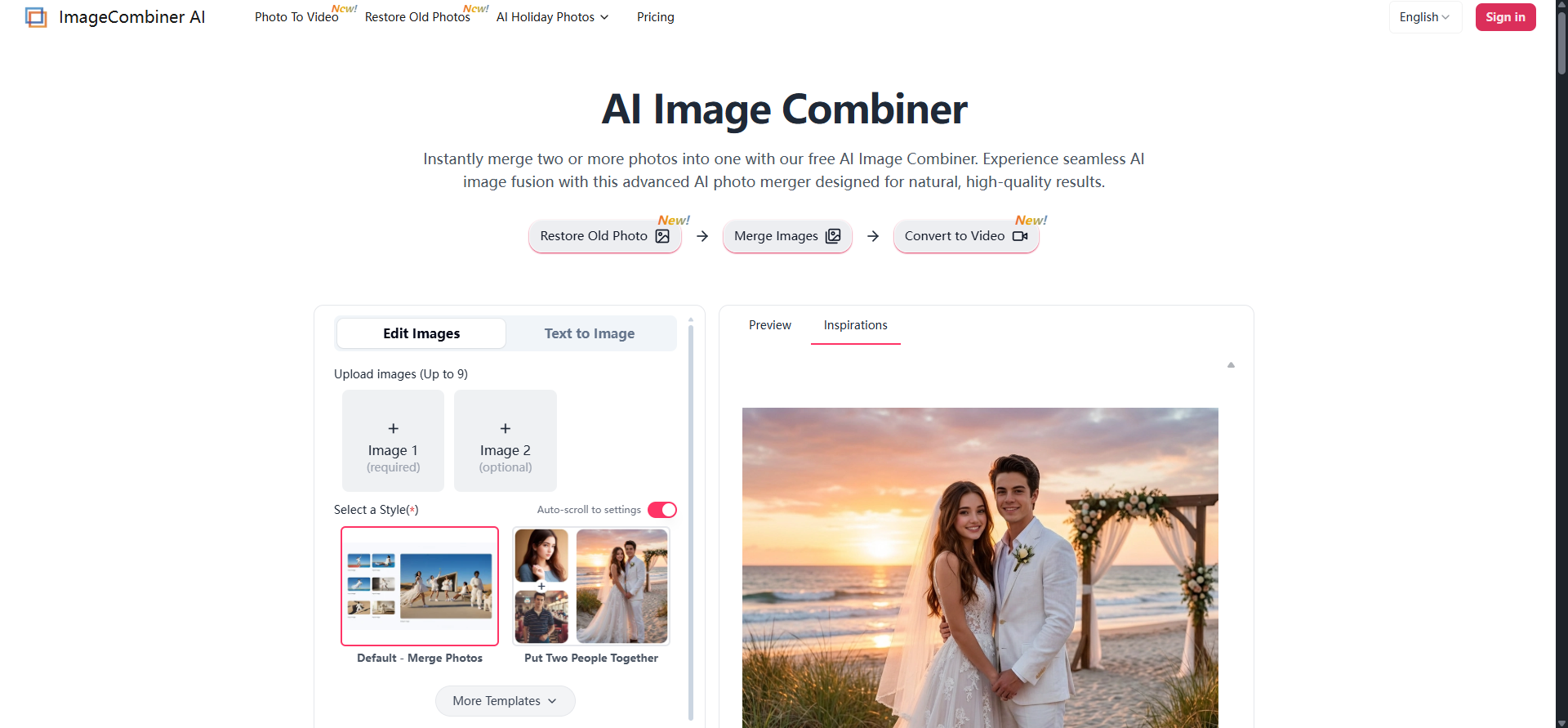
AI Image Combiner, operated by ImageCombiner AI, is an online tool that uses artificial intelligence to merge two or more photos into a single, cohesive composition rather than simply arranging them side by side. Instead of a basic collage grid, its context-aware models adjust lighting, shadows, colors, and spatial perspective across uploaded images so the final result looks like one natural scene. Users can upload between one and nine images and combine them through structured templates such as Merge Photos, Put Two People Together, or Add Person to Photo, or through free-form text prompts that describe the desired scene or style. The tool covers a wide range of use cases. Personal users can create couple or group portraits from separate shots, generate playful face blends, put themselves into fantasy or travel backgrounds, or produce fan art and surreal mashups. E-commerce sellers can use it for virtual try-on, lifestyle product staging, and logo mockups on packaging or apparel. Designers and real estate marketers can virtually furnish empty rooms, create before-and-after comparisons, and apply painterly style transfers to photographs. The product uses a freemium model. New users receive free starter credits after login, and generated previews carry a subtle watermark that can be removed by purchasing a credits pack. A Basic model handles everyday merges, while a Premium model targets complex multi-image tasks with sharper facial detail and stronger object consistency. Because the workflow is designed to require no editing skills, it suits both casual users and small businesses that need quick, professional-looking visuals.
SpecificationsAI-estimated
Key Features of AI Image Combiner
Use Cases for AI Image Combiner
Couple and Group Portraits
Combine separate photos to place people together who were never in the same shot.
Virtual Try-On for Fashion Retail
Dress models in apparel so customers can visualize fit and style before buying.
Product Lifestyle Staging
Move products from plain backgrounds into lifestyle scenes to improve marketing visuals.
Virtual Home Staging
Furnish empty rooms with virtual furniture for real estate listings.
Before and After Comparisons
Place two photos side by side to showcase progress, transformations, or case studies.
Artistic Style Transfer
Apply painting textures or modern art styles to photographs for campaigns or digital art.
How to use AI Image Combiner?
Upload Your Images
Upload at least one photo to Image 1, add Image 2 optionally, and upload up to nine images in total.
Choose a Template or Enter a Prompt
Select a template such as Merge Photos or Put Two People Together, then edit the prompt to describe how the images should combine.
Generate and Download
Check the credit cost on the Generate button, click Generate, preview the result, and download it.
Pros & Cons of AI Image Combiner
Pros
- Produces natural-looking merges by automatically matching lighting, shadows, and perspective instead of simple side-by-side layouts
- Supports flexible inputs, from quick template-based merges to free-form text prompts, with up to nine images per project
- Requires no manual editing skills, making advanced compositing accessible to beginners
- Free starter credits and watermarked previews let users evaluate output quality before paying
Cons
- Full-resolution, watermark-free downloads require paid credits
- Login is required before using the combination features
- Complex multi-image results depend on the Premium model, which costs more than the Basic option
- Output realism for facial blends and virtual try-on can vary with input photo quality
Frequently Asked Questions
What is AI Image Combiner?
It is an online tool by ImageCombiner AI that uses AI to merge two or more photos into one cohesive image, adjusting lighting, shadows, and perspective automatically.
Is it free to use?
New users receive free starter credits after logging in. Generated previews include a watermark, which can be removed by purchasing a credits pack.
How many photos can I combine?
You can upload between one and nine images per project.
What is the difference between the Basic and Premium models?
The Basic model suits everyday merges and quick edits. The Premium model handles complex multi-image tasks with sharper facial detail and stronger object consistency.
Can I use the results commercially?
Yes. Once you unlock an image by removing the watermark, you have commercial usage rights.
Do I need an account?
Yes. Login is required to access combination features, secure your credits, and save your generation history.
Can I control the output style?
Yes. You can choose a template for a structured result or write a text prompt to guide the style, setting, and composition.
Pricing Overview
View full pricing →The page does not state explicit plan names or dollar amounts; it mentions only a credit cost shown on the Generate button, and the tool is described as free to use online.
Detailed plans are not listed. Visit the official website for pricing information.
Reviews & Ratings0.0
No reviews yet. Be the first to write one!
Top Alternatives & Similar Software
View all alternatives & similar software→No alternatives available yet.
People also viewed


Related searches
Is this your tool?
Claim this page to update details, reply to user reviews, and drive more traffic to your product.
Claim this Product →
Tags
Explore Related Topics
Keep up with AI Image Combiner alternatives
New alternatives, pricing changes and the week's biggest movers - one email every Tuesday.