


AIColors
A free AI tool that turns a simple mood description into a ready-to-use five-color palette.
What is AIColors?
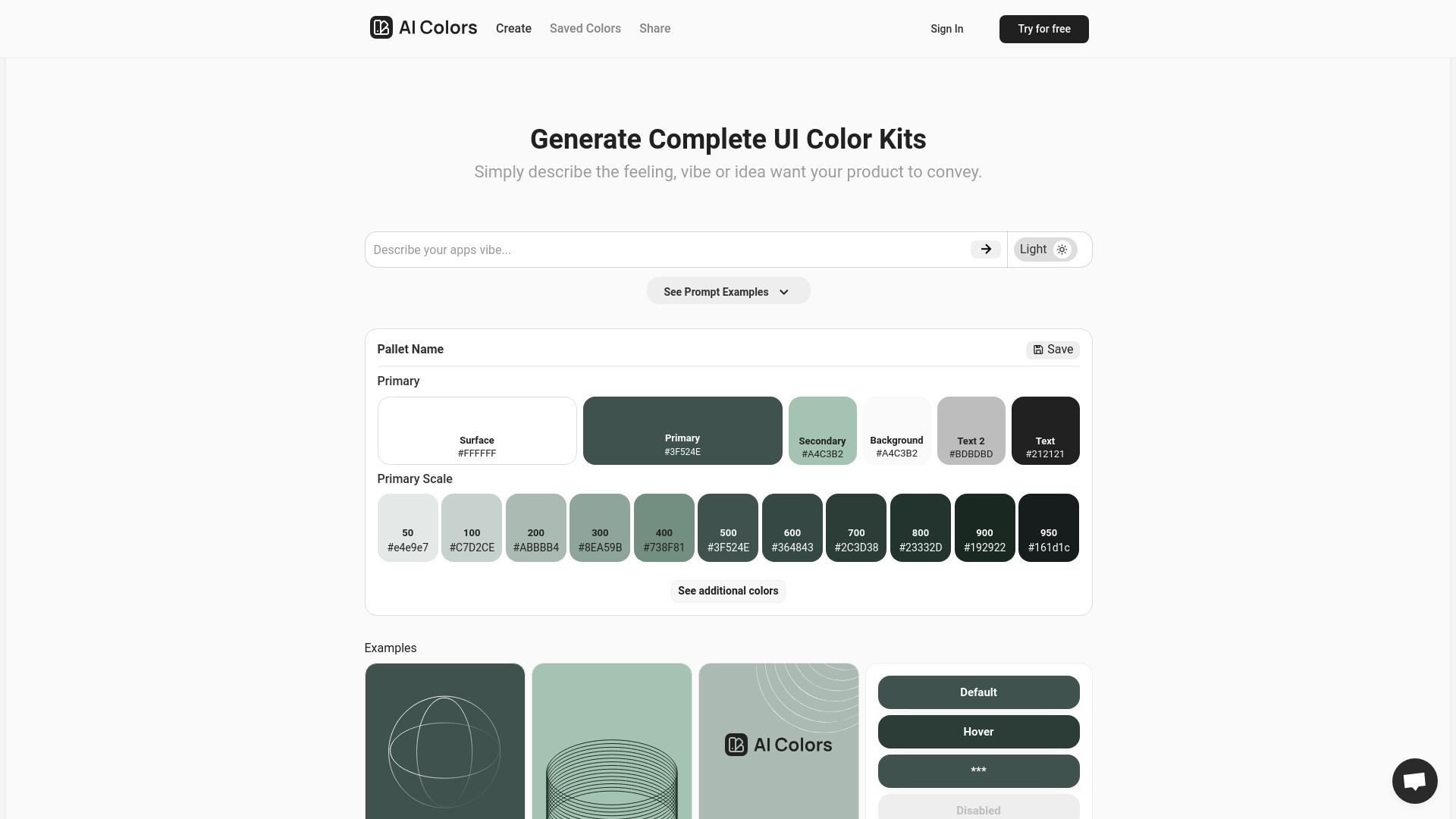
AIColors is a free, browser-based AI color palette generator that turns a plain-language description of a mood, theme, or aesthetic into a harmonious five-color scheme in seconds. Instead of manually picking hues and testing contrast combinations, users type a phrase such as "tropical sunset", "ocean calm", or "minimalist tech" and receive a ready-to-use palette represented as hex codes. The tool is designed to shorten the early exploration phase of visual design, where the goal is to find a color direction quickly before committing to detailed work. The core experience is deliberately simple. Users describe their vision, the AI interprets the mood and aesthetic, and the generator returns a balanced palette that can be copied with one click. Because the output spans a wide range of styles, from modern and vibrant to vintage and pastel, it can serve as a starting point for brand identities, web interfaces, illustrations, presentations, or social media graphics. There is no account requirement and no stated limit on how many palettes can be generated, which lowers the barrier to experimenting with many directions in a single session. AIColors is aimed at designers, developers, and creative hobbyists who need color inspiration without a steep learning curve in color theory. Its emphasis on natural-language input makes it approachable for people who think in terms of feelings and themes rather than RGB or HSL values. The interface is available in nine languages, which broadens its reach beyond English-speaking users, although it does not currently offer saved palettes or a public API, so users typically export values into their own design tools or stylesheets.
SpecificationsAI-estimated
Key Features of AIColors
Use Cases for AIColors
Brand color exploration
Designers can describe a brand personality and quickly generate several candidate palettes to compare before refining a final identity.
Website theming
Developers can produce a color scheme matching a site's mood and paste the hex values directly into CSS variables.
Presentation design
Presenters can generate a cohesive palette that fits the tone of a deck without needing color theory expertise.
Social media graphics
Creators can find fast, on-theme colors for posts, banners, and thumbnails tied to a seasonal or thematic mood.
Illustration and art inspiration
Artists can use palettes as a starting point for paintings, digital illustrations, or moodboards.
Product UI prototyping
Product teams can test different aesthetic directions for an interface early in the design process.
How to use AIColors?
Describe
Enter a mood, theme, or keyword such as "tropical sunset" or "minimalist tech".
Generate
Let the AI analyze the description and produce a five-color harmonious palette.
Copy and apply
Copy the hex codes and apply them to your design project, CSS, or design system.
Pros & Cons of AIColors
Pros
- Generates complete five-color palettes from plain-language descriptions in seconds
- Completely free with no sign-up and no stated generation limits
- One-click copying of hex codes for direct use in CSS and design tools
- Supports nine languages, making it accessible to a global audience
Cons
- Does not save generated palettes, so users must keep track of their own favorites
- No public API, limiting integration into automated design workflows
- Output is limited to hex codes without built-in contrast or accessibility checks
Frequently Asked Questions
Is this AI color palette generator free?
Yes, AIColors is completely free to use, and you can create unlimited palettes without an account.
What export formats are supported?
You can copy individual hex codes or the full palette directly from the page, then paste them into CSS variables, Tailwind config, or design tokens.
How does the AI generate palettes?
The AI analyzes your text description to understand the mood, theme, and aesthetic, then produces a harmonious five-color palette matching that vision.
Can I save my palettes?
No, AIColors does not store generated palettes or require an account. Save hex codes in your own project files.
What languages are supported?
The generator is available in nine languages: English, Simplified Chinese, Traditional Chinese, Japanese, Korean, Spanish, French, German, and Portuguese.
Is there an API?
There is no public API for the homepage generator, so palette values must be copied manually or used through the browser interface.
Pricing Overview
View full pricing →AIColors is a completely free AI color palette generator with unlimited palette generation and no sign-up required.
Detailed plans are not listed. Visit the official website for pricing information.
Reviews & Ratings0.0
No reviews yet. Be the first to write one!
Top Alternatives & Similar Software
View all alternatives & similar software→No alternatives available yet.
People also viewed


Related searches
Is this your tool?
Claim this page to update details, reply to user reviews, and drive more traffic to your product.
Claim this Product →
Tags
Explore Related Topics
Keep up with AIColors alternatives
New alternatives, pricing changes and the week's biggest movers - one email every Tuesday.