


BulkImagen
Type once, get a stack of images back—the bulk AI image generator that turns one prompt or CSV into hundreds of ready-to-download images.









What is BulkImagen?
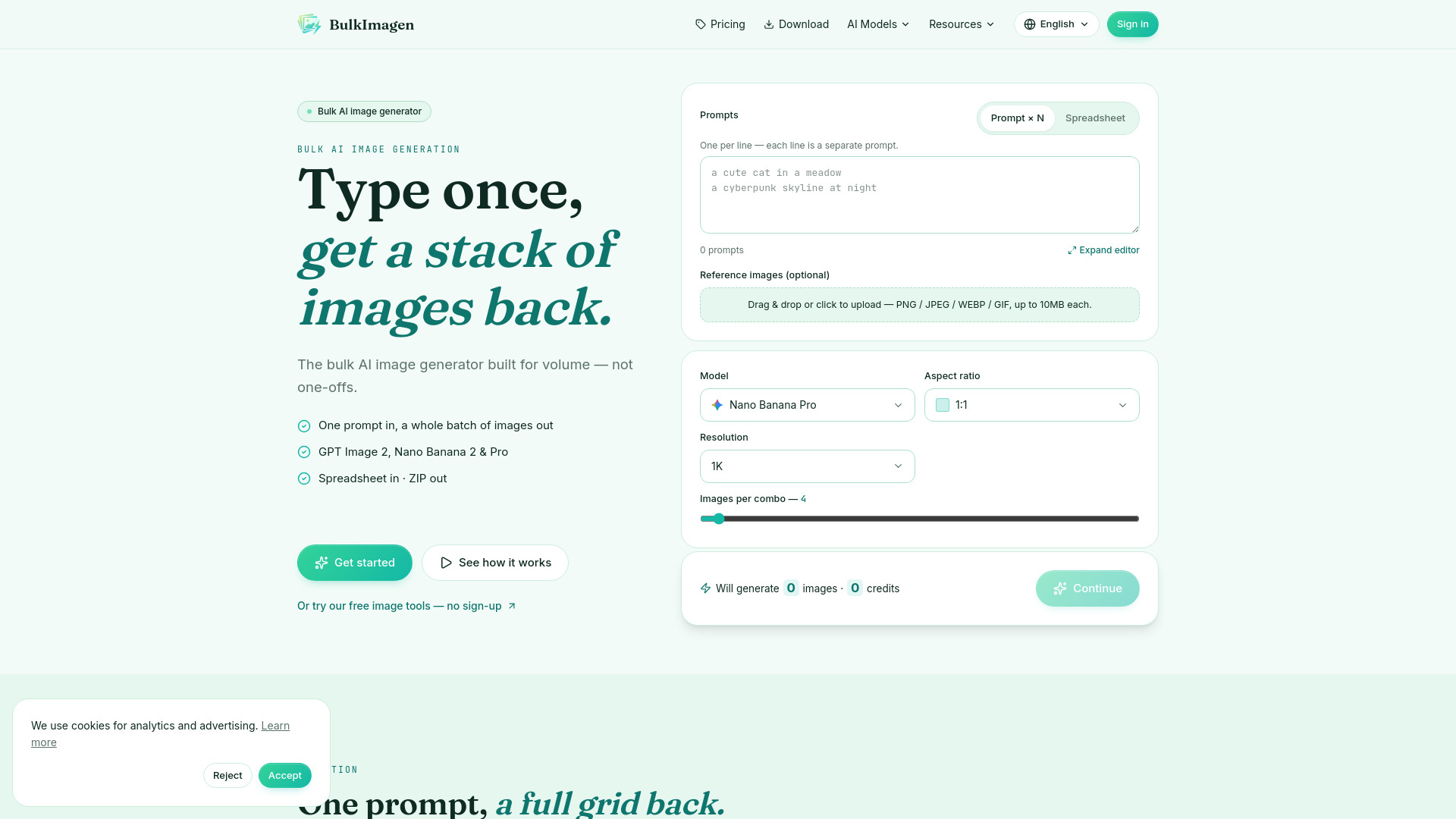
BulkImagen is a browser-based bulk AI image generation platform built for volume, not one-offs. Instead of generating images one at a time, you paste one prompt, load a CSV/spreadsheet of prompts, or upload a reference image, and the service runs the whole batch in parallel. When the run completes, every result is packed into a single ZIP for easy download. Behind its single form, BulkImagen routes batches through a wide range of AI models—including GPT Image 2, Nano Banana 2/Pro, Seedream, Grok Imagine 2.0, Flux 2 Pro, and Z-Image—and lets you set aspect ratio, resolution, and images per combo. It also includes specialized tool pages for logos, coloring pages, app icons, avatars, product photos, quotes, affirmation cards, and ad creatives, plus an API and an AI agent skill for automation. BulkImagen is aimed at e-commerce teams, performance marketers, print-on-demand sellers, agencies, and game studios that need image output at scale. It operates on prepaid credits—there is no subscription and credits never expire—and new accounts get free starter credits to try a small batch before paying.
SpecificationsAI-estimated
Key Features of BulkImagen
Use Cases for BulkImagen
E-commerce catalogs
Generate fresh hero shots for every product line in one batch instead of staging and shooting each one.
Social ad sets
Produce many prompt variants across multiple aspect ratios, ready for the Meta ad library.
Print-on-demand
Use a CSV of product and design variations to get hundreds of mockups that cover every color and size.
Game & UGC assets
Keep character art, weapon icons, and biome tiles visually consistent when generating large asset packs.
Editorial illustrations
Create article hero images fast enough for a newsroom while maintaining a consistent visual style.
A/B testing creative
Render numerous variants of the same product framing, then ship the winners and discard the rest.
Storyboarding
Turn a scene-by-scene script into storyboard frames with the same character and style.
Logo & brand exploration
Feed one brand brief and receive multiple logo marks or visual directions to choose between.
How to use BulkImagen?
Prepare your prompts
Enter one prompt per line in the text box, upload a CSV with a prompt column, or drop in reference images to steer the batch.
Set model and output options
Choose the AI model, aspect ratio, resolution, and images per combo. The exact credit cost is shown before you continue.
Run the batch
Click continue and BulkImagen processes your whole batch in parallel, handling every image for you.
Download the results
When the batch finishes, download everything as a single ZIP or grab individual images from the results gallery.
Pros & Cons of BulkImagen
Pros
- Generates hundreds of images in parallel from one prompt or CSV, not one at a time.
- No subscription: prepaid credits never expire and new accounts get free starter credits.
- All 11 major AI image models accessible in one interface, including GPT Image, Nano Banana, Seedream, Flux 2 Pro, and Grok Imagine.
- Fast ZIP export of the entire batch plus individual gallery downloads.
- Reference image support keeps whole batches visually consistent.
Cons
- Credits are the only payment model; there is no flat-rate subscription for unlimited use.
- The platform is online-only, so it requires a browser and internet connection—no native desktop or offline app.
- Generated images are not stored indefinitely, so you need to download them promptly after a batch completes.
- Usage rights depend on each individual model provider's terms in addition to BulkImagen's own Terms of Service.
Frequently Asked Questions
Which AI models does BulkImagen support?
All 11 models are included: GPT Image 2, GPT Image 2.5, Nano Banana 2, Nano Banana 2 Lite, Nano Banana Pro, Seedream 4.5, Seedream 5.0 Lite, Seedream 5.0 Pro, Grok Imagine 2.0, Flux 2 Pro, and Z-Image. You pick the model for each batch, and there is no auto-switching between models.
What's the CSV format for a bulk generation run?
One row per render, or per group if you add a count column. The only required column is prompt; ratio and count are optional. Save the file as UTF-8, comma-separated, and quote any prompt that contains a comma.
How fast is a batch?
Your entire batch runs in parallel rather than one item after another, so a large batch finishes in a fraction of the time a sequential tool would take. The exact speed depends on the model you choose and how many images you queue.
How do credits work?
Prepaid credits, no subscription. Each render costs a few credits depending on the model and resolution you choose, and the exact cost is shown in the form before you generate. Credits never expire.
Is there a free way to try BulkImagen?
Yes, new accounts start with free starter credits so you can run a small batch before you ever pay. When the free credits run out, you simply top up—there is no subscription, just prepaid credits.
Can I use reference images with the bulk generator?
Yes. Attach one or more PNG / JPEG / WEBP / GIF reference images up to 10MB each, and BulkImagen uses them to steer the look of every render in the run. This is the simplest way to keep a whole batch visually consistent.
Who owns what I generate?
You do. What you generate is yours to use for your own lawful projects, subject to each model provider's terms and BulkImagen's Terms of Service.
Do I need to install anything to use BulkImagen?
No. BulkImagen runs entirely in your browser—sign in with Google and start a batch. The platform holds the model credentials for you, so you never have to manage an API key for the web app.
Can BulkImagen handle a large CSV?
Yes. Studio and Scale plans support larger spreadsheet uploads, with Scale adding the largest batch limits and a priority render queue.
Reviews & Ratings0.0
No reviews yet. Be the first to write one!
Top Alternatives & Similar Software
View all alternatives & similar software→
People also viewed



Related searches
Is this your tool?
Claim this page to update details, reply to user reviews, and drive more traffic to your product.
Claim this Product →
Tags
Explore Related Topics
Keep up with BulkImagen alternatives
New alternatives, pricing changes and the week's biggest movers - one email every Tuesday.