



Checkie
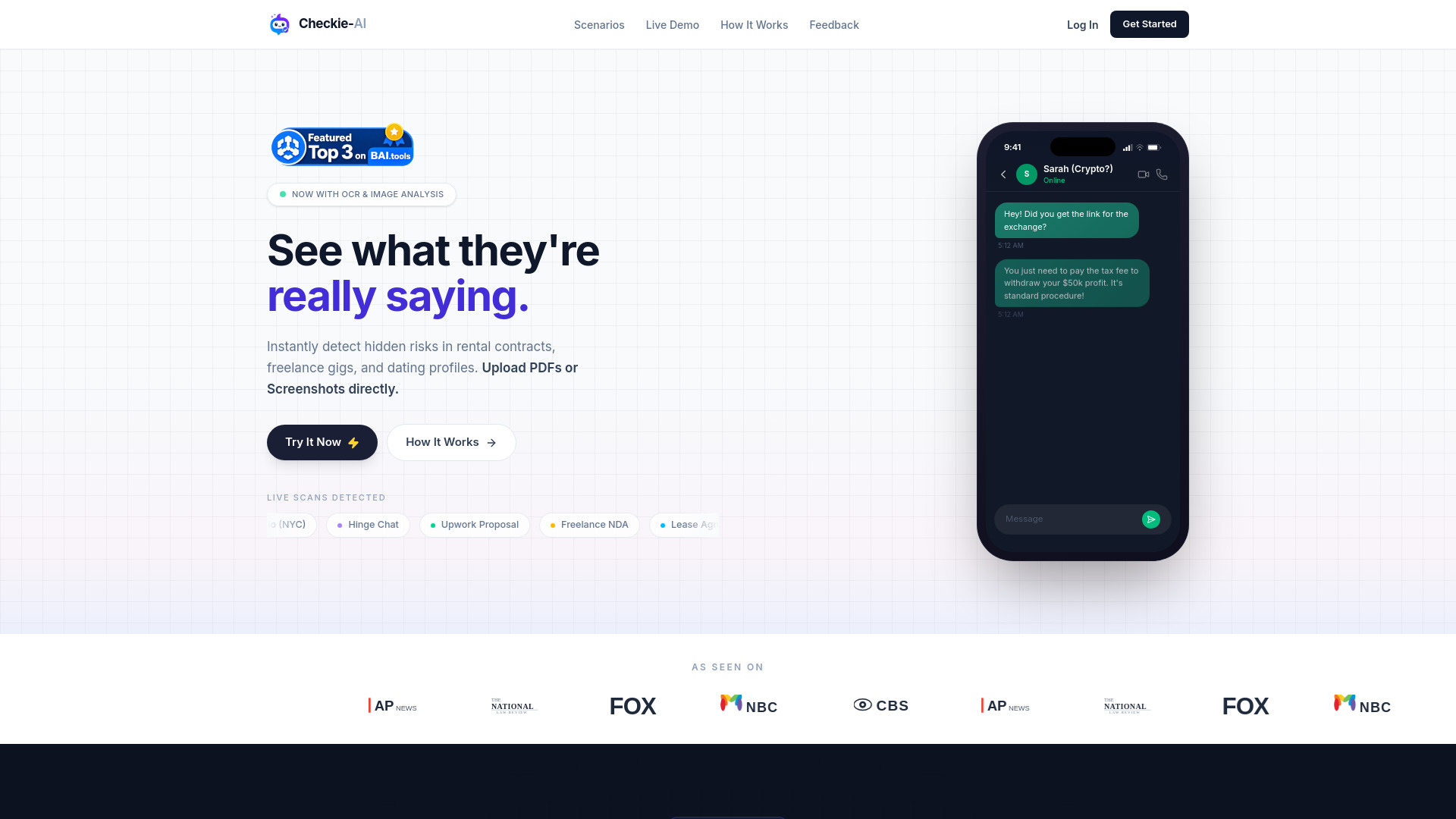
An AI risk radar that scans contracts, chats, and profiles for hidden traps, scams, and red flags in plain English.




What is Checkie?
Checkie is an AI-powered analysis tool that helps people spot hidden risks in the documents and conversations they encounter daily. Users can upload PDFs or screenshots of rental contracts, freelance agreements, dating profiles, and chat messages, and receive a plain-English breakdown of unfair clauses, scam signals, manipulative language, and red flags. Its OCR and image analysis capabilities allow it to read text directly from photos and screenshots, including WhatsApp chats, dating app bios, and physical contracts. The product is organized around a set of focused scanners. The Nomad Shield targets renters abroad by flagging illegal clauses and hidden maintenance fees, the Gig Guard looks for traps such as unlimited revisions and overbroad IP rights in freelance contracts, and the Vibe Check examines dating and social chats for manipulation tactics, commitment issues, and crypto scams. Additional tools include Face Check for comparing photos, Image Check for detecting AI-generated images, and Story Check for naming manipulation patterns in pasted conversations. Results are presented as a simple traffic-light system (green, yellow, red) so users can quickly decide whether to proceed, pause, or walk away. Checkie positions itself as a decision-support layer rather than a legal replacement: its founder framing, 'AI creates, AI checks, human decides,' reflects that the analysis is meant to inform judgment, not substitute for a qualified lawyer. It is recognized as a technology partner in the HKMA GenAI Sandbox and has received industry awards, and it states that uploaded chats and contracts are processed anonymously and discarded after analysis.
SpecificationsAI-estimated
Key Features of Checkie
Use Cases for Checkie
Reviewing a rental contract abroad
Snap a photo of a lease while traveling to catch non-refundable deposit terms or hidden maintenance fees before signing.
Checking a freelance agreement
Upload a client contract PDF to identify unlimited revision demands and overbroad intellectual property transfers.
Screening a dating match
Upload profile screenshots or photos to check whether a profile image is AI-generated or a chat shows scam signals.
Spotting romance and crypto scams
Paste suspicious DMs asking for gift cards or investment deposits to get a breakdown of manipulation patterns.
Translating legal jargon
Get plain-English explanations of dense legal text for people who don't have time to read full contracts.
Reporting emerging scam types
Contributors can submit newly seen risks to help the models learn to detect new scams and unfair clauses.
How to use Checkie?
Choose a scanner
Select the relevant tool, such as Nomad Shield for rentals, Gig Guard for freelance contracts, or Vibe Check for dating chats.
Upload or paste your content
Drop in a PDF, a screenshot, a photo, or paste the text directly.
Let the AI analyze it
Checkie reads the content with OCR where needed and checks it against known risk patterns and regulations.
Review the traffic-light report
Check the green, yellow, or red rating along with plain-English explanations of each flagged item.
Decide and seek advice if needed
Use the findings to decide whether to proceed, negotiate, or consult a lawyer for significant agreements.
Pros & Cons of Checkie
Pros
- Accepts PDFs, screenshots, and photos via OCR, so users don't need to retype text
- Translates legalese and manipulative language into plain-English risk summaries
- Simple green/yellow/red traffic-light verdicts make results fast to act on
- Covers multiple domains: rentals, freelance contracts, dating, and social scams
- Claims to support over 90 languages and to discard uploaded data after analysis
Cons
- Not a substitute for legal advice; a qualified lawyer is still needed for high-stakes contracts
- Relies on common patterns and public regulations, so novel or jurisdiction-specific risks may be missed
- Some tools, such as Face Check, involve subjective judgments that are hard to validate
Frequently Asked Questions
Can Checkie read text from screenshots?
Yes. Its OCR engine can read text from screenshots of dating bios, WhatsApp chats, and photos of physical contracts.
Does Checkie replace a lawyer?
No. It is an AI analysis tool that highlights potential risks based on common patterns and public regulations, but it does not replace qualified legal advice.
What languages are supported?
The company states that analysis works across more than 90 languages, including German, Spanish, Thai, and Japanese.
Is my data stored?
According to the company, chats and contracts are processed anonymously and discarded immediately after analysis.
How does the Image Check work?
It uses deep pixel analysis to detect whether a profile or other photo is likely AI-generated.
How accurate are the results?
The site does not publish accuracy benchmarks. Results should be treated as risk indicators to inform your judgment rather than definitive findings.
Can I contribute new scam examples?
Yes. The site has a feedback form where users can report new types of risks to help train the models.
Reviews & Ratings0.0
No reviews yet. Be the first to write one!
Top Alternatives & Similar Software
View all alternatives & similar software→No alternatives available yet.
People also viewed


Related searches
Is this your tool?
Claim this page to update details, reply to user reviews, and drive more traffic to your product.
Claim this Product →
Tags
Explore Related Topics
Keep up with Checkie alternatives
New alternatives, pricing changes and the week's biggest movers - one email every Tuesday.