


ColorArt AI
Turn any text prompt or family photo into a printable, personalized coloring page in seconds.


What is ColorArt AI?
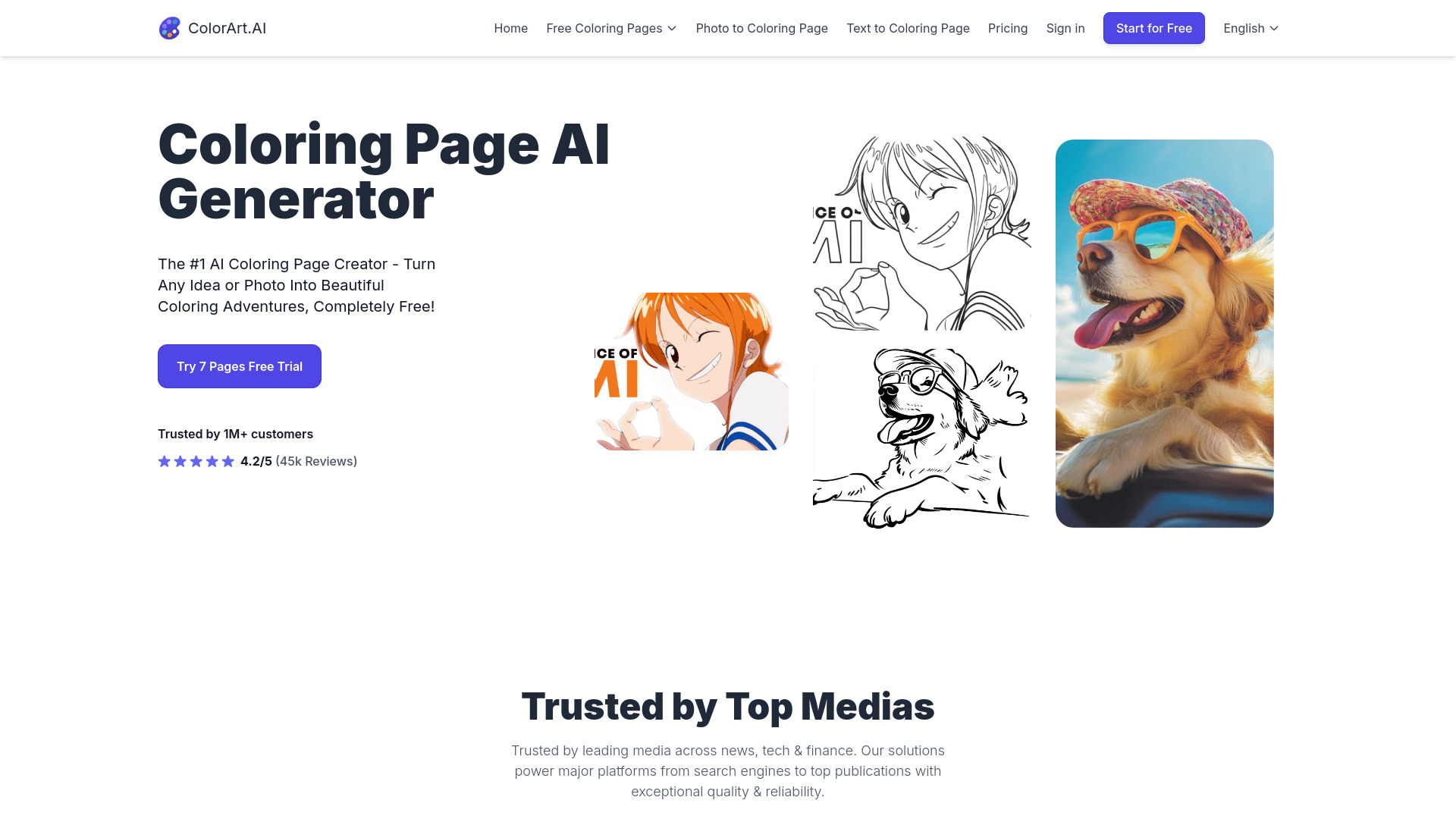
ColorArt AI (colorart.ai) is an AI-powered creative tool that generates printable coloring pages from simple text descriptions, uploaded photos, or rough sketches. Users type an idea such as dinosaurs having a tea party or a favorite cartoon character, and the platform produces a line-art coloring page within seconds to a few minutes, depending on prompt complexity and server load. It is positioned as a free-to-start generator with paid tiers for higher volume. Beyond text prompts, the photo-to-coloring-page feature uses AI edge detection to convert family photos, children's artwork, or scenic images into outline drawings suitable for coloring. A companion photo enhancement function upscales low-resolution images so the output is sharp enough to print. Users can also turn sketches into polished pages and personalize designs with letters, words, names, and numbers. The product is aimed primarily at parents looking for screen-free family activities and at creators who publish coloring books. A creator toolkit supports building full books with consistent characters and publishing directly to Amazon, making the platform useful for both casual home printing and high-volume business use.
SpecificationsAI-estimated
Key Features of ColorArt AI
Use Cases for ColorArt AI
Parents making screen-free activities
Generate custom coloring sheets featuring a child's favorite characters or interests to keep kids engaged at home.
Turning family photos into keepsakes
Convert vacation shots, portraits, or grandparent moments into coloring pages that become shared family activities.
Preserving children's artwork
Transform a child's drawing or sketch into a polished coloring page they can color again.
Teachers creating classroom materials
Produce themed coloring sheets quickly for lessons, rewards, or seasonal activities.
Authors publishing coloring books
Build multi-page coloring books with consistent characters and publish them to Amazon.
Party and event personalization
Create custom coloring pages with names and numbers for birthdays, celebrations, or gifts.
How to use ColorArt AI?
Choose your input
Enter a text description, upload a photo, or start from a sketch.
Generate the coloring page
Let the AI convert your input into line art, which typically takes seconds to a few minutes.
Personalize (optional)
Add letters, words, names, or numbers to customize the page.
Download and print
Export the high-resolution page and print it for coloring, or use the creator toolkit to assemble a book.
Pros & Cons of ColorArt AI
Pros
- Creates coloring pages from plain-language text prompts with no design skills required
- Photo-to-line-art conversion preserves personal details from family photos and children's artwork
- Built-in upscaling makes low-resolution images print-ready
- Creator toolkit supports character consistency and direct Amazon publishing for coloring books
Cons
- Generation times vary from about 10 seconds to 5 minutes depending on prompt complexity and server load
- Output quotas are limited on lower tiers, which may constrain heavy users
- Results depend on prompt and photo quality, so some outputs may need manual adjustment
Frequently Asked Questions
How can I create coloring pages with ColorArt AI?
You can create pages from text prompts, photos, sketches, or personalized designs with letters, words, names, and numbers.
Are there limits on how many pages I can create?
Limits depend on your plan. Higher tiers provide increased access for creators and businesses.
How long does it take to generate a page?
Generation usually takes between 10 seconds and 5 minutes, depending on prompt complexity and server load.
Can I turn my sketches into detailed coloring pages?
Yes. Start with a simple sketch and the AI fills in the details to create a polished coloring page.
Can I use photos of my family or children?
Yes. The photo-to-coloring-page feature converts any picture, including family photos and children's artwork, into line art.
Can I publish the coloring books I create?
The creator toolkit supports building multi-page books with consistent characters and publishing directly to Amazon.
Pricing Overview
View full pricing →The page references multiple plan tiers with different limits but does not state any plan names or prices in the provided content.
Reviews & Ratings0.0
No reviews yet. Be the first to write one!
Top Alternatives & Similar Software
View all alternatives & similar software→No alternatives available yet.
People also viewed


Related searches
Is this your tool?
Claim this page to update details, reply to user reviews, and drive more traffic to your product.
Claim this Product →
Tags
Explore Related Topics
Keep up with ColorArt AI alternatives
New alternatives, pricing changes and the week's biggest movers - one email every Tuesday.