


Docus
An AI layer that turns diagnostic lab results into clinical interpretations, follow-up care, and compliant orders.


What is Docus?
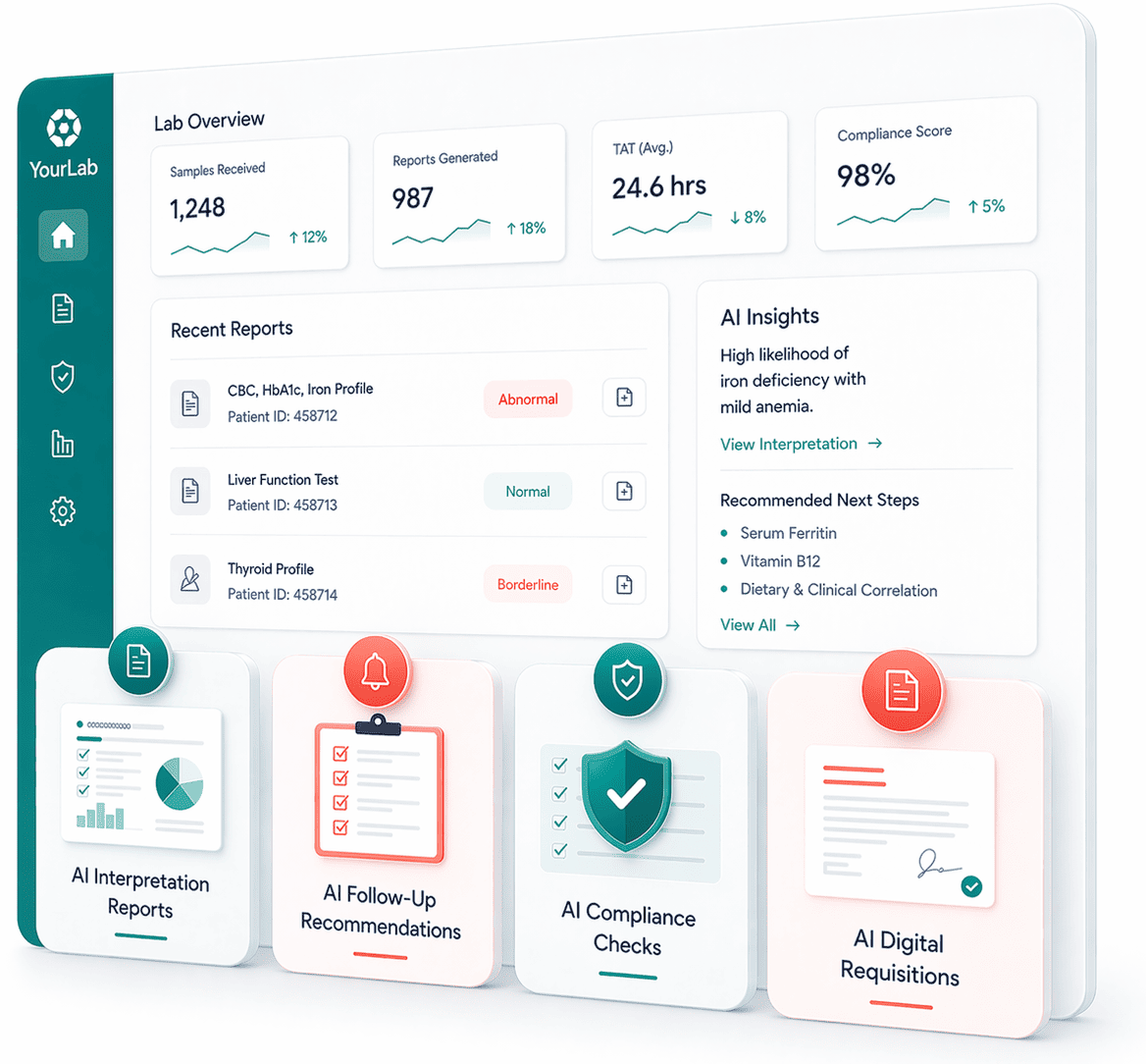
Docus is an AI layer built for diagnostic laboratories, designed to help labs interpret test results, streamline ordering, and keep patients and providers engaged. It serves direct-to-consumer labs, reference labs, and in-house laboratories within hospitals and clinics, aiming to reduce operational and compliance burden while improving retention. The platform's core capabilities include Interpretation Reports that generate clinical reports for doctors (with differential diagnoses, follow-up suggestions, and clinical plans) alongside patient-friendly explanations of results. Follow-Up Recommendations suggest next tests and send timely notifications to bring patients back to the lab. An AI Compliance Agent checks test orders against ICD diagnosis codes, monitors repeat testing frequency, and flags medical necessity issues before claims are denied. Digital Requisitions use autocomplete and guided inputs to speed up order completion, with digital signatures and direct delivery to LIS systems. Docus is positioned for lab operators who want to increase test volume and patient retention without expanding clinical staff. Integration is flexible: labs can connect via API or HL7 to push structured outputs into their LIS, CRM, or EHR, or start immediately using Docus's hosted interfaces for labs, doctors, and patients. The company emphasizes compliance, citing alignment with HIPAA, GDPR, and SOC 2 requirements, with encryption throughout and no PII required for core workflows.
SpecificationsAI-estimated
Key Features of Docus
Use Cases for Docus
Direct-to-consumer lab patient engagement
Direct-to-consumer labs can send understandable result explanations and follow-up test suggestions to keep patients returning.
Reference lab interpretation support
Reference labs can deliver clinical interpretations to referring providers, saving them review time.
Hospital in-house lab workload reduction
In-house labs in hospitals and clinics can reduce interpretation workload and speed internal decisions.
Pre-claim compliance checking
Billing and compliance teams can validate test orders against diagnosis codes to reduce audit risk and denials.
Simplified test ordering
Providers can complete digital requisitions faster using guided inputs and AI-generated medical necessity statements.
Automated LIS and EHR delivery
Labs can push structured reports directly into their existing LIS or EHR systems via API or HL7.
How to use Docus?
Choose an integration method
Select either API/HL7 integration to connect your existing systems or use Docus's hosted interfaces for a no-integration start.
Send lab data
Transmit test results from your LIS or lab workflow to Docus so the AI can process them.
Review interpretation reports
Doctors receive clinical reports while patients receive plain-language explanations of their results.
Act on follow-up and compliance alerts
Use the follow-up recommendations and compliance checks to schedule next tests and resolve order issues before submission.
Pros & Cons of Docus
Pros
- Generates both clinical reports for doctors and patient-friendly explanations from the same results
- Automated ICD-to-test order validation helps reduce claim denials and audit risk
- Flexible integration via API/HL7 or ready-to-use hosted interfaces
- Claims compliance with HIPAA, GDPR, and SOC 2 with encryption throughout
Cons
- Targeted specifically at diagnostic labs, so it is not useful for general consumers or unrelated healthcare businesses
- Clinical outputs require professional oversight and do not replace physician judgment
- Public materials do not disclose detailed pricing, requiring a sales conversation
Frequently Asked Questions
Who is Docus designed for?
Docus is designed for diagnostic laboratories, including direct-to-consumer labs, reference labs, and in-house labs within hospitals or clinics.
Do I need to integrate with my existing systems?
No. You can start immediately with Docus interfaces, or connect via API or HL7 to send data and receive outputs in your LIS, CRM, or EHR.
How does Docus help reduce billing denials?
The AI Compliance Agent checks ordered tests against diagnosis codes and flags medical necessity issues before claims are submitted.
Is patient data secure?
Docus states it aligns with HIPAA, GDPR, and SOC 2 requirements, encrypts data at every step, and does not require personally identifiable information for core workflows.
What kinds of tests are supported?
Docus advertises support for a wide range of tests for interpretation reports, though the specific test catalog is not detailed on the homepage.
How much does Docus cost?
Pricing is not publicly listed on the homepage; you would need to contact the Docus team for pricing details.
Reviews & Ratings0.0
No reviews yet. Be the first to write one!
Top Alternatives & Similar Software
View all alternatives & similar software→No alternatives available yet.
People also viewed



Related searches
Is this your tool?
Claim this page to update details, reply to user reviews, and drive more traffic to your product.
Claim this Product →
Tags
Keep up with Docus alternatives
New alternatives, pricing changes and the week's biggest movers - one email every Tuesday.