



Free AI PDF Summarizer
Upload any PDF and get instant AI summaries plus a chat assistant that answers questions about your document.


What is Free AI PDF Summarizer?
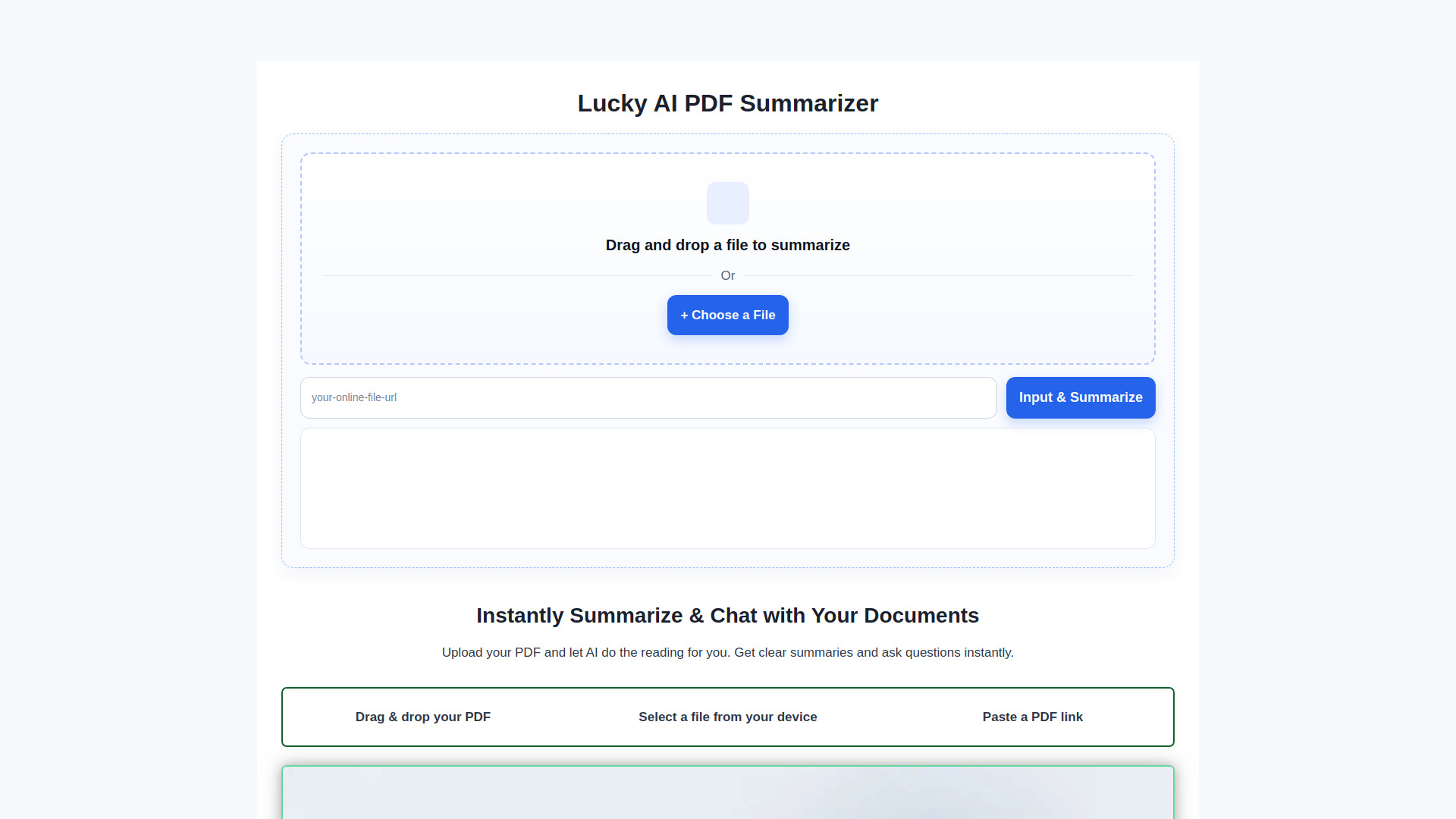
Free AI PDF Summarizer is a browser-based tool that turns lengthy documents into concise, readable summaries and lets users ask follow-up questions about their files through an AI chat interface. Users can add a document by dragging and dropping it into the uploader, selecting it from their device, or pasting a PDF link. Once uploaded, the AI scans the document, identifies its main arguments and conclusions, and returns a clean summary that can be copied, edited, or downloaded. Beyond static summaries, the built-in chat lets users interrogate their documents directly. Typical prompts include requesting bullet-point takeaways, asking for a section to be explained in simple language, or checking what conclusions a report reaches. This turns the tool from a one-time condenser into an interactive reading assistant, useful when working through dense academic papers, technical manuals, or business reports where specific answers matter more than a full read-through. The tool is aimed at students, researchers, professionals, consultants, content creators, and teams who regularly work with long-form documents and need to extract value quickly. It is positioned as free to use and accepts PDFs as well as other formats such as DOCX and TXT, making it a practical option for anyone looking to save reading time without sacrificing comprehension of the core material.
SpecificationsAI-estimated
Key Features of Free AI PDF Summarizer
Use Cases for Free AI PDF Summarizer
Студy and exam prep
Students condense textbook chapters and academic papers into quick review notes.
Research literature review
Researchers scan long papers to decide quickly which sources merit a full read.
Business report review
Professionals grasp the key findings of proposals, manuals, and reports without reading every page.
Content creation
Creators extract key ideas and references from source documents for blogs, videos, or scripts.
Team document sharing
Teams summarize meeting notes and project files to align faster on decisions.
Technical document comprehension
Engineers and analysts get plain-language explanations of dense technical material.
How to use Free AI PDF Summarizer?
Upload your document
Drag your PDF into the uploader, select it from your device, or paste a PDF link.
Run the summary
Click Summarize and let the AI scan the document and identify its key points.
Review the summary
Read the generated summary, then copy, edit, or download it as needed.
Ask follow-up questions
Use the chat to request bullet points, simplified explanations, or specific answers about the document.
Pros & Cons of Free AI PDF Summarizer
Pros
- Free to use with no sign-up friction described on the page
- Multiple upload options: drag-and-drop, device selection, or pasted PDF link
- Interactive chat lets users ask targeted questions about their document
- Supports multiple file formats beyond PDF, including DOCX and TXT
Cons
- Summary accuracy depends on the underlying AI model and document complexity, with no published accuracy benchmarks
- Page does not clearly state file size or page limits despite claiming no limits for large documents
- No details provided on data privacy, storage, or whether uploaded documents are retained
Frequently Asked Questions
Is the AI PDF Summarizer free?
The page presents the tool as a free AI PDF summarizer, with no paid tier described.
What file types are supported?
The page states support for PDFs, DOCX, and TXT files, among other formats.
Can I upload a document from a link?
Yes, you can paste a PDF link as an alternative to uploading a file from your device.
Can I ask questions about my document?
Yes, the built-in AI chat answers questions about your uploaded file, such as key takeaways or explanations of specific sections.
Can I edit or download the summary?
Yes, summaries can be copied, edited, or downloaded at any time.
Does it work with long documents?
The page says the tool is built for large documents like textbooks and research papers, though specific page or size limits are not listed.
Reviews & Ratings0.0
No reviews yet. Be the first to write one!
Top Alternatives & Similar Software
View all alternatives & similar software→No alternatives available yet.
People also viewed


Related searches
Is this your tool?
Claim this page to update details, reply to user reviews, and drive more traffic to your product.
Claim this Product →
Tags
Explore Related Topics
Keep up with Free AI PDF Summarizer alternatives
New alternatives, pricing changes and the week's biggest movers - one email every Tuesday.