


HumanizeAI
A free text humanizer that rewrites AI-generated drafts into clearer, more natural writing across eight selectable styles.
What is HumanizeAI?
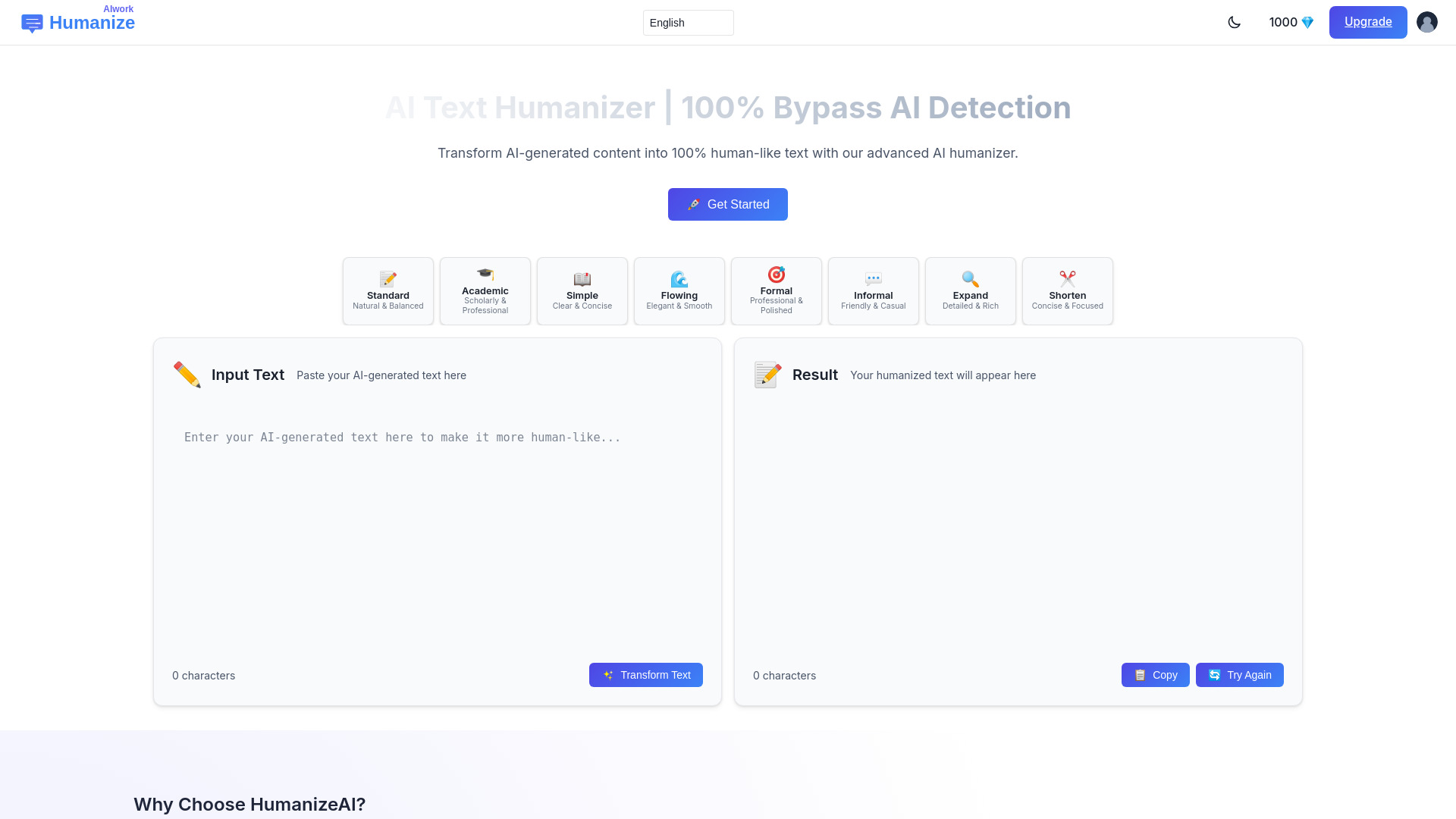
HumanizeAI is a free, browser-based AI text humanizer hosted at humanizeaiwork.com. It rewrites drafts produced by ChatGPT and other AI writing tools into clearer, more natural-sounding prose. The workflow is simple: paste a draft, choose one of eight writing styles, click Transform, and review the output. The site stresses that it is a separate product from similarly named sites such as humanizeai.com or humanizeai.io. The tool offers eight styles to match different goals: Standard for natural, balanced writing; Academic for scholarly tone; Simple for clear, concise text; Flowing for smoother, more elegant prose; Formal for polished professional writing; Informal for a friendly, casual voice; Expand for richer, more detailed text; and Shorten for focused, concise output. No account is required to use the homepage tool, and it is presented as free. Drafts are sent to the rewrite service for processing but are not written to a site database, although users are warned not to paste passwords or confidential material. HumanizeAI is positioned around readability and naturalness rather than guaranteed detector evasion. The site explicitly notes that AI detectors disagree with one another because they use different models, thresholds, and training data, and that no tool can promise a fixed score everywhere. Users are encouraged to treat detector results as signals, verify meaning and facts themselves, and add their own examples or voice before publishing. It is aimed at writers, students, marketers, and business professionals who want AI-assisted drafts to read more smoothly.
SpecificationsAI-estimated
Key Features of HumanizeAI
Use Cases for HumanizeAI
Polishing AI-assisted blog posts
Content creators can refine ChatGPT drafts so they read more naturally before publishing.
Improving student drafts
Students can make AI-assisted work easier to read, then review meaning, citations, and their own voice before submitting.
Marketing copy refinement
Marketers can adjust campaign text to sound more emotionally resonant and less generic.
Business email editing
Executives and professionals can make routine emails sound warmer and clearer.
Product description writing
E-commerce teams can make product descriptions and promotional copy more relatable to customers.
Simplifying technical or legal language
Professionals can convert dense jargon into plainer wording that clients can more easily understand.
How to use HumanizeAI?
Paste your draft
Copy your AI-generated text into the input box on humanizeaiwork.com. Avoid pasting passwords or confidential material.
Choose a writing style
Select one of the eight styles, such as Standard, Academic, Formal, or Informal, that matches your intended tone.
Click Transform
Run the rewrite and wait for the processed output to return.
Review the result
Check that the meaning, names, numbers, and citations are still accurate, and fix any shifts in meaning.
Edit in your own voice
Add your own examples, opinions, or context before publishing, and optionally compare detector results across tools if the document matters.
Pros & Cons of HumanizeAI
Pros
- Completely free to use with no account required on the homepage tool
- Eight distinct writing styles, from Academic and Formal to Informal and Expand/Shorten
- Simple three-step workflow: paste, choose a style, click Transform
- Drafts are not stored in a site database, with clear guidance on what not to paste
- Honest positioning that treats detector scores as signals rather than promising guaranteed results
Cons
- Does not guarantee a passing score on any AI detector, and results vary by checker
- Very long drafts can fail or return shorter than expected, requiring manual splitting
- Rewritten output still needs careful review for meaning shifts, citations, and facts
- Limited public detail on the rewrite model, data handling, and paid plan options
Frequently Asked Questions
What is HumanizeAI?
HumanizeAI is a free AI text humanizer on humanizeaiwork.com that rewrites ChatGPT and other AI drafts into clearer, more natural writing. It is separate from humanizeai.com and humanizeai.io.
Is HumanizeAI free?
Yes. The homepage tool is free, requires no account, and offers all eight writing styles. Very long drafts may still fail or return short, so splitting them is recommended.
Does HumanizeAI keep the original meaning?
The rewrite aims to preserve the same ideas while changing phrasing. Expand and Shorten intentionally change length, and all output should be checked for meaning shifts before publishing.
Is my text stored?
Drafts are sent to the rewrite service to produce a result, but the site states it does not save submissions in a database. Do not paste passwords or confidential material.
Can HumanizeAI guarantee a low AI-detector score?
No. Detector scores vary by tool, model, and threshold. HumanizeAI aims to improve naturalness and reduce repetitive phrasing but does not promise a passing result on any checker.
Which writing styles are available?
Standard, Academic, Simple, Flowing, Formal, Informal, Expand, and Shorten. You choose one before clicking Transform.
Pricing Overview
View full pricing →HumanizeAI's homepage tool is free to use with no account required, and all eight writing styles are available without a paid plan.
Reviews & Ratings0.0
No reviews yet. Be the first to write one!
Top Alternatives & Similar Software
View all alternatives & similar software→No alternatives available yet.
People also viewed


Related searches
About the Product
Is this your tool?
Claim this page to update details, reply to user reviews, and drive more traffic to your product.
Claim this Product →
Tags
Explore Related Topics
Keep up with HumanizeAI alternatives
New alternatives, pricing changes and the week's biggest movers - one email every Tuesday.