


Image to Prompt Generator
A free, no-login tool that turns any image or idea into ready-to-use AI art prompts for Midjourney, DALL·E, Stable Diffusion, and Flux.
What is Image to Prompt Generator?
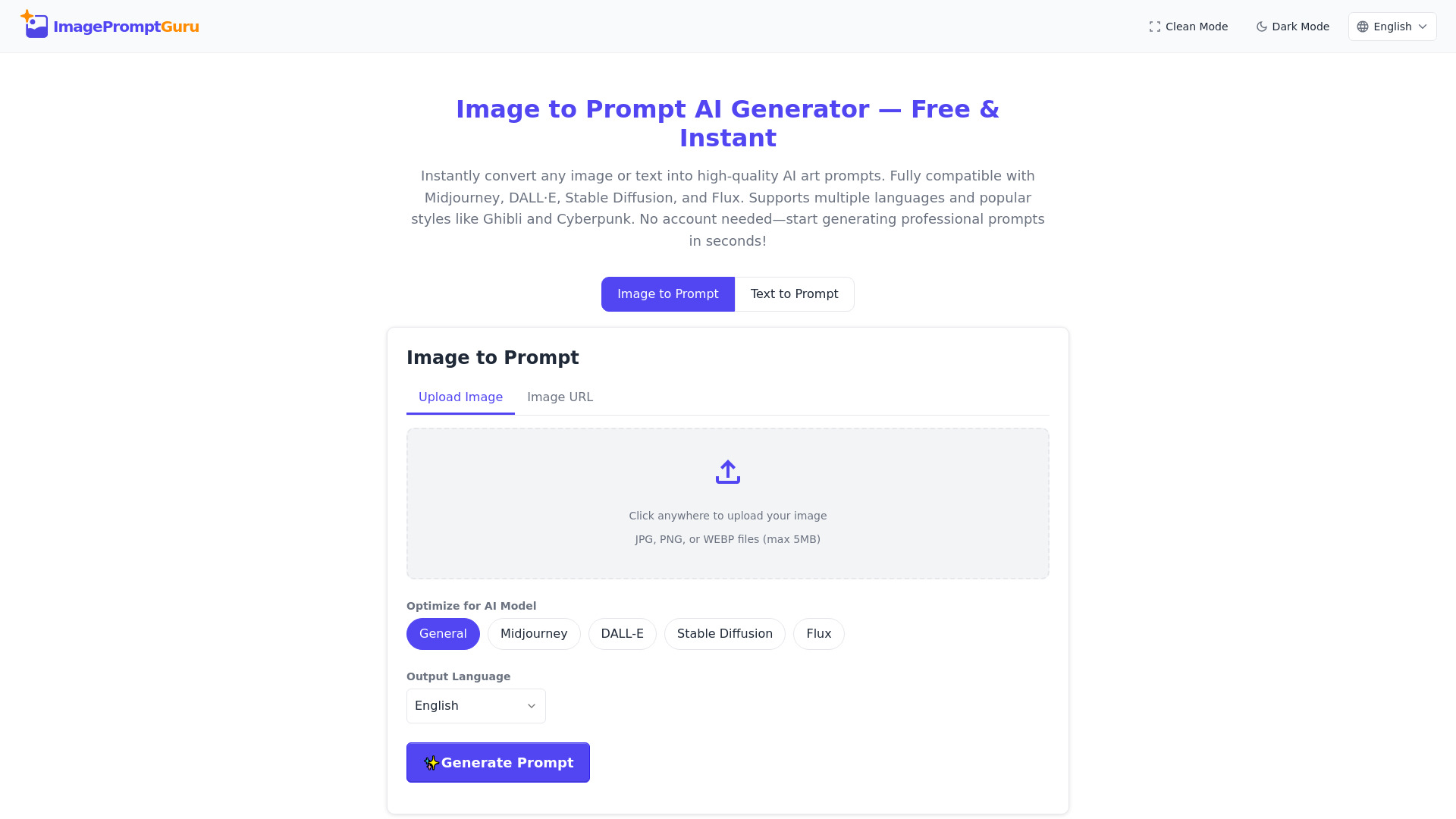
Image to Prompt Generator is a free, browser-based web tool that converts images or plain text descriptions into polished prompts for AI art generators. Users can upload a JPG, PNG, or WEBP file (up to 5MB), paste an image URL, or type a short idea, and receive a detailed prompt ready to paste into Midjourney, DALL·E, Stable Diffusion, or Flux. The tool offers two complementary modes: Image to Prompt, which analyzes visual content such as photos, sketches, or artwork to describe subject, composition, and style, and Text to Prompt, which enhances rough written ideas using established AI art phrasing conventions. The platform stands out for its accessibility. No account, login, or subscription is required, and prompt history is stored locally in the browser for convenience and privacy. Users can optimize output for specific models, including Midjourney, DALL·E, Stable Diffusion, and Flux, and choose from scene and style presets such as Photorealistic, Ghibli, Cyberpunk, Fantasy, Anime, Watercolor, Oil Painting, and Steampunk. Support for 18 input languages lets non-English speakers describe their ideas in their native tongue while receiving English prompts, the de facto standard for AI image generators. This tool is best suited for digital artists, designers, marketers, content creators, and hobbyists who want to reverse-engineer the look of an existing image or quickly turn an idea into a professional-grade prompt. Because uploaded images are stated to be processed in real time and discarded without storage or training use, it also appeals to users concerned about privacy. Output quality will still depend on the user's chosen model and some manual refinement, but the tool significantly lowers the barrier to crafting effective AI art prompts.
SpecificationsAI-estimated
Key Features of Image to Prompt Generator
Use Cases for Image to Prompt Generator
Reverse-engineering an image style
Upload an artwork or photo you admire to get a prompt that captures its subject, composition, and aesthetic for recreation in an AI generator.
Polishing a rough idea
Type a short concept in the Text to Prompt mode to receive a richer, professionally phrased prompt with appropriate art terminology.
Creating prompts for a specific model
Select Midjourney, DALL·E, Stable Diffusion, or Flux to tailor phrasing and parameters to that generator's conventions.
Applying a signature art style
Combine a concept with style presets like Ghibli, Watercolor, or Cyberpunk to quickly achieve a consistent visual direction.
Working in a non-English language
Describe your idea in Spanish, Japanese, Arabic, or another supported language and receive an English prompt ready for AI generators.
Producing commercial AI art
Generate prompts for client projects or marketing visuals, with the stated freedom to use the output commercially.
How to use Image to Prompt Generator?
Choose a mode
Select Image to Prompt to analyze an existing picture, or Text to Prompt to enhance a written description.
Provide your input
Upload a JPG, PNG, or WEBP file up to 5MB, paste an image URL, or type your idea in any supported language.
Select your target model and style
Pick Midjourney, DALL·E, Stable Diffusion, Flux, or General, and optionally choose a scene or style preset.
Generate and copy the prompt
Run the tool, review the resulting English prompt, and paste it into your chosen AI art generator, adjusting as needed.
Pros & Cons of Image to Prompt Generator
Pros
- Completely free with no subscriptions, watermarks, or account registration required
- Two modes: image-to-prompt analysis and text-to-prompt enhancement
- Optimizes output for popular AI art models including Midjourney, DALL·E, Stable Diffusion, and Flux
- Supports 18 input languages and a range of style presets like Ghibli, Cyberpunk, and Watercolor
- Uploaded images are stated to be processed instantly and discarded, with no training use
Cons
- Output quality depends heavily on the source image or input text and may still need manual refinement
- Image uploads are limited to 5MB and to JPG, PNG, or WEBP formats
- Prompt history is stored only locally in the browser, so it does not sync across devices
- Prompts are always returned in English, which may require extra editing for non-English users who want other output
Frequently Asked Questions
Is this service completely free?
Yes, the service is described as free with no subscriptions, watermarks, or hidden costs.
Is an account required?
No. There is no registration, and prompt history is stored locally in your browser.
Which AI models are supported?
Prompts are optimized for Midjourney, DALL·E, Stable Diffusion, Flux, and other generic AI art models.
Can I use languages other than English?
Yes. Eighteen languages are supported for input, and the generated prompts are returned in English.
What happens to my uploaded images?
Images are processed in real time and discarded. The site states they are never stored, shared, or used for training.
Can I use the prompts commercially?
Yes. The site states that generated prompts belong to the user and can be used for personal or commercial work without restrictions.
Pricing Overview
View full pricing →The service is free forever with no subscriptions, watermarks, or hidden costs, and no account is required.
Detailed plans are not listed. Visit the official website for pricing information.
Reviews & Ratings0.0
No reviews yet. Be the first to write one!
Top Alternatives & Similar Software
View all alternatives & similar software→No alternatives available yet.
People also viewed


Related searches
Is this your tool?
Claim this page to update details, reply to user reviews, and drive more traffic to your product.
Claim this Product →
Tags
Explore Related Topics
Keep up with Image to Prompt Generator alternatives
New alternatives, pricing changes and the week's biggest movers - one email every Tuesday.