



ImaginPrompt Image to Prompt
An AI tool that turns any image into a model-specific, reproduction-ready prompt for Midjourney, DALL-E, Stable Diffusion, and Flux.
What is ImaginPrompt Image to Prompt?
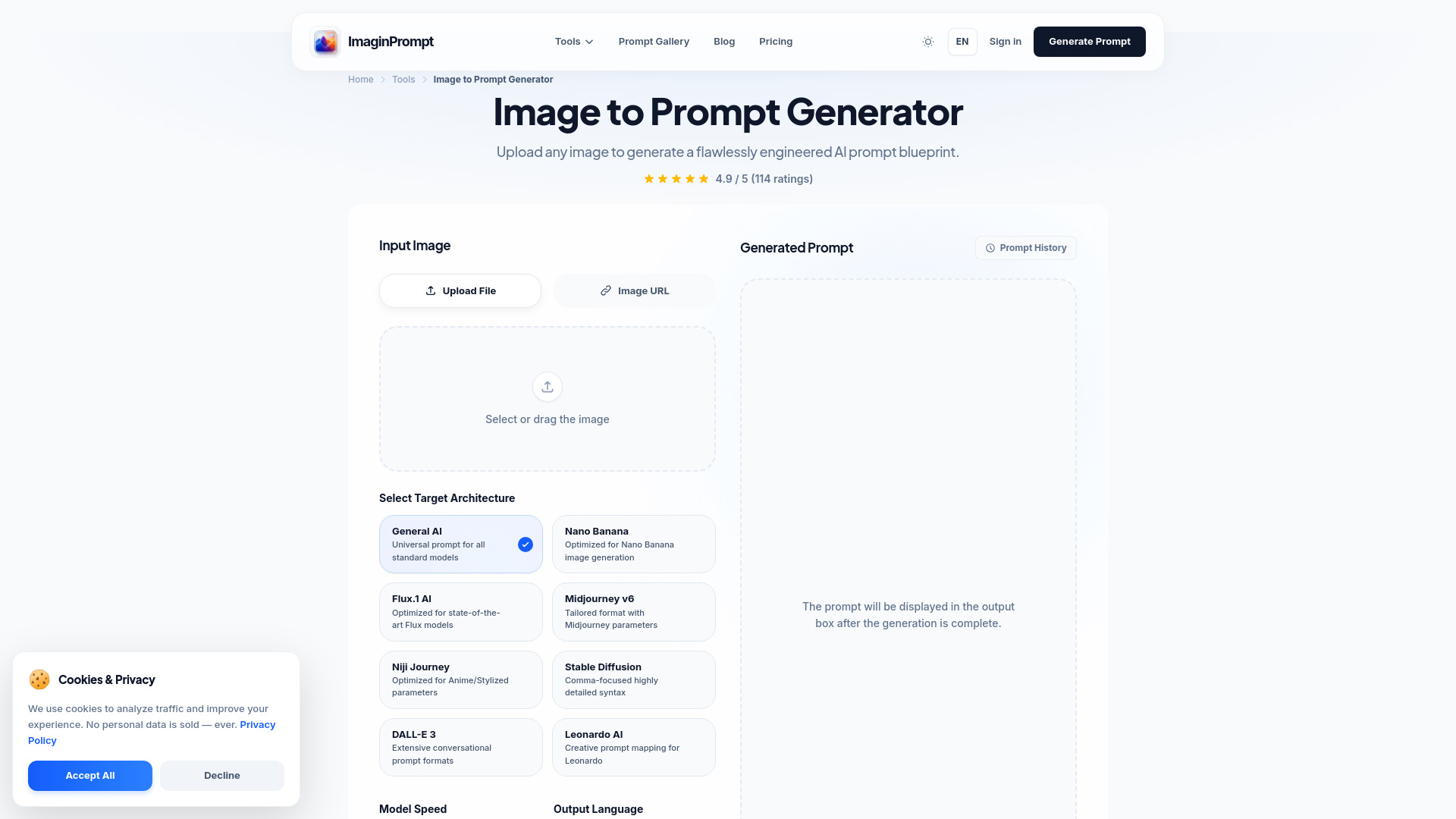
ImaginPrompt's Image to Prompt tool is an AI-powered web application that reverse-engineers any uploaded photo, screenshot, or artwork into a production-ready text prompt for AI image generators. Users upload a JPG, PNG, or WebP file (up to 10MB), and the engine analyzes the visual structure, lighting, camera angle, color temperature, depth of field, composition, artistic style, and subject matter to produce a detailed prompt. The stated aim is to capture not just the contents of an image but the feeling behind it. A key differentiator is model-aware output. The same image can be formatted for Midjourney with parameters such as --ar and --stylize, for DALL-E 3 as natural language with medium descriptors, for Stable Diffusion as comma-separated tags with suggested negative prompts, or for Flux in a descriptive, aesthetically rich style. This targeting is intended to save users from rewriting prompts when switching between generators. The tool is aimed at digital artists, photographers, marketing teams, e-commerce sellers, game designers, and educators who want to reproduce a visual style, study how AI interprets images, or scale variations of existing assets. A free tier offers five conversions per day without signup, while paid plans add batch processing of up to 20 images and REST API access for pipeline integration.
SpecificationsAI-estimated
Key Features of ImaginPrompt Image to Prompt
Use Cases for ImaginPrompt Image to Prompt
Style replication for digital artists
Reverse-engineer reference images into prompts to produce style-consistent collections across Midjourney and Stable Diffusion.
Recreating photography setups
Photographers can extract lighting, lens, and composition parameters from portfolio shots to reproduce similar looks with AI.
Consistent marketing visuals
Marketing teams can derive prompts from brand assets to keep AI-generated campaign imagery visually aligned.
Product variation renders
E-commerce sellers can turn product photography into prompt blueprints for generating color and setting variations at scale.
Concept art iteration
Game designers can convert concept art into prompts to rapidly generate environment and character variations.
Learning how AI interprets images
Educators and students can study extracted prompts to understand how visual elements map to generator language.
How to use ImaginPrompt Image to Prompt?
Select your target model
Choose Midjourney, DALL-E 3, Stable Diffusion, or Flux so the output uses the correct syntax.
Upload your image
Drop a JPG, PNG, or WebP file up to 10MB. Higher resolution images generally produce more accurate results.
Generate the prompt
The engine analyzes lighting, composition, style, and subject matter and returns a formatted prompt, including negative prompts for Stable Diffusion.
Copy and use
Paste the prompt into your generator of choice and adjust or append LoRA triggers or custom tokens as needed.
Pros & Cons of ImaginPrompt Image to Prompt
Pros
- Model-specific output tailored for Midjourney, DALL-E 3, Stable Diffusion, and Flux
- Free tier of five conversions per day with no signup or credit card required
- Captures technical photography parameters like lighting, lens, and composition, not just object labels
- Automatic negative prompt suggestions useful for Stable Diffusion workflows
- Batch processing and REST API access for professional and automated workflows
Cons
- Free tier is limited to one image at a time and five uses per day
- Batch processing and API access require paid plans
- Output quality depends heavily on source image resolution and lighting clarity
- No browser extension is currently available
Frequently Asked Questions
What image formats are supported?
JPG, PNG, and WebP files up to 10MB are supported. Higher resolution sources generally yield more accurate prompts.
Is the tool free to use?
Yes. The free tier allows five image-to-prompt conversions per day with no signup or credit card required.
Can it generate negative prompts?
Yes. The engine automatically suggests negative prompts, which are especially useful for Stable Diffusion.
Can I batch process images?
Premium plans support batch processing of up to 20 images per session. Free users process one image at a time.
Is there an API?
Paid plans include REST API access for integrating prompt extraction into automated workflows.
Does it work with real photos and AI-generated images?
Yes. Real photos produce prompts focused on camera settings and natural lighting, while AI-generated images produce prompts that identify generation style and model characteristics.
Reviews & Ratings0.0
No reviews yet. Be the first to write one!
Top Alternatives & Similar Software
View all alternatives & similar software→No alternatives available yet.
People also viewed


Related searches
About the Product
Is this your tool?
Claim this page to update details, reply to user reviews, and drive more traffic to your product.
Claim this Product →
Tags
Keep up with ImaginPrompt Image to Prompt alternatives
New alternatives, pricing changes and the week's biggest movers - one email every Tuesday.