


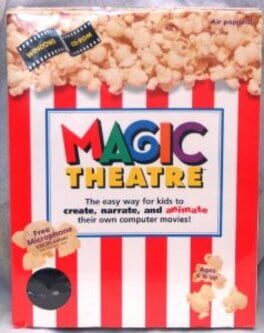
Magic Theatre
Award-winning storytelling software that lets kids as young as three make their own animated movies.
Best for
Young kids and early educators wanting simple, drag-and-drop animated storytelling on a PC.
Skip if
You need Mac or mobile support, or want to use your own custom artwork.


What is Magic Theatre?
Magic Theatre is a children's storytelling software title that brings filmmaking to the computer era. Using simple click-and-drag animation, kids can blend animations, music, narration, and their own drawings into short films, with the only real limit being their imagination. Its icon-based, verbally guided interface is designed so that even pre-readers can use it. Developed with educators, artists, and children, Magic Theatre aims to be both entertaining and educational. Beyond endless creative play, it helps build artistic, speech, and extemporization skills, along with the communication foundations useful throughout life.
SpecificationsAI-estimated
Key Features of Magic Theatre
Use Cases for Magic Theatre
Child Storytelling
Young children can invent and animate their own stories without needing to read or write.
Classroom Creativity
Teachers can use it to encourage storytelling, speech practice, and artistic expression in early education.
Speech Development
Narrating scenes aloud helps children build verbal communication and extemporization skills.
Sharing Family Movies
Kids can produce short films and broadcast them to family or online audiences.
Pros & Cons of Magic Theatre
Pros
- Simple click-and-drag interface usable by children as young as three
- Large built-in libraries of animations, sounds, and music
- Automatic saving and synchronization require no technical skill
- Builds storytelling, speech, and artistic skills alongside entertainment
Cons
- Limited to PC platform
- Output is restricted to the included asset libraries
- Sharing movies online requires a separate free screen recorder
Frequently Asked Questions
What age is Magic Theatre for?
It is designed for children as young as three, including pre-readers, thanks to its icon-based and verbal-help interface.
Do I need to type or manage files?
No. Movies are saved and named automatically, so no keyboard use or computer administration is required.
Can I make longer movies?
Yes. The multiple scene feature lets movies be of any length and complexity.
Can I share my movies online?
Yes, you can record and broadcast movies on sites like YouTube using a free screen recorder.
Pricing Overview
View full pricing →Detailed plans are not listed. Visit the official website for pricing information.
Reviews & Ratings0.0
No reviews yet. Be the first to write one!
Top Alternatives & Similar Games
View all alternatives & similar games→No alternatives available yet.
People also viewed

Best For
Related searches
About the Product
Is this your tool?
Claim this page to update details, reply to user reviews, and drive more traffic to your product.
Claim this Product →
Explore Related Topics
Keep up with Magic Theatre alternatives
New alternatives, pricing changes and the week's biggest movers - one email every Tuesday.