


Photo Upscaler AI
Upscale Images to 8K Online for Free with Advanced AI Technology
What is Photo Upscaler AI?
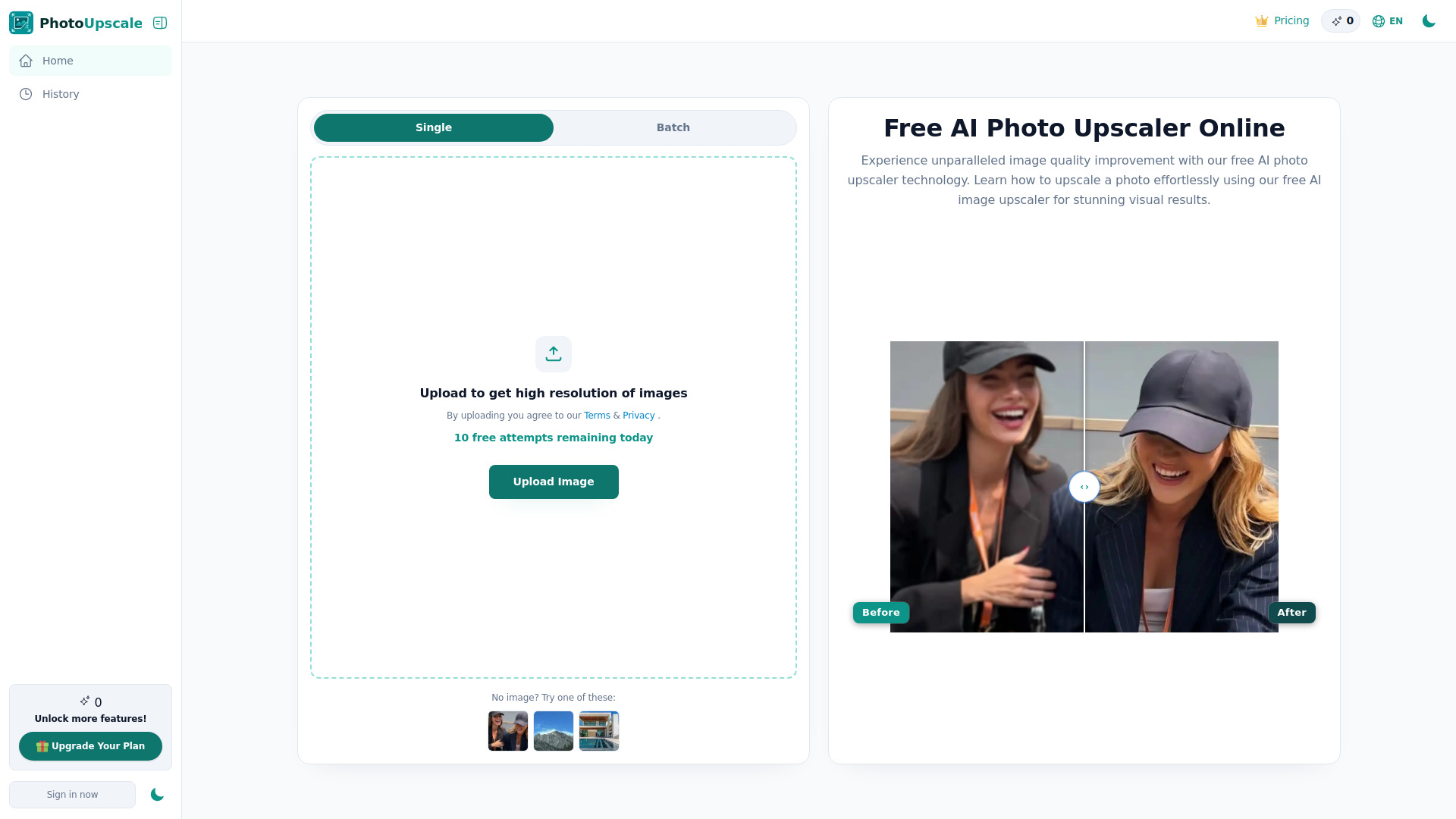
Photo Upscaler AI is an online tool designed to enhance image quality and increase resolution up to 8K using artificial intelligence. It transforms blurry or low-resolution images into sharp, high-definition visuals within seconds, offering a professional-grade solution accessible for free. The platform is built for creators, designers, and everyday users who need to improve image clarity and detail without complex editing software or high costs. This AI-powered upscaler focuses on intelligent processing to reconstruct missing details, reduce blur, and maintain natural colors and textures. It provides a user-friendly interface that allows for instant uploads and processing, making it available whenever inspiration strikes. The tool ensures privacy and security, protecting user images throughout the enhancement workflow. With its versatile capabilities, Photo Upscaler AI serves a wide range of needs, from enhancing e-commerce product photos and restoring old images to optimizing illustrations and creative projects. It aims to deliver consistent performance across various devices and image types, making high-resolution image enhancement accessible to everyone.
SpecificationsAI-estimated
Key Features of Photo Upscaler AI
Use Cases for Photo Upscaler AI
E-commerce Product Enhancement
Improve the clarity and resolution of product images to make them more appealing to online shoppers, boosting sales potential.
Restoring Old or Low-Resolution Photos
Bring old, pixelated, or blurry photographs back to life, recovering details and enhancing overall quality for nostalgic or archival purposes.
Creative Project Optimization
Elevate illustrations, digital art, and other creative works by increasing their resolution for printing, high-definition displays, or detailed digital use.
Social Media Content Improvement
Ensure images shared on social media platforms are sharp and high-quality, regardless of their original resolution, to capture audience attention.
Marketing and Advertising Assets
Create professional-looking visuals for marketing campaigns, advertisements, and presentations by enhancing image quality and detail.
Printing and Publishing Needs
Prepare images for high-quality printing or publishing by increasing their resolution to 8K, ensuring crisp and clear results.
How to use Photo Upscaler AI?
Upload Your Image
Click the 'Upscale Image' button or drag and drop your JPG, PNG, WEBP, or HEIC file directly into the image upscaler.
AI Enhancement Process
The AI automatically analyzes and enhances your image, sharpening details, reducing blur, and improving overall quality within seconds.
Preview and Download
Review the enhanced high-resolution image and download it. You can then use it for printing, sharing, or further editing.
Pros & Cons of Photo Upscaler AI
Pros
- Free to use with unlimited capabilities for upscaling.
- Enhances image resolution up to 8K.
- Intelligent AI processing reconstructs details and reduces blur.
- User-friendly interface with quick upload and processing.
- Maintains natural colors and textures, ensuring professional results.
- Secure and private image processing.
Cons
- Requires an internet connection to use.
- Limited control over fine-tuning specific AI parameters.
- May not be suitable for highly specialized professional workflows requiring granular control.
- Reliance on AI might lead to occasional unexpected artifacts in complex images.
Frequently Asked Questions
What is an AI Photo Upscaler Free tool?
An AI photo upscaler free tool uses advanced AI technology to increase image resolution while preserving visual quality. Unlike traditional resizing, it intelligently restores details, reduces blur, and creates sharper, high-resolution images.
How does Photo Upscaler AI work?
Our intelligent image upscaler online analyzes your uploaded photo and automatically improves details, textures, and clarity. AI enhancement helps enlarge images naturally without requiring manual editing skills.
What’s the difference between an Image Enlarger and a Photo Upscaler?
Traditional image enlargers simply stretch pixels, which can reduce quality. A modern photo upscaler uses AI to reconstruct missing details and produce clearer, more natural-looking results.
How can I upscale an image to 4K or 8K?
Upload your image and let Photo Upscaler AI process it automatically. Our image upscaler 4K free unlimited technology helps improve image quality and makes it easy to upscale photo to 8K in just a few clicks.
What types of images work best with Photo Upscaler AI?
Photo Upscaler AI works well for portraits, product photos, old photos, anime artwork, social media visuals, and low-resolution images that need higher clarity and detail.
Can I continue editing images after upscaling?
Yes. Once enhanced, you can download your image and continue editing for design, printing, publishing, marketing, or personal creative projects.
Is my content secure when using Photo Upscaler AI?
Yes. Your uploaded images are processed securely through our protected enhancement workflow. Photo Upscaler AI prioritizes privacy and keeps your content protected during processing.
Pricing Overview
View full pricing →The page describes the tool as free to use, but does not list any specific paid plans, tiers, or dollar amounts. No explicit pricing information is provided on the page.
Detailed plans are not listed. Visit the official website for pricing information.
Reviews & Ratings0.0
No reviews yet. Be the first to write one!
Top Alternatives & Similar Software
View all alternatives & similar software→No alternatives available yet.
People also viewed


Related searches
About the Product
Is this your tool?
Claim this page to update details, reply to user reviews, and drive more traffic to your product.
Claim this Product →
Tags
Explore Related Topics
Keep up with Photo Upscaler AI alternatives
New alternatives, pricing changes and the week's biggest movers - one email every Tuesday.