


Pixel-Art.ai
An online AI pixel art generator with a built-in editor and inpainting for creating and refining retro-style sprites and scenes.


What is Pixel-Art.ai?
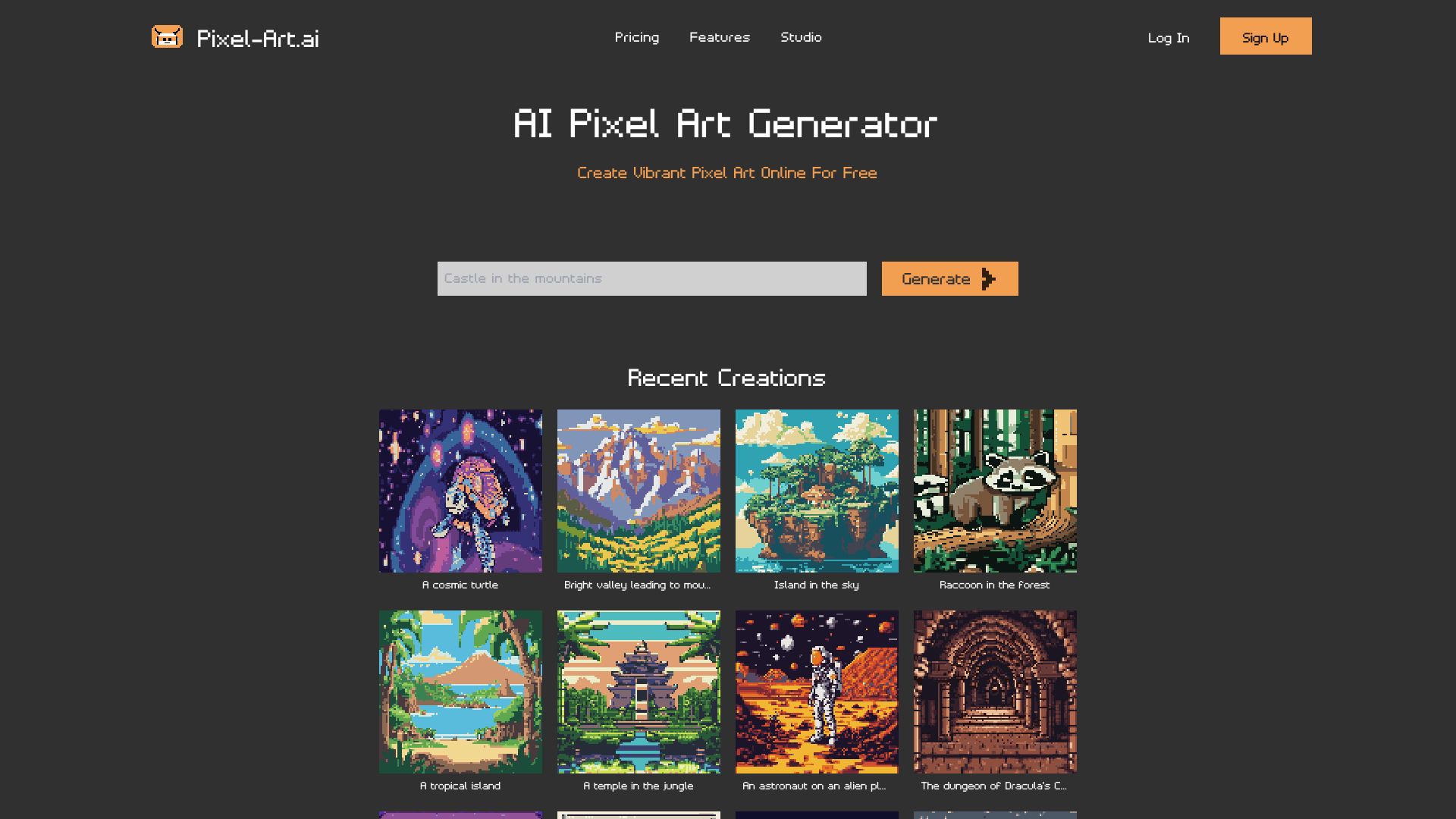
Pixel-Art.ai is an online AI pixel art generator that lets users create retro-style pixel art from text prompts. Users describe a scene, character, or object, and the AI produces a pixel-art image that can serve as a finished piece or a starting point for further editing. The site showcases a gallery of recent creations, including cosmic turtles, haunted houses, side-scrolling level backgrounds, and robots with swords, illustrating the range of styles and subjects the generator supports. Beyond raw generation, Pixel-Art.ai bundles a built-in pixel art studio with a well-equipped editor. The editor supports pixel-perfect drawing, copy and paste, layers, brushes, and multiple canvases, so users can organize projects and refine AI output by hand. Finished work can be exported to PNG, and all creations are saved and kept private to the user's account. The platform is well suited to game developers, indie creators, pixel artists, and hobbyists who want quick, stylized sprites, backgrounds, or concept art without a steep learning curve. Its AI inpainting feature lets users select a region of an image, type a prompt, and have the AI regenerate just that area, making iterative refinement fast. The combination of generation, manual editing, and inpainting in one browser-based tool makes it a convenient option for anyone working in the pixel art style.
SpecificationsAI-estimated
Key Features of Pixel-Art.ai
Use Cases for Pixel-Art.ai
Indie game sprites
Generate character sprites and creatures for 2D games quickly.
Game backgrounds
Create side-scrolling level backgrounds and environmental scenes.
Concept art
Explore visual ideas for characters, worlds, and items in pixel style.
Social media art
Make eye-catching retro-style images for posts and profiles.
Hobby creation
Experiment with pixel art without prior drawing experience.
Iterative refinement
Use inpainting to fix or change specific parts of an existing image.
How to use Pixel-Art.ai?
Enter a prompt
Describe the pixel art scene or subject you want to generate.
Set dimensions
Choose the width and height of your canvas before generating.
Generate and review
Let the AI create the image and review the result.
Refine with the editor or inpainting
Select an area, prompt a change, or hand-edit with the built-in tools.
Export your work
Save your creation to your account or export it as a PNG.
Pros & Cons of Pixel-Art.ai
Pros
- Generates pixel art quickly from simple text prompts with no artistic skill required
- Built-in pixel art editor with layers, brushes, and multiple canvases for hand refinement
- AI inpainting lets users regenerate only selected areas of an image
- Private, saved creations with PNG export for use in games and projects
Cons
- Output quality and style consistency depend heavily on prompt wording
- Free-tier limits, pricing details, and generation quotas are not clearly stated on the page
- Limited to pixel art style, so it is not a general-purpose image generator
- Requires an internet connection since it is a browser-based service
Frequently Asked Questions
What is Pixel-Art.ai?
It is an online AI generator that creates pixel art from text prompts, with a built-in editor for refinement.
Do I need drawing skills to use it?
No. You describe what you want in text, and the AI generates the image. The editor is available if you want to refine it manually.
Can I edit generated images?
Yes. The built-in editor supports layers, brushes, copy/paste, and pixel-perfect tools, and AI inpainting lets you regenerate selected areas.
How do I export my art?
Finished creations can be exported to PNG.
Are my creations private?
The site states that everything is 100% private and that all creations are saved to your account.
Can I organize multiple projects?
Yes. You can work with multiple canvases to keep projects organized.
Pricing Overview
View full pricing →The page content shows no explicit pricing tiers or dollar amounts; the tool is presented as a free-to-start AI pixel art generator with a built-in editor and saving features.
Detailed plans are not listed. Visit the official website for pricing information.
Reviews & Ratings0.0
No reviews yet. Be the first to write one!
Top Alternatives & Similar Software
View all alternatives & similar software→No alternatives available yet.
People also viewed


Related searches
Is this your tool?
Claim this page to update details, reply to user reviews, and drive more traffic to your product.
Claim this Product →
Tags
Explore Related Topics
Keep up with Pixel-Art.ai alternatives
New alternatives, pricing changes and the week's biggest movers - one email every Tuesday.