


ThumbnailMakerr
Create stunning, high-CTR YouTube thumbnails in seconds with AI.












What is ThumbnailMakerr?
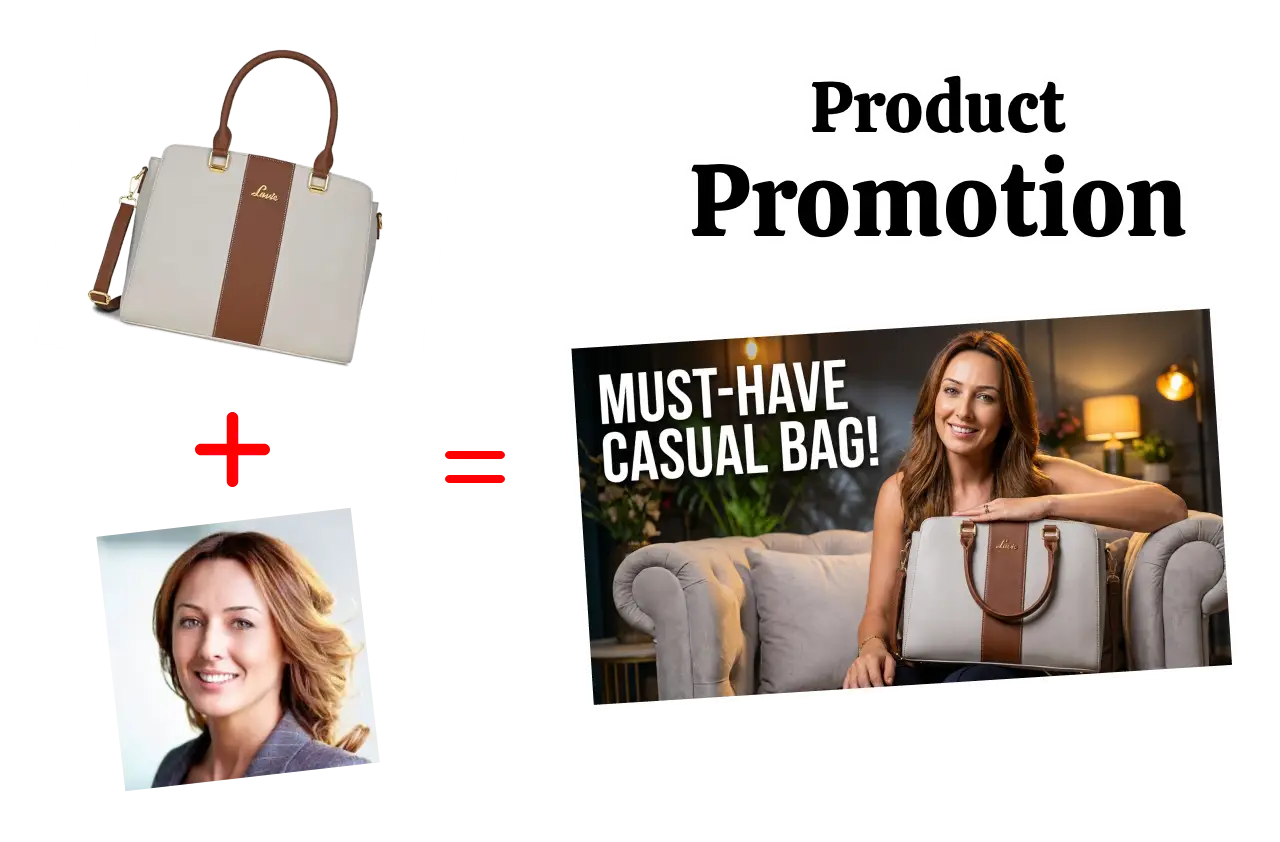
ThumbnailMakerr is an AI-powered online tool designed to help YouTube creators generate high-CTR thumbnails quickly and efficiently. It offers a suite of four AI tools: a general thumbnail generator that creates visuals from text descriptions, a face swap tool for editing faces in existing images, a style recreation feature to mimic popular YouTube aesthetics, and a product promotion tool for creating comparison or promotional thumbnails. The platform emphasizes ease of use, allowing users to create professional-looking thumbnails in just three simple steps: describe your vision, let the AI generate options, and download the chosen design. It also provides a preview feature to see how thumbnails will appear across different devices and in real YouTube layouts, helping creators optimize for maximum clicks. ThumbnailMakerr aims to save creators significant time, with claims of saving up to 10 hours per week and achieving an average CTR increase of 32%. It is trusted by over 15,000 users, including established YouTubers, and offers various pricing plans to suit different needs, including a free tool option.
SpecificationsAI-estimated
Key Features of ThumbnailMakerr
Use Cases for ThumbnailMakerr
Boosting Video Views
Leverage AI to create visually appealing thumbnails that capture attention and drive clicks, increasing overall video viewership.
Maintaining Brand Identity
Utilize the Style Recreate feature to ensure all your video thumbnails have a consistent and recognizable aesthetic, strengthening your brand.
Quick Thumbnail Generation
Generate professional thumbnails in seconds by simply describing your vision, saving significant time in the content creation process.
Creating Comparison Thumbnails
Design effective thumbnails for product reviews or comparisons by easily incorporating product images and personal elements.
Enhancing Reaction Videos
Use the Face Swap feature to add or replace faces in thumbnails, perfect for reaction content or collaborations.
Optimizing Thumbnail Performance
Preview your thumbnails in realistic YouTube layouts to ensure readability and impact before publishing.
Matching Influencer Styles
Recreate the thumbnail aesthetic of popular creators to leverage proven visual strategies for your own content.
How to use ThumbnailMakerr?
Describe Your Vision
Input a text description of the thumbnail you want, or paste a YouTube URL if you wish to recreate a specific style.
AI Generates Options
The AI processes your input and generates multiple thumbnail variations, optimized for click-through rates.
Preview and Download
Review the generated options, preview them in a YouTube interface, select your favorite, and download it in high definition.
Upload to YouTube
Upload the downloaded thumbnail directly to your YouTube video.
Pros & Cons of ThumbnailMakerr
Pros
- AI-powered generation of eye-catching thumbnails
- Features like Face Swap and Style Recreate for advanced editing
- Preview tool to visualize thumbnail appearance on YouTube
- Aims to significantly boost Click-Through Rates (CTR)
- Free tool option available
Cons
- Pricing can increase for higher usage (credits/month)
- Reliance on AI might limit highly unique artistic control for some users
- The effectiveness of 'Style Recreate' might vary depending on the complexity of the target style
Frequently Asked Questions
Is ThumbnailMakerr free to use?
Yes, ThumbnailMakerr offers a free tool option, along with tiered paid plans for more extensive usage.
How does the AI Thumbnail Generator work?
You describe your desired thumbnail in text, including elements like text, images, and backgrounds, and the AI generates professional options instantly.
Can I recreate the style of other YouTubers?
Yes, the Style Recreate feature allows you to mimic the thumbnail aesthetics of popular creators like MrBeast or MKBHD.
What is the Face Swap feature used for?
The Face Swap feature uses AI to replace faces in your thumbnails, ideal for reaction videos, collaborations, or personalizing designs.
How does the preview feature help?
The preview feature allows you to see exactly how your thumbnail and title will appear on different devices and in YouTube layouts before publishing, helping optimize for clicks.
What are credits in the pricing plans?
Credits are used to generate thumbnails and utilize various AI features. Each plan includes a monthly allocation of credits.
Can I use ThumbnailMakerr for series consistency?
Yes, the Style Recreate and consistency tools allow you to save and reuse styles, maintain brand consistency, and create templates for video series.
Pricing Overview
View full pricing →ThumbnailMakerr offers paid subscription plans starting at $15.00/month for Standard, with Pro at $39.00/month and Ultimate at $79.00/month.
Reviews & Ratings0.0
No reviews yet. Be the first to write one!
Top Alternatives & Similar Software
View all alternatives & similar software→



People also viewed


Related searches
Is this your tool?
Claim this page to update details, reply to user reviews, and drive more traffic to your product.
Claim this Product →
Tags
Explore Related Topics
Keep up with ThumbnailMakerr alternatives
New alternatives, pricing changes and the week's biggest movers - one email every Tuesday.