



Trellus
AI-powered power and parallel dialer that puts likely pickups first and coaches reps during live calls.
What is Trellus?
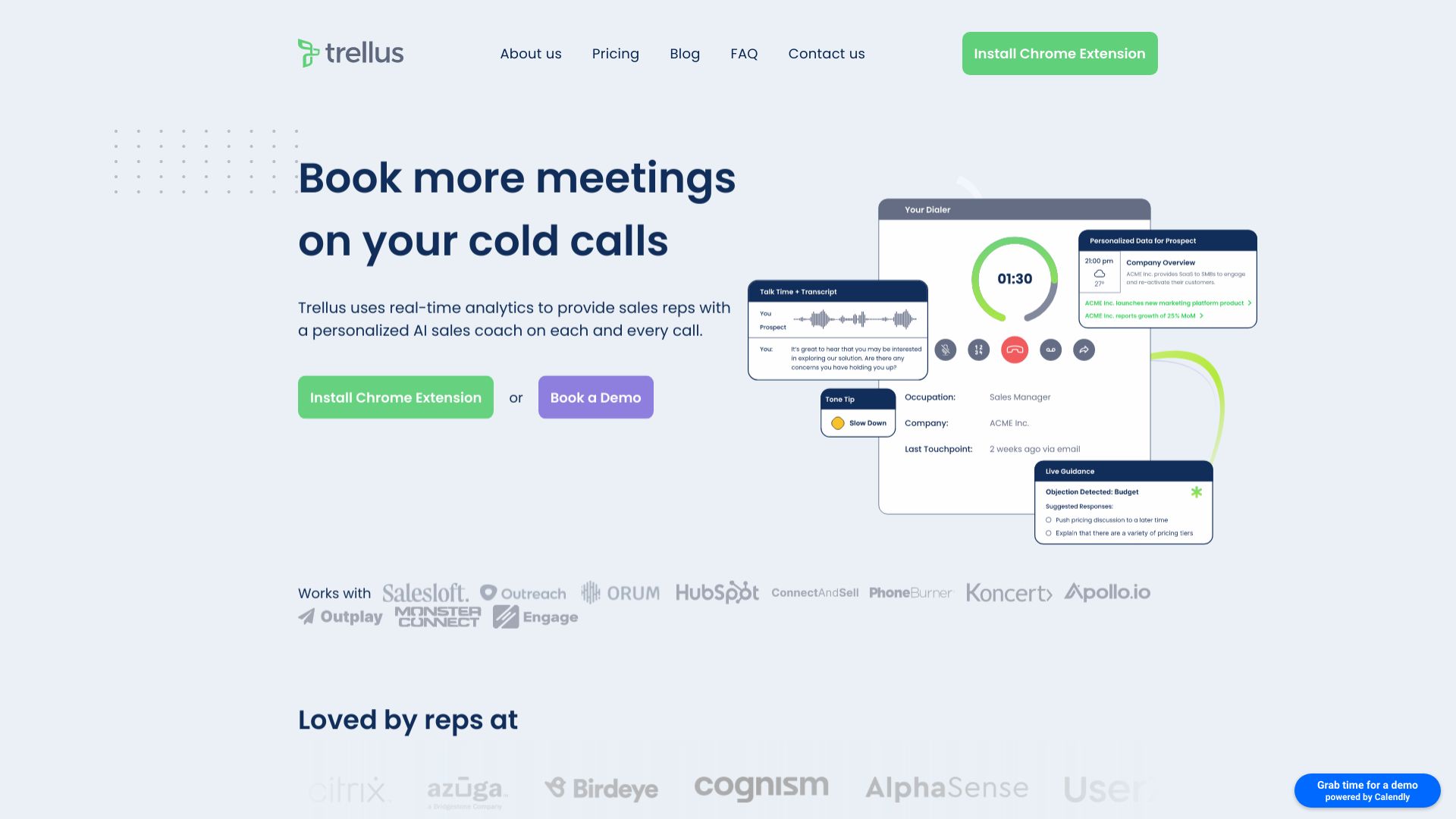
Trellus is a sales calling platform built for teams that make high volumes of outbound calls. It brings power dialing and parallel dialing into supported CRMs and sales engagement tools, so reps can work their call lists without switching between applications. Parallel dialing places several calls at once and connects the rep only when someone answers, while power dialing works through contacts one at a time. A Hot Numbers feature ranks eligible contacts by estimated pickup likelihood so the most promising leads are called first, and number management tools help teams monitor number health, spam flags, and caller-ID rotation. Beyond dialing, Trellus adds live AI coaching during calls, offering suggested replies to questions and objections and generating a transcript afterward for review. Call insights compare volume, outcomes, talk time, and rep performance, and each call can be opened to review its recording, transcript, and notes. Teams can also join a shared virtual salesfloor to listen in on live calls and coach reps as conversations happen, and rehearse difficult scenarios with AI practice bots before speaking to real prospects. Trellus is aimed at sales development, business development, and sales leadership teams that want higher dial volume and better call quality without burning out reps. Its integrations and calling modes depend on the specific CRM or platform, so teams should confirm support for their stack. An interactive product tour with sample data lets prospective users explore the features before connecting an account.
SpecificationsAI-estimated
Key Features of Trellus
Use Cases for Trellus
High-volume outbound prospecting
Sales development reps can dial large contact lists faster using parallel dialing and pickup-likelihood ranking.
Live call coaching
Managers can listen in on calls in a shared salesfloor and coach reps as conversations happen.
Objection handling practice
Reps can rehearse difficult scenarios with AI prospect bots and receive feedback before real calls.
Voicemail and phone screener handling
Teams can drop saved voicemails and play recorded introductions to phone screeners on eligible calls.
Call performance analysis
Leaders can review call volume, outcomes, and talk time to find what is working across the team.
Caller-ID and number health management
Admins can monitor spam flags and connect rates and rotate caller IDs to protect answer rates.
How to use Trellus?
Install the Chrome extension
Add the Trellus Chrome extension and sign in to your Trellus account.
Connect your CRM or sales platform
Follow the setup guide for your supported platform so Trellus can work from your contact lists.
Test your audio and calling setup
Check your microphone and headset and place a test call before your first calling block.
Choose a dialing mode and start a call block
Select power or parallel dialing, let Hot Numbers prioritize contacts, and use live coaching during calls.
Review calls and insights
Open call recordings, transcripts, and notes, and use call insights to improve team performance.
Pros & Cons of Trellus
Pros
- Parallel dialing connects reps only when a prospect answers, multiplying dial volume without sacrificing rep time
- Hot Numbers ranks contacts by estimated pickup likelihood to prioritize the best calls
- Live AI coaching and post-call transcripts help reps handle objections and improve over time
- Shared salesfloor and practice bots support real-time coaching and scenario rehearsal
Cons
- Feature availability and calling modes vary by CRM or sales platform and by plan
- Requires installing a Chrome extension and checking microphone and headset setup before use
- Pricing details are not stated on the page, so cost evaluation requires contacting sales
Frequently Asked Questions
What does Trellus do?
Trellus provides power and parallel dialing, live AI coaching, and call review inside supported CRMs and sales platforms.
Will Trellus work with my CRM?
Trellus supports a range of CRMs and sales engagement tools, but calling surfaces, dialing modes, and how results are saved can vary by platform. Check the integration page for your specific platform.
How do I get started?
Install the Trellus Chrome extension, sign in, follow the setup guide for your platform, and make a test call to confirm audio.
Can I explore Trellus before connecting my account?
Yes. The interactive product tour lets you explore features with sample data without placing real calls or changing your CRM.
What is the difference between power and parallel dialing?
Power dialing works through contacts one at a time. Parallel dialing places several calls at once and connects the rep when someone answers.
When does the AI coaching appear?
Real-time coaching appears during supported calls, offering prompts for objection handling and talking points, and a transcript is available afterward.
Pricing Overview
View full pricing →No pricing tiers or prices are listed in the provided Trellus page content; only a demo request is offered.
Detailed plans are not listed. Visit the official website for pricing information.
Reviews & Ratings0.0
No reviews yet. Be the first to write one!
Top Alternatives & Similar Software
View all alternatives & similar software→No alternatives available yet.
People also viewed



Related searches
Is this your tool?
Claim this page to update details, reply to user reviews, and drive more traffic to your product.
Claim this Product →
Tags
Keep up with Trellus alternatives
New alternatives, pricing changes and the week's biggest movers - one email every Tuesday.