


Core Temp vs OpenHardwareMonitor
Side-by-side comparison of features, pricing, ratings, and alternatives.
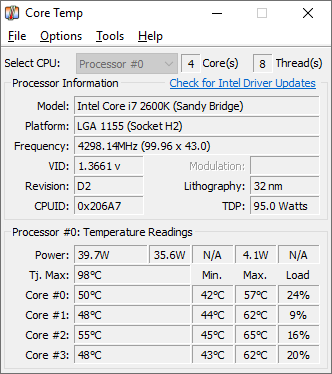

Core Temp is a compact monitoring utility focused on displaying real-time temperature readings for each individual processor core. It supports Intel, AMD, and VIA x86 processors and is designed to be motherboard-agnostic.
OpenHardwareMonitor is an open‑source desktop application for Windows that reads temperature sensors, fan speeds, voltages, load and clock speeds from a wide range of hardware components. It presents the data in a clear, sortable tree view and can log values for later analysis. The software supports most modern CPUs, GPUs, motherboards and external devices, and it can display the information in the Windows taskbar or as a portable executable without installation.
- Very lightweight and focused specifically on accurate core temperature readings
- Free to use with no paid tier required
- Motherboard-agnostic, so it works across a wide range of systems
- Plugin platform allows extending functionality
- Completely free and open‑source
- No installation required; runs as portable exe
- Supports a wide range of hardware sensors
- Lightweight with minimal system impact
- Windows-only, with no native Mac or Linux support
- Interface and feature set are narrower than full multi-sensor tools like HWMonitor
- Installer has historically bundled optional third-party offers, so users should watch installation steps carefully
- Windows‑only; no native macOS or Linux version
- Limited visual customization beyond default UI
- No built‑in remote API or web dashboard
More alternatives & similar tools
Alternatives to Core Temp
View all →

Alternatives to OpenHardwareMonitor
View all →The Verdict
AI-generated from listing dataBoth tools are free Windows utilities, but OpenHardwareMonitor offers broader multi‑sensor monitoring, while Core Temp focuses narrowly on per‑core CPU temperatures.
Key differences
- •Sensor scope: OpenHardwareMonitor tracks CPU, GPU, fan speeds, voltages; Core Temp tracks only CPU cores.
- •Open source: OpenHardwareMonitor is open‑source; Core Temp is closed‑source.
- •Plugin ecosystem: Core Temp supports a plugin platform; OpenHardwareMonitor has no plugin system.
- •Portability: OpenHardwareMonitor runs as a portable exe; Core Temp requires installation.
- •Additional features: OpenHardwareMonitor provides CSV logging and taskbar integration; Core Temp offers battery status and mobile companion apps.
Pricing & value
Both are free, but OpenHardwareMonitor adds open‑source flexibility and more sensor data, increasing overall value.
Ease of use / learning curve
Core Temp’s UI is narrowly focused on CPU temps, making it simpler for users needing only that data.
Features & depth
OpenHardwareMonitor covers CPU, GPU, fan speeds, voltages, logging, and taskbar view; Core Temp is limited to CPU cores.
Integrations & ecosystem
Core Temp offers a plugin platform and mobile companion apps; OpenHardwareMonitor has no API or plugins.
Support
OpenHardwareMonitor lists email and community forum support; Core Temp provides no specified support channels.
Security & privacy
OpenHardwareMonitor is open source, allowing independent review of code; Core Temp is closed source.
Choose Core Temp if…
Users who only need precise per‑core CPU temps and want a minimal, plugin‑extendable installer.
Choose OpenHardwareMonitor if…
Users who need comprehensive hardware monitoring (CPU, GPU, fans, voltages) and prefer open‑source, portable tools.
Common questions
Is either tool paid or does it require a license?
Both are free; OpenHardwareMonitor is free and open‑source, Core Temp is free with no paid tier.
Can I monitor GPU temperatures with Core Temp?
No; Core Temp only monitors CPU core temperatures. GPU monitoring is available in OpenHardwareMonitor.
Do either of the tools offer remote or API access?
Neither provides a built‑in API or remote dashboard; both are local desktop applications only.