


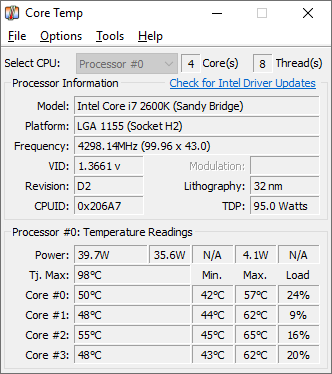
Core Temp
Lightweight utility that shows real-time, per-core CPU temperature readings.
Alternatives

Choose Fan Control if…
- you need to automate fan speed based on multiple sensor
- you want to switch between named cooling profiles on the fly
- you prefer a Windows service that runs fan control before
- you rely on community plugins to extend sensor support
Choose SpeedFan if…
- you need automatic fan‑speed curves based on temperature
- you want to see motherboard voltage readings
- you require SMART drive health monitoring
- you prefer a single tool for temperature and fan control

Choose CPU-Z if…
- you need a complete inventory of CPU, motherboard and
- you want to run single‑thread and multi‑thread CPU
- you must generate validation reports for hardware
- you prefer a free tool that also runs on Android

Choose OpenHardwareMonitor if…
- you need GPU temperature and load alongside CPU readings
- you want to log sensor values to CSV for later analysis
- you prefer a portable executable with no installation step
Choose HWiNFO if…
- you need voltage and fan speed monitoring alongside temps
- you want CSV/HTML logs for post‑run analysis
- you require an on‑screen display while gaming or
- you use integrated benchmark tools to measure CPU and memory
How to Decide
Core Temp is a lightweight utility that shows real‑time, per‑core CPU temperature readings and is used by PC enthusiasts and overclockers needing detailed per‑core data. The alternatives split into a few clear camps: Fan Control leans on custom fan‑curve creation from any sensor; HWiNFO emphasizes comprehensive system‑wide monitoring with an API for integration; CPU‑Z is chosen for its cross‑platform (Windows and Android) hardware profiling plus built‑in benchmarking; SpeedFan is selected for its deep low‑level motherboard sensor access, voltage monitoring and fan‑speed control.
When weighing replacements for Core Temp, focus on (1) platform breadth – Core Temp and most rivals are Windows‑only while CPU‑Z adds Android support; (2) sensor scope – Core Temp reports only core temps, whereas HWiNFO and SpeedFan expose full system temperatures, voltages and fan speeds; (3) fan‑control capability – Fan Control and SpeedFan provide granular fan‑curve or threshold management, a feature Core Temp lacks; (4) API availability – HWiNFO offers an API for automation, unlike the others; and (5) pricing model – all four alternatives are free, so cost isn’t a differentiator.
All Alternatives
“Fan Control reads sensor data to display core temps, appealing to users needing lightweight temp monitoring.”
“SpeedFan monitors CPU core temps (and more) on Windows, a common alternative for temperature‑focused users.”
“CPU‑Z shows real‑time per‑core temperature and other CPU stats, directly comparable to Core Temp.”
“Specializes in real‑time CPU temperature monitoring, a core use‑case of OpenHardwareMonitor.”
“HWiNFO provides detailed per‑core temperature readouts and sensor monitoring, matching Core Temp's core purpose.”
About the Product
Is this your tool?
Claim this page to update details, reply to user reviews, and drive more traffic to your product.
Claim this Product →