



CPU-Z
A freeware system profiling and monitoring application for Windows and Android.
Alternatives
Choose SpeedFan if…
- you need to set custom fan speed thresholds based on
- you want to log voltage readings to catch power supply
- you must verify hard‑drive health via S.M.A.R.T. while
- you are fine‑tuning system noise for a silent PC build

Choose Belarc Advisor if…
- you need to capture software license keys
- you must verify missing Microsoft security patches
- you want a single local HTML report of hardware and software
- you prefer a free tool that also lists installed
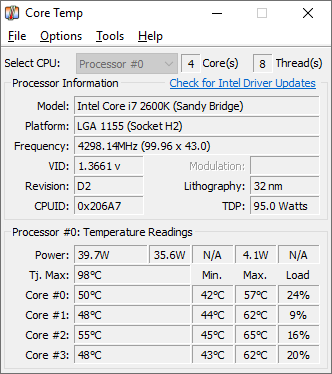
Choose Core Temp if…
- you need per‑core temperature readings in real time
- you run on a wide range of motherboards without driver
- you want a plugin system to add custom alerts
- you need a battery‑temperature indicator for laptops
Choose HWiNFO if…
- you need continuous temperature and voltage logs
- you want CSV/HTML sensor export for analysis
- you rely on alerts when thresholds are crossed
- you need on‑screen sensor overlays during gaming or stress

Choose SIW if…
- you must audit installed software versions
- you need to map active network connections
- you require built‑in benchmark reports for disk and memory
- you want a portable version for field troubleshooting
How to Decide
CPU‑Z is known for being a free, lightweight system profiling and benchmarking tool popular among hardware enthusiasts and PC gamers. The alternatives split into a few clear camps: Sandra leans on a freemium model with modular benchmarking suites for IT professionals; Belarc Advisor is chosen for its free personal‑use license that also audits software and security patches; HWiNFO stands out with a free offering that includes an API and real‑time sensor logging with CSV export; AIDA64 differentiates itself by requiring a one‑time paid license and providing extensive stress‑testing and customizable LCD panels; SIW offers a freemium version with a portable build and built‑in network‑monitoring tools for system administrators.
When comparing these tools, the pricing model (free, freemium, or one‑time paid) directly affects feature access and commercial use rights; the depth of real‑time sensor monitoring and whether an API is available determines how well you can track temperatures, voltages, and fan speeds over time; the breadth and rigor of benchmarking and stress‑testing suites (CPU, memory, disk, stability tests) influence suitability for overclocking or performance tuning; and the variety of reporting and export formats (HTML, CSV, JSON, LCD panel integration) matters for documentation, sharing, and integration with other utilities.
All Alternatives
“CPU‑Z includes real‑time temperature and voltage monitoring, a close alternative for basic fan control needs.”
“CPU‑Z shows real‑time per‑core temperature and other CPU stats, directly comparable to Core Temp.”

About the Product
Is this your tool?
Claim this page to update details, reply to user reviews, and drive more traffic to your product.
Claim this Product →