


SpeedFan
Monitor computer temperatures, voltages, and fan speeds on Windows.
Alternatives

Choose Fan Control if…
- you need to mix CPU and GPU temps in one fan curve
- you want to save and auto‑load multiple named cooling
- you rely on community plugins to add support for newer
- you prefer a low‑resource Windows service that starts at

Choose CPU-Z if…
- you need exact CPU model and stepping info
- you want on‑the‑fly frequency monitoring
- you require built‑in single‑ and multi‑thread benchmarks
- you must generate text or HTML validation reports
- you prefer a tool that uses virtually no system resources
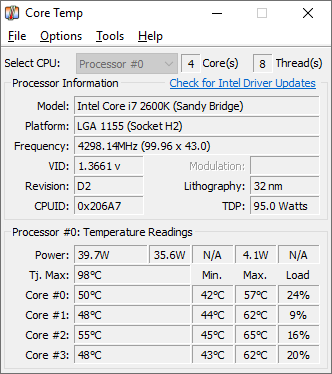
Choose Core Temp if…
- you need per‑core temperature readings on any motherboard
- you run a laptop and want a battery‑status temperature
- you prefer a tiny utility that won’t tax CPU or RAM
- you already use Windows and don’t need cross‑platform
Choose HWiNFO if…
- you need a complete hardware inventory with exact part
- you want to export sensor data to CSV or HTML for analysis
- you integrate monitoring data with third‑party tools like
- you run benchmarks and need built‑in performance

Choose G-Helper if…
- you need per‑model fan‑curve editing on an ASUS gaming
- you want to switch GPU power profiles without installing
- you prefer a single portable executable with no background
- you want to control RGB keyboard or Anime Matrix lighting
How to Decide
SpeedFan is known for monitoring computer temperatures, voltages, and fan speeds on Windows, and is used by PC enthusiasts and system builders. The alternatives split into a few clear camps: HWiNFO leans on its public API and deep third‑party integration for custom dashboards; AIDA64 is a paid one‑time license that adds extensive stress‑testing and benchmarking suites; CPU‑Z is a free, ultra‑lightweight tool that bundles built‑in CPU performance benchmarks.
When comparing these tools, the key factors that actually matter are: the pricing model (free vs paid one‑time license), whether an API is available for custom integrations, the breadth of benchmarking and stress‑testing capabilities beyond basic sensor reads, and the overall system resource footprint of the utility. These dimensions directly differentiate SpeedFan from HWiNFO, AIDA64, and CPU‑Z.
All Alternatives
“Direct fan‑speed and temperature control on Windows, the classic alternative to Fan Control.”
“CPU‑Z includes real‑time temperature and voltage monitoring, a close alternative for basic fan control needs.”
“SpeedFan monitors CPU core temps (and more) on Windows, a common alternative for temperature‑focused users.”
“HWiNFO offers comprehensive sensor readouts and fan control on Windows, directly comparable to SpeedFan.”
“Free utility that monitors temps and lets users set fan speeds, matching G‑Helper's core cooling control.”
“AIDA64 provides detailed hardware monitoring and fan speed management, matching SpeedFan's core purpose.”

“Same Windows hardware‑monitoring focus, reads temps, voltages and fan speeds, free like OpenHardwareMonitor.”
About the Product
Is this your tool?
Claim this page to update details, reply to user reviews, and drive more traffic to your product.
Claim this Product →