


Fan Control
A lean, bloat-free Windows app for building custom fan curves from any sensor.
Alternatives
Choose SpeedFan if…
- you need to track motherboard voltages in real time
- you want integrated S.M.A.R.T. drive health data
- you prefer a single free tool for both monitoring and fan
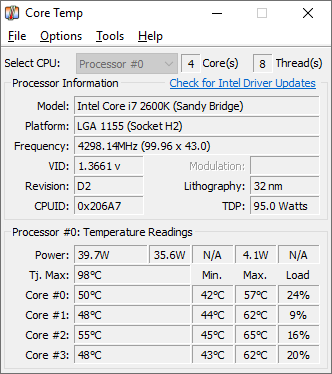
Choose Core Temp if…
- you need real‑time per‑core temperature readouts
- you run on a wide range of motherboards without driver
- you prefer a minimal‑resource utility for laptop battery
- you want a plugin platform to add niche diagnostics
- you don’t need fan‑speed automation or multi‑sensor curves
Choose SignalRGB if…
- you need one app to sync RGB across many brands
- you want lighting to react to in‑game events
- you prefer a usable free tier before paying for Pro

Choose G-Helper if…
- you need performance‑mode switching on an ASUS ROG laptop
- you want to limit battery charge to extend lifespan
- you require a single‑file app with no background services
- you also want to control RGB keyboard or Anime Matrix

Choose OpenHardwareMonitor if…
- you need per‑fan custom speed curves
- you need to switch between saved cooling profiles
- you need step‑count fine‑tuning of fan RPM ranges
- you need a plugin ecosystem to extend hardware support
How to Decide
Fan Control is a lean, bloat‑free Windows app that lets PC enthusiasts and system builders craft custom fan curves from any detected sensor. The alternatives split into a few clear camps: G‑Helper leans on its open‑source, portable executable design to serve ASUS ROG laptop owners; SignalRGB distinguishes itself with a freemium model that bundles RGB unification and Pro‑tier multi‑point fan‑curve editing; SpeedFan stands out for its deep, low‑level access to motherboard sensors and voltage monitoring alongside classic fan‑speed thresholds.
When choosing a replacement, focus on (1) the licensing and source model – open‑source (G‑Helper) vs closed (Fan Control, SpeedFan) vs freemium (SignalRGB); (2) the hardware scope – dedicated ASUS laptop control, generic Windows desktop fan control, or broader RGB‑plus‑fan ecosystems; (3) the feature breadth – pure fan‑curve granularity, added voltage/SMART monitoring, or integrated lighting and macro capabilities; (4) the pricing structure – completely free versus a subscription for advanced tiers; and (5) the UI/modernity – minimalist service‑style UI versus legacy interfaces that may affect ease of setup.
All Alternatives
“Direct fan‑speed and temperature control on Windows, the classic alternative to Fan Control.”
“Fan Control reads sensor data to display core temps, appealing to users needing lightweight temp monitoring.”
“Includes fan‑control features alongside RGB management, appealing to users needing fan tweaks.”
“Provides fan‑curve adjustments for ASUS laptops, a focused fan‑control utility like Fan Control.”
“Focuses on building custom fan curves from sensor data, directly overlapping fan‑control functionality.”
About the Product
Is this your tool?
Claim this page to update details, reply to user reviews, and drive more traffic to your product.
Claim this Product →