


Color Picker from Image
A free, privacy-first browser tool that reads exact HEX, RGB, HSL, and HSV values from any pixel in an image.


What is Color Picker from Image?
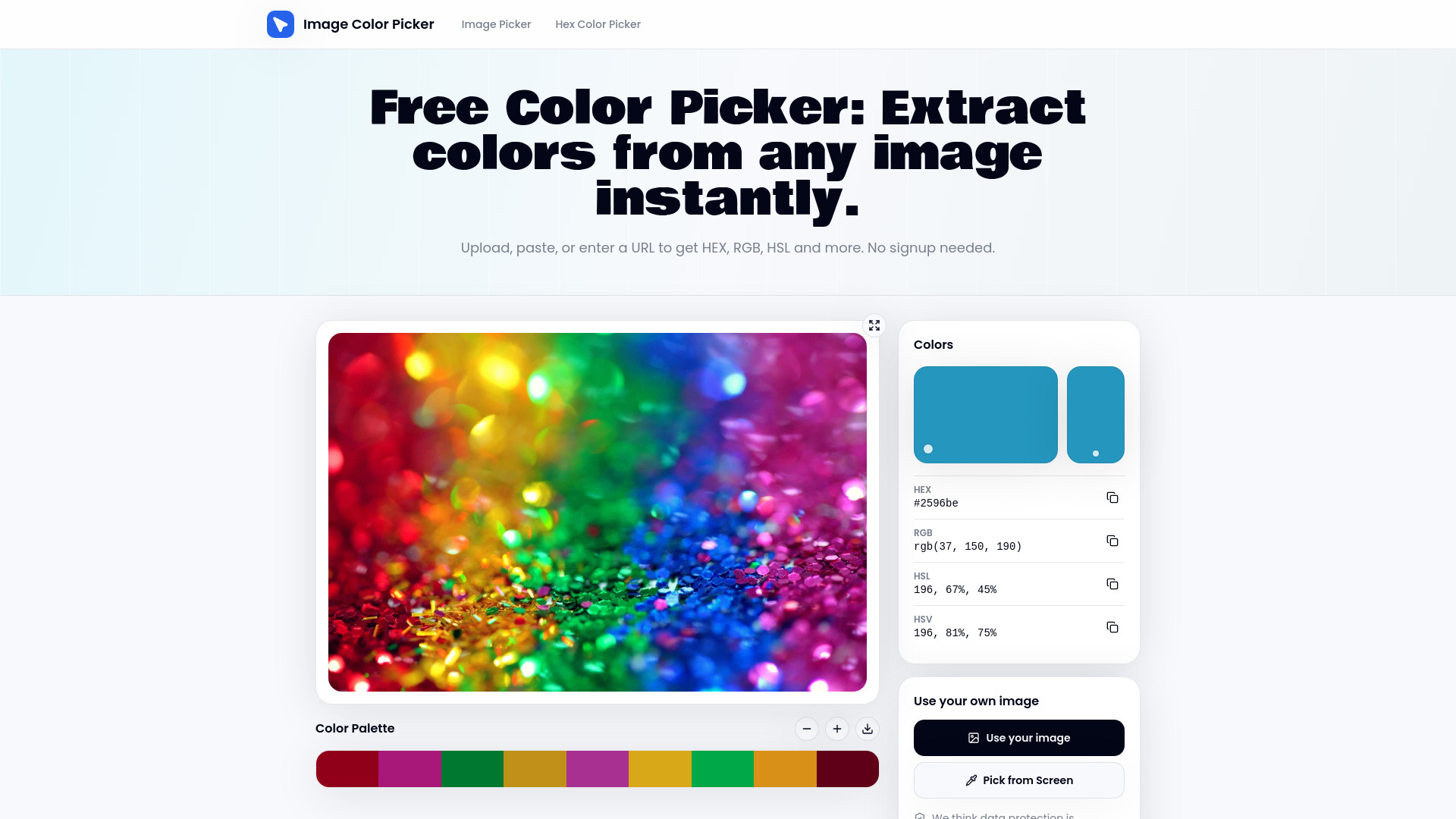
Color Picker from Image is a free, browser-based tool for extracting exact color values from any image. Users can upload a photo, paste a screenshot from the clipboard, enter an image URL, or sample colors directly from their screen using the EyeDropper. Clicking anywhere on the loaded image reads the pixel beneath the cursor and returns its HEX, RGB, HSL, and HSV values at once, each copyable with a single click. The tool is built around speed and privacy. Processing runs entirely in the browser through the Canvas API, so uploaded images never leave the user's device. There is no signup, no account, and no friction between loading an image and getting a usable color code. Hovering over the image previews values in real time, and clicking locks the reading so it can be copied or added to a palette strip. It is aimed at designers, developers, marketers, and anyone who needs to identify or match a color quickly, such as matching a brand color from a logo, pulling a palette from inspiration photography, or checking a color from a screenshot against a design system. Its straightforward scope makes it a practical everyday utility rather than a full design suite.
SpecificationsAI-estimated
Key Features of Color Picker from Image
Use Cases for Color Picker from Image
Brand color matching
Pull the exact hex code from a logo or brand asset to keep marketing materials consistent.
Identifying colors from photos
Determine the precise color of an object, paint, or fabric from a photograph.
Building palettes from inspiration
Sample colors from photography, artwork, or screenshots to assemble a cohesive palette.
Design system compliance checks
Verify that colors in a mockup or screenshot match the values defined in a design system.
Web design research
Extract colors from competitor websites or thumbnails to study color usage.
Quick color lookups for developers
Convert a sampled color into the format needed for CSS without manual calculator steps.
How to use Color Picker from Image?
Load your image
Upload a file, paste a screenshot from the clipboard, or enter an image URL.
Hover to preview
Move the cursor over the image to see color values update in real time.
Click to sample
Click the pixel you want to lock the reading and view its HEX, RGB, HSL, and HSV values.
Copy or save
Copy any value with one click, add the color to the palette strip, and export or save the palette.
Pros & Cons of Color Picker from Image
Pros
- Runs entirely in the browser, so images are never uploaded to a server
- No signup or account required to start sampling colors
- Returns HEX, RGB, HSL, and HSV simultaneously for every sampled pixel
- Accepts uploads, clipboard pastes, URLs, and screen sampling via EyeDropper
Cons
- Limited to sampling colors; it does not offer broader palette generation or design tooling
- Depends on a modern browser with Canvas API and EyeDropper support for full functionality
- Palette export is basic (text file or local storage) with no integration into design apps
Frequently Asked Questions
Is the tool free to use?
Yes, the color picker is free and does not require an account or signup.
Are my images uploaded to a server?
No. Processing happens entirely in your browser, so images stay on your device.
Which image formats are supported?
PNG, JPG, WebP, SVG, and GIF files can be uploaded directly.
Can I sample colors from my screen?
Yes, the EyeDropper option lets you sample colors directly from anything on your screen.
Which color formats does it return?
Each sampled pixel returns HEX, RGB, HSL, and HSV values simultaneously.
Can I save a palette of colors?
Yes, you can add sampled colors to a palette strip and download them as a text file or save them to local storage.
Is the color reading exact?
The tool reads the exact pixel values stored in the image data via the Canvas API rather than estimating them.
Pricing Overview
View full pricing →The Color Picker from Image tool is free to use, with no signup required and no pricing tiers listed on the page.
Reviews & Ratings0.0
No reviews yet. Be the first to write one!
Top Alternatives & Similar Software
View all alternatives & similar software→No alternatives available yet.
People also viewed


Related searches
Is this your tool?
Claim this page to update details, reply to user reviews, and drive more traffic to your product.
Claim this Product →
Tags
Keep up with Color Picker from Image alternatives
New alternatives, pricing changes and the week's biggest movers - one email every Tuesday.