



ExcelMaster
An AI agent inside Excel that reads your real workbook, writes VBA and Python, executes it, and verifies the results.

What is ExcelMaster?
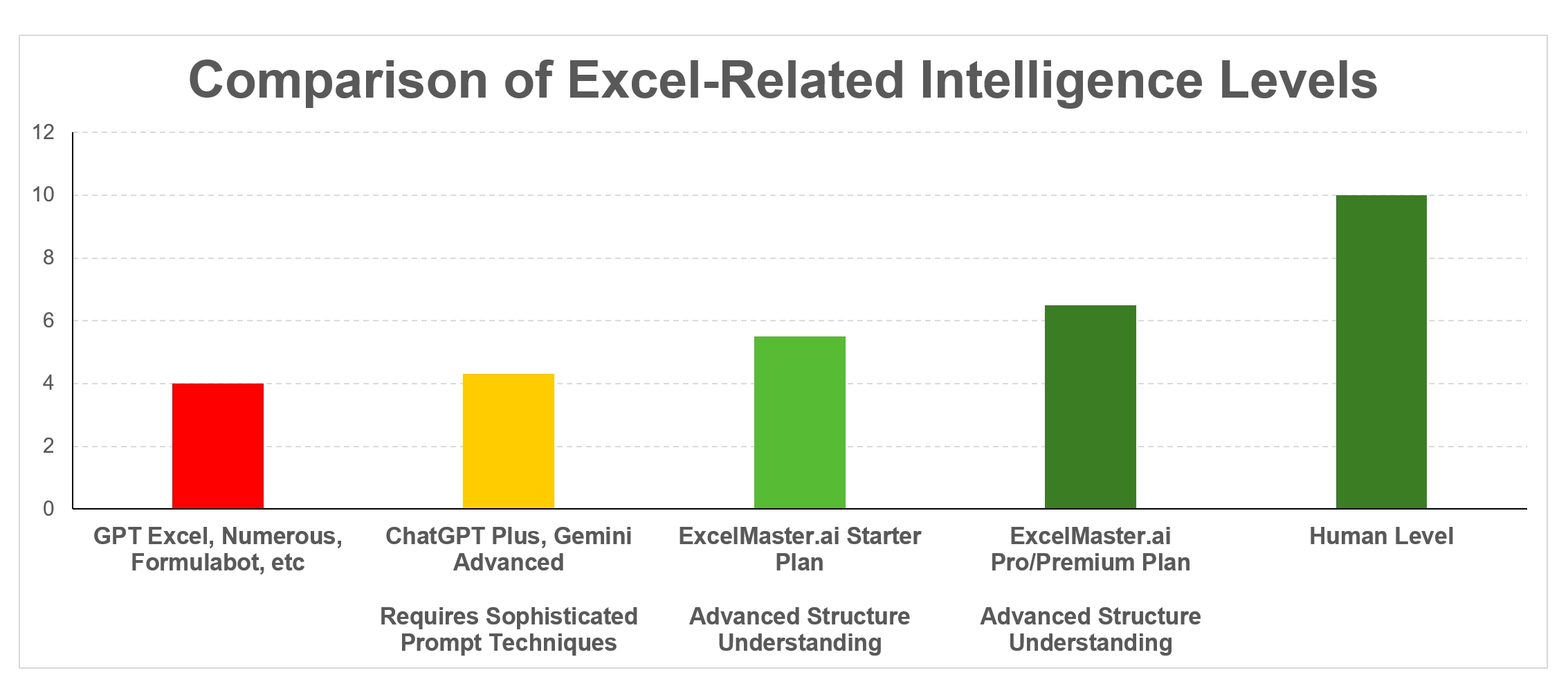
ExcelMaster is an AI agent that runs inside Microsoft Excel as a Windows add-in. Rather than only suggesting formulas in a chat window, it reads the actual structure of your workbook, including sheet names, column layouts, merged cells, named ranges, and cross-sheet references, then writes and executes VBA or Python code directly against that data. Users describe a task in plain language, such as building a DCF model, cleaning a 10,000-row dataset, or consolidating regional sheets, and the agent carries out the work step by step while showing each action in real time. The product positions itself against general-purpose chatbots like ChatGPT and against Microsoft Copilot for Excel. Its main argument is that chatbots generate template code with placeholder references that does not fit a specific workbook, forcing users into repeated debugging rounds, while ExcelMaster works from the real file. It also verifies its output, creates automatic backups before operations, and retries when something fails, with one-click rollback to earlier checkpoints. ExcelMaster is best suited to financial analysts, data analysts, and operations professionals who spend significant time on repetitive or multi-step spreadsheet work and do not want to copy and paste code from an external AI tool. It requires the desktop version of Excel on Windows, and the vendor's self-reported benchmarks should be weighed as marketing claims until independently verified.
SpecificationsAI-estimated
Key Features of ExcelMaster
Use Cases for ExcelMaster
Financial Modeling
Build formula-driven DCF models with projections, WACC calculations, terminal value, and sensitivity analysis from raw revenue data.
Data Cleaning
Standardize date formats, remove duplicates, and flag missing values across large datasets with conditional formatting.
Monthly Reporting
Aggregate transaction sheets into structured P&L summaries with department breakdowns, subtotals, and trend charts.
VBA Macro Generation
Create macros that consolidate regional sheets or map columns dynamically without manually debugging generated code.
Formula Generation
Write complex formulas that reference multiple sheets or merged cells, based on the actual layout of the workbook.
Repetitive Task Automation
Automate recurring spreadsheet workflows for non-coders who would otherwise perform the steps manually each week.
How to use ExcelMaster?
Install the Add-in
Download and run the installer. ExcelMaster appears as a tab in the Excel ribbon with no additional configuration required.
Open a Workbook
Open the Excel file you want to work on and click the ExcelMaster tab.
Describe Your Task
Type what you need in the chat sidebar using plain language, such as 'Standardize all date formats and flag missing values in red.'
Watch the Agent Work
The agent analyzes the data, writes code, executes it, and delivers results while you observe each step live.
Review or Restore
Check the output. If something is wrong, use the automatic backup to roll back to the state before the change.
Pros & Cons of ExcelMaster
Pros
- Reads actual workbook structure, including merged cells, named ranges, and cross-sheet references, so generated code fits the file
- Executes VBA and Python inside Excel instead of requiring manual copy-paste and debugging
- Automatic backups before each operation with one-click rollback to earlier checkpoints
- Runs on standard Excel installs rather than requiring a Copilot tier subscription
Cons
- Windows-only and limited to the desktop version of Excel 2016 or later; the web version is not supported
- Credit-based pricing means heavy users may exhaust monthly allowances, and unused credits do not roll over
- Performance claims such as 80% accuracy and 10-minute completion come from internal benchmarks rather than independent testing
Frequently Asked Questions
How is ExcelMaster different from ChatGPT or Claude for Excel?
ChatGPT and Claude provide formulas or code snippets that you must copy, paste, and debug yourself. ExcelMaster reads your workbook, writes code, executes it inside Excel, verifies the output, and fixes errors automatically.
Is my spreadsheet data uploaded to the cloud?
According to the vendor, the workbook is stored locally and only relevant cell content is sent to the AI model for processing. API communication is encrypted in transit.
Which versions of Excel are supported?
Microsoft Excel 2016 and later on Windows 10 or 11. The desktop version is required; the web version is not supported.
What happens if the AI makes a mistake?
ExcelMaster creates an automatic backup before every operation. If something fails, it can roll back to the prior state, and you can also restore any earlier checkpoint manually.
Do I need to know VBA or Python?
No. Tasks are described in plain language and the code is generated and executed automatically. Users who know VBA or Python can also review and modify the generated code.
Does unused credit roll over to the next month?
No. Credits are consumed based on AI usage and unused credits do not roll over between billing periods.
Pricing Overview
View full pricing →ExcelMaster offers monthly subscription tiers (Starter and Pro shown with 3-day free trials), with annual billing available at a 20% discount.
Reviews & Ratings0.0
No reviews yet. Be the first to write one!
Top Alternatives & Similar Software
View all alternatives & similar software→No alternatives available yet.
People also viewed



Related searches
Is this your tool?
Claim this page to update details, reply to user reviews, and drive more traffic to your product.
Claim this Product →
Tags
Explore Related Topics
Keep up with ExcelMaster alternatives
New alternatives, pricing changes and the week's biggest movers - one email every Tuesday.