


Magic Thumbnails
Turn your YouTube video title and description into AI-generated thumbnails in seconds.
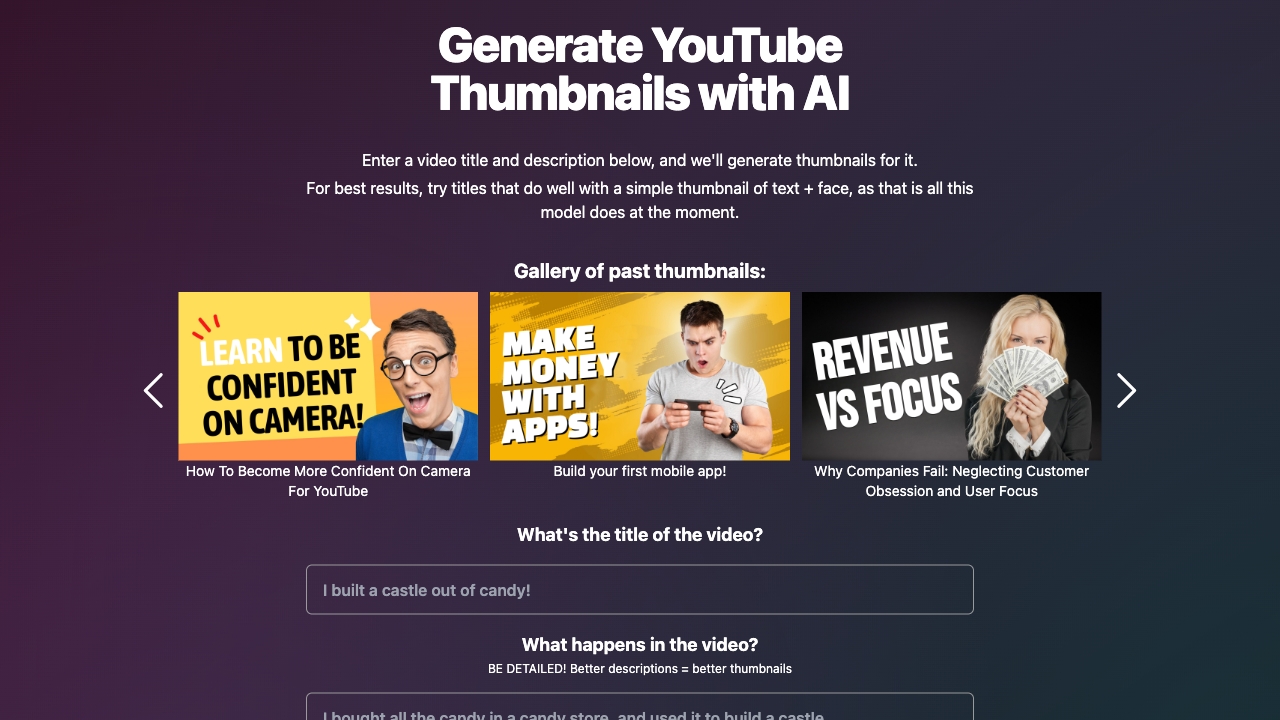



What is Magic Thumbnails?
Magic Thumbnails is a specialized AI-powered web tool designed to help YouTube creators generate thumbnail images automatically. By entering a video title and description, users receive thumbnail visuals tailored to the video concept, removing the need for manual design work. The service focuses on a specific style: simple thumbnails combining text with a face, which tend to perform well for many YouTube videos. Magic Thumbnails sits in the broader wave of generative media tools but positions itself narrowly for the YouTube thumbnail use case. Creators can use it as a quick brainstorming or production aid, iterating on titles and descriptions to explore different thumbnail ideas. The tool's gallery showcases sample outputs for videos on topics like confidence on camera, building a mobile app, and company failure/customer obsession. However, the service has announced it will shut down on February 1st, 2024. Users are advised to download any thumbnails they want to keep before that date. Given its pending shutdown, Magic Thumbnails is mainly useful as a temporary or legacy workflow option for creators who already have generated assets, and it should not be depended on for recurring long-term use.
SpecificationsAI-estimated
Key Features of Magic Thumbnails
Use Cases for Magic Thumbnails
Fast YouTube Thumbnail Creation
Generate a YouTube thumbnail quickly without opening a design tool.
Thumbnail Brainstorming
Enter different titles and descriptions to see how thumbnail concepts change.
Design-Free Content Workflows
Let AI handle the visuals so creators without graphic design experience can still get a thumbnail.
Tutorial and How-To Videos
Works well for educational topics like the example 'Build your first mobile app!'
Personal Development Content
Suitable for self-improvement videos such as 'How To Become More Confident On Camera For YouTube.'
Business or Analytical Videos
Can create simple thumbnails for business and analysis topics like 'Why Companies Fail.'
How to use Magic Thumbnails?
Prepare Your Video Title
Think of a YouTube video topic that works well with a simple text + face thumbnail style, and come up with a clear, catchy video title.
Provide Title and Description
Enter the video title and a short description into the Magic Thumbnails generator form on the website.
Generate Thumbnails
Let the AI process the text and generate thumbnail image options based on the information you provided.
Review and Download
Review the generated thumbnails and download the ones you want to keep, ideally before the shutdown date.
Pros & Cons of Magic Thumbnails
Pros
- Frictionless input: just a video title and description
- Eliminates manual thumbnail design work
- Purpose-built for YouTube creators
- Simple text + face model matches a proven YouTube thumbnail format
- Showcases past examples to set clear expectations
Cons
- Service is shutting down on February 1, 2024, so it is no longer viable for long-term use.
- Thumbnail style is limited to simple text + face compositions only.
- Results work best only for titles that fit the simple text + face thumbnail format.
- No clear pricing, export, or customization features are documented on the landing page.
Frequently Asked Questions
What is Magic Thumbnails?
Magic Thumbnails is an AI-powered web tool that generates YouTube thumbnail images from a video title and description.
How do I generate a thumbnail?
Enter a video title and description into the provided fields, and the AI will generate thumbnail images based on that text.
What types of thumbnails can it create?
The model currently creates simple thumbnails that combine text with a face, which is a style that tends to perform well for certain YouTube videos.
Why are my thumbnails simple text + face images?
Because the current model is designed specifically for text + face compositions, titles that work well with that simple style will produce the best results.
Is Magic Thumbnails still running?
No. Magic Thumbnails announced it will shut down on February 1st, 2024.
What should I do before the shutdown?
Download any thumbnails you want to keep before February 1st, 2024, since the service will no longer be available after that date.
Does Magic Thumbnails require a YouTube video link?
No, you only need to provide a video title and description. A YouTube video link is not required.
Are there alternative tools recommended by Magic Thumbnails?
The website does not list an official alternative. After shutdown, creators will need to use other AI thumbnail generators or design tools.
Reviews & Ratings0.0
No reviews yet. Be the first to write one!
Top Alternatives & Similar Software
View all alternatives & similar software→


People also viewed


Related searches
Is this your tool?
Claim this page to update details, reply to user reviews, and drive more traffic to your product.
Claim this Product →
Tags
Explore Related Topics
Keep up with Magic Thumbnails alternatives
New alternatives, pricing changes and the week's biggest movers - one email every Tuesday.