


Narrator: Audiobook Maker
Turn ebooks and documents on your iPhone into free, natural-sounding audiobooks — offline, with no account required.


What is Narrator: Audiobook Maker?
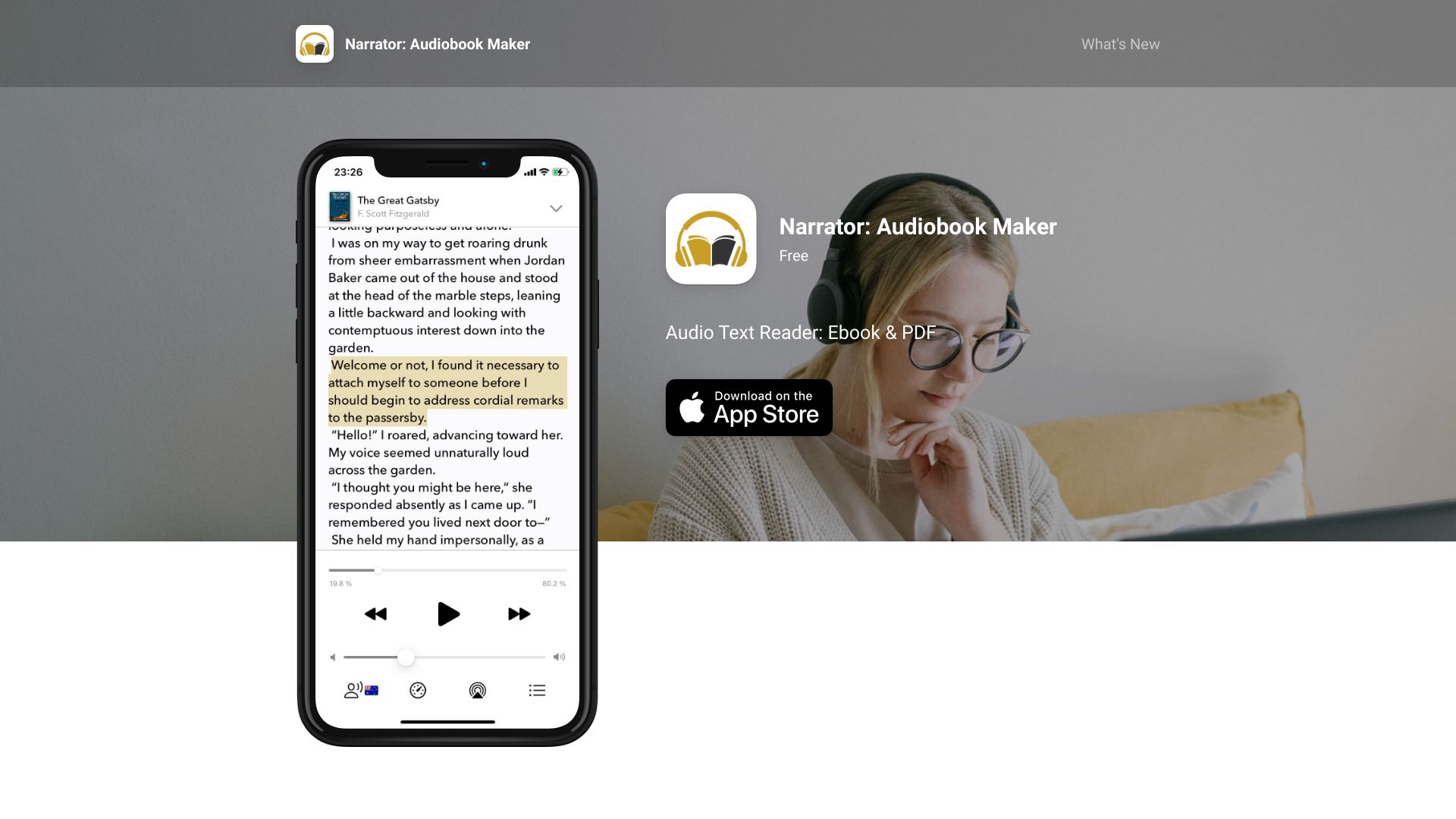
Narrator is a free audiobook maker for iPhone and iPad that turns the books and documents you already own into listenable audio. Instead of buying or renting audiobooks, you import an ePub, MOBI, AZW3, PDF, DOCX, TXT, or RTF file from your device or cloud storage, and Narrator reads it aloud with natural AI voices. There's no account to create and no subscription required for day-to-day listening, making it one of the simplest ways to get text-to-speech on iOS. With a clean, distraction-free interface designed for simplicity, the app supports English, French, Spanish, Italian and Portuguese via natural AI voices, plus 25+ additional languages using the built-in iOS voices. You can listen instantly on your iPhone or iPad, adjust playback speed from 0.5x to 3x, or convert any passage into a shareable .m4a audiobook file. Once a book is imported and the voice is downloaded, everything works offline — perfect for commutes, travel, or anywhere you'd rather listen than read. The free plan narrates 25,000 characters per day — about a chapter or half an hour of listening — with no account and no trial expiry. For heavy listeners, a 150,000-character lifetime pool covers occasional over-limit days, and the optional Plus subscription removes limits entirely for $4.99 per month or $29.99 per year. With a 4.7-star rating from 600+ reviews and 100K+ downloads, Narrator has become a go-to tool for students, commuters, and anyone with a backlog of ebooks they'd rather hear.
SpecificationsAI-estimated
Key Features of Narrator: Audiobook Maker
Use Cases for Narrator: Audiobook Maker
Turn ebooks into audiobooks
Import your own ePub or Kindle-format ebooks and listen to them chapter by chapter.
Listen to documents hands-free
Have Word docs, PDFs, and text files read aloud while cooking, driving, or commuting.
Catch up on long fanfic
Import saved fanfiction or fic files and get through them while multitasking.
Accessibility aid for reading
Use natural text-to-speech to make reading more approachable for reluctant readers or those with reading difficulties.
Create shareable audiobook files
Export .m4a files to listen on any device or share with friends.
Language listening practice
Hear books and articles read aloud in one of 25+ languages using iOS voices.
How to use Narrator: Audiobook Maker?
Add Your Content
Import an ePub, MOBI, AZW3, PDF, DOCX, TXT, or RTF file from your iPhone or cloud storage via the Files app.
Choose a Voice
Select one of the natural AI voices for English, French, Spanish, Italian, or Portuguese, or use one of 25+ built-in iOS voices. Download the voice for offline use.
Listen or Export
Tap play to hear it instantly, adjust playback speed from 0.5x to 3x, or convert the narration to a shareable .m4a audiobook file.
Pros & Cons of Narrator: Audiobook Maker
Pros
- Genuinely free tier with no account and no trial expiry
- Natural AI voices that sound less robotic than many competitors
- Works fully offline after import and voice download
- One-tap export to .m4a audiobook files
- Clean, simple, and highly rated iPhone interface
Cons
- Free plan is capped at 25,000 characters per day, which is roughly one chapter or half an hour of listening.
- Requires iOS 26.0 or later; there is no Android, Mac, or web version.
- Cannot open DRM-protected books bought from the Kindle store.
- Scanned PDFs without a real text layer cannot be narrated.
Frequently Asked Questions
What does Narrator cost?
There is a free plan with no account and no trial expiry: 25,000 characters per day. Plus ($4.99/month or $29.99/year) removes the limits.
What file formats can I import?
Narrator supports ePub, MOBI, AZW and AZW3 ebooks, plus PDF, DOCX, RTF and TXT documents. You can import them from your device or from cloud storage through the Files app.
Can I listen offline?
Yes. Once a book is imported and its voice is downloaded, you can listen offline. Some voices need a connection the first time they are used.
Can Narrator read Kindle books?
Only if the book is not DRM-protected. Books bought from the Kindle store are DRM-protected, and no app can open those.
Will it work with scanned PDFs?
No, unless the PDF has a real text layer. A scanned PDF — a photographed or photocopied page saved as an image — has no text to read, so it will not work.
Which languages and voices are available?
Natural AI voices cover English, French, Spanish, Italian and Portuguese. Another 25+ languages are available using the voices built into iOS.
Can I export the narrated audio?
Yes. Narrator can export what it narrates as an .m4a audiobook file you can save to Files, move to another device, or listen to in any audio player.
Does playback speed affect my daily allowance?
No. Playback speed runs from 0.5x to 3x, and it does not change how much of your daily allowance you use — the cap is on the length of the text, not on listening time.
Reviews & Ratings0.0
No reviews yet. Be the first to write one!
Top Alternatives & Similar Software
View all alternatives & similar software→

People also viewed



Related searches
About the Product
Is this your tool?
Claim this page to update details, reply to user reviews, and drive more traffic to your product.
Claim this Product →
Tags
Explore Related Topics
Keep up with Narrator: Audiobook Maker alternatives
New alternatives, pricing changes and the week's biggest movers - one email every Tuesday.