


PixaryAI AI Dress Changer
Try on virtual outfits, swap clothes in photos, and explore endless fashion looks instantly with AI.
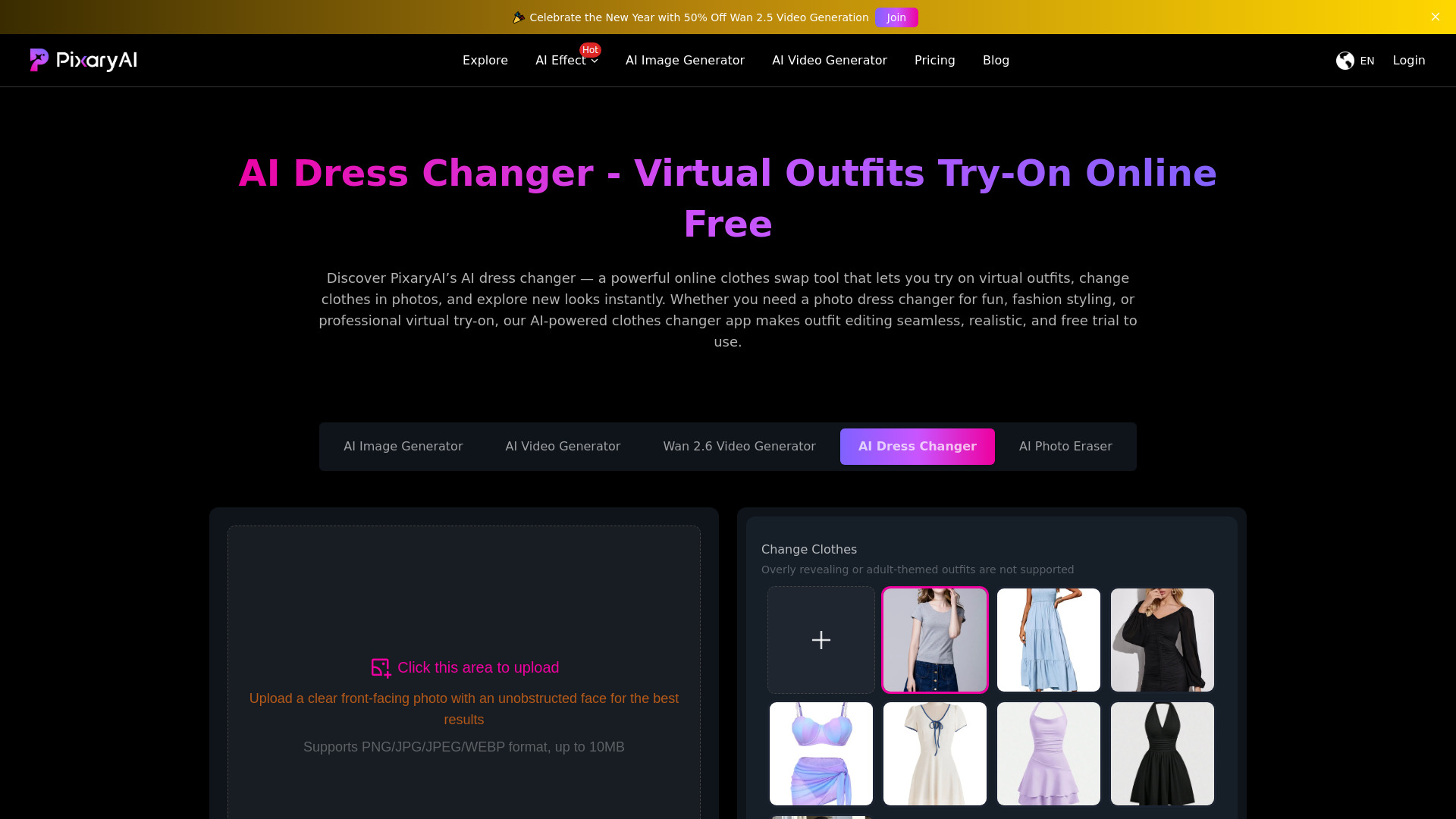
What is PixaryAI AI Dress Changer?
PixaryAI's AI Dress Changer is a browser-based virtual try-on and photo clothes-swap tool. It uses artificial intelligence to replace garments in photos, allowing users to preview different outfits, colors, and fabric styles from a single image. The tool is designed for casual fashion experimentation, e-commerce virtual fitting rooms, influencer content creation, and professional photography workflows, with a free daily generation for new users. Unlike simple filters, the AI analyzes body shape, posture, lighting, and fabric textures to create natural, hyper-realistic outfit swaps. Users upload a clear front-facing photo, choose a style from PixaryAI's asset library, and download the resulting image without watermarks. It also supports high-resolution exports, layered editing, and transparent backgrounds for commercial work, making it more than a novelty app. PixaryAI positions the tool as privacy-first: everything runs securely in the browser, no app download is required, and users retain control over their photos. The free tier provides one generation per day, with credit-based upgrades for more. While it requires a clear, unobstructed face and rejects overly revealing outfits, its combination of realism, flexibility, and accessibility makes it a strong option for anyone exploring virtual outfit try-on.
SpecificationsAI-estimated
Key Features of PixaryAI AI Dress Changer
Use Cases for PixaryAI AI Dress Changer
Virtual Shopping Try-On
Preview how outfits, colors, and fabrics will look on your body before buying clothes online.
Social Media Content Creation
Turn one photo into multiple outfit variations for TikTok, Instagram reels, and YouTube thumbnails.
Personal Styling & Wardrobe Planning
Experiment with outfits for work, travel, or special occasions and plan seasonal looks.
E-Commerce & Brand Marketing
Showcase clothing collections digitally without costly reshoots and help customers visualize products.
Fashion Photography & Editorial Work
Swap outfits, test visual concepts, and fine-tune colors for ad campaigns and editorial spreads.
Cosplay & Artistic Projects
Create character outfit variations and artistic concepts quickly for creative projects.
How to use PixaryAI AI Dress Changer?
Upload Your Photo
Upload a clear front-facing photo with an unobstructed face. The AI automatically detects your body and posture.
Choose an Outfit
Browse the asset library and select a style, color, or outfit type you want to try on.
Let the AI Apply the Outfit
The dress changer AI renders the new outfit onto your photo with realistic fabric, lighting, and proportions.
Preview Multiple Looks
Try different combinations and compare styles until you find the look you want.
Download and Share
Download the final high-resolution image or share it directly on social media.
Pros & Cons of PixaryAI AI Dress Changer
Pros
- Hyper-realistic outfit swaps that preserve fabric textures, lighting, and body proportions
- Free daily generation with no watermarks and no app download
- Works across personal styling, e-commerce, influencer content, and professional photography
- Privacy-first approach with secure in-browser processing
- Supports high-resolution exports, layered editing, and transparent backgrounds
Cons
- Only one free generation per day; additional generations require credits
- Requires a clear front-facing photo with an unobstructed face for best results
- Overly revealing or adult-themed outfits are not supported
- Photo uploads are limited to 10MB
Frequently Asked Questions
What is an AI Dress Changer and how does it work?
AI dress changer uses artificial intelligence to replace outfits in photos seamlessly. By analyzing body shape, lighting, and texture, the tool delivers realistic outfit swaps for virtual try-on, e-commerce, or personal styling.
Is PixaryAI's AI Clothes Changer free to use?
Yes, PixaryAI offers a free AI clothes changer experience with a limited free generation per day. Additional generations are available through credit-based upgrades.
Can I use the Photo Dress Changer on mobile devices?
Yes. The tool runs in the browser, so you can use it on mobile devices without downloading an app.
How accurate are the results from the Dress Changer AI?
PixaryAI uses advanced algorithms to deliver natural, hyper-realistic outfit swaps, with precise rendering of fabric textures, lighting, and body proportions.
What types of outfits can I try with the Clothes Swap AI?
You can select from a wide range of styles and colors, including casual, formal, and creative looks. Overly revealing or adult-themed outfits are not supported.
Is it safe to upload personal photos to the AI Dress Changer Online?
Yes. PixaryAI says everything runs securely in the browser with strict privacy protection, no watermarks, and users keep full control over their photos.
Can I change clothes in group or couple photos?
The tool is optimized for a single clear front-facing photo with an unobstructed face, so group or couple photos may not produce accurate results.
How is PixaryAI different from other Dress Changer Online tools?
PixaryAI combines hyper-realistic AI rendering, all-in-one flexibility for creators and shoppers, free browser-based access, and privacy-first processing without watermarks.
Can I use the AI Clothes Changer for e-commerce or business purposes?
Yes. It is suitable for e-commerce previews, brand campaigns, and fashion collections, helping businesses boost engagement and reduce returns.
Do I need editing skills to use the Change Clothes Photo Editor Online Free?
No. The workflow is simple: upload a photo, choose an outfit, and download your new look. No manual editing skills are required.
Reviews & Ratings0.0
No reviews yet. Be the first to write one!
Top Alternatives & Similar Software
View all alternatives & similar software→



People also viewed


Related searches
About the Product
Is this your tool?
Claim this page to update details, reply to user reviews, and drive more traffic to your product.
Claim this Product →
Tags
Explore Related Topics
Keep up with PixaryAI AI Dress Changer alternatives
New alternatives, pricing changes and the week's biggest movers - one email every Tuesday.