


Any Video Converter vs HitPaw
Side-by-side comparison of features, pricing, ratings, and alternatives.

Any Video Converter is a video and audio conversion tool with a long operating history, converting between more than 1000 formats with batch processing the vendor advertises at up to 130x real-time speed. It includes AI-powered video upscaling and quality enhancement for improving lower-resolution source footage, along with modern-codec compression to reduce file size, audio extraction to MP3/WAV, and a built-in downloader that can save video from over 1000 supported websites. The product also bundles AI creative tools (branded Seedance AI) for text-to-video generation and photo editing alongside its core conversion features. It is offered in free and paid Pro/Ultimate tiers for both Windows and macOS, aimed at general users and content creators who need broad, flexible format conversion rather than a single-purpose converter.
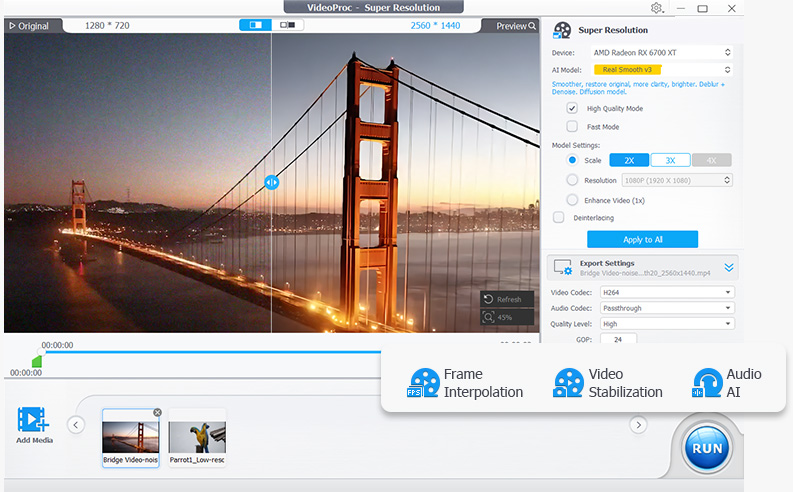
HitPaw is an AI-powered media enhancement suite that helps creators turn low-quality video, photos, and audio into polished, high-resolution content. It combines video upscaling, photo restoration, format conversion, real-time voice changing, and language localization in one ecosystem. The tools are designed for everyone from photographers and YouTubers to e-commerce sellers and small business owners who need fast, reliable media editing without a steep learning curve. The suite includes dedicated modules for different tasks. HitPaw FotorPea focuses on image enhancement, using AI to sharpen blurry pictures, remove noise, upscale low-resolution files, and restore old or damaged photos. HitPaw VikPea handles video enhancement, with features for denoising, facial enhancement, SDR-to-HDR conversion, watermark removal, and background elimination. HitPaw Univd acts as a universal converter that can process video, audio, and images at speeds up to 170 times faster while preserving quality. There is also a real-time AI voice changer with more than 200 character voices and low-latency performance for live streaming. HitPaw is used by more than 7.3 million people in over 190 countries, with a 4.7 Trustpilot rating and a 98% satisfaction rate. It is especially popular among YouTubers, photographers, filmmakers, online sellers, and marketers who need to prepare high-definition content quickly and at scale. The platform's AI automation reduces manual editing time dramatically, and its translation, subtitling, and voice-dubbing features help global creators break language barriers.
- Extremely broad format support covers nearly any video or audio conversion need in one app.
- Long operating history suggests active, ongoing maintenance and format updates.
- Free tier handles basic conversion tasks without requiring immediate payment.
- Built-in downloader and AI upscaling add value beyond plain format conversion.
- All-in-one AI suite for video, photo, audio, and format conversion.
- Dramatically speeds up restoration and enhancement tasks, cutting manual work from weeks to hours.
- High user trust with 4.7 Trustpilot rating and 7.3M+ users worldwide.
- Real-time voice changer with 200+ voices and under 0.3s latency for live streaming.
- Historically bundled optional third-party offers during installation, so the installer needs careful attention to avoid extra software.
- Pro/Ultimate pricing isn't clearly listed on the main site and requires visiting a separate purchase flow.
- Interface is more utilitarian than modern, minimal converter tools.
- Full pricing and free-tier details are not disclosed on the landing page.
- The reviewed page focuses on desktop-style workflows and does not mention a mobile app.
- As a proprietary product, it is not open source and offers limited customizability.
- Heavy AI enhancement tasks may require a reasonably powerful computer for the fastest results.
More alternatives & similar tools
Alternatives to Any Video Converter
View all →
Alternatives to HitPaw
View all →Long-running video conversion tool supporting 1000+ formats with AI upscaling and compression.
The Verdict
AI-generated from listing dataHitPaw offers an all‑in‑one AI media suite but hides pricing, while Any Video Converter focuses on broad format conversion with a clear one‑time fee.
Key differences
- •HitPaw combines video, photo, audio enhancement and translation in one suite; Any Video Converter specializes in format conversion and includes a downloader.
- •HitPaw’s pricing and free‑tier details are not disclosed; Any Video Converter provides a free tier and a known one‑time paid option.
- •HitPaw emphasizes AI‑driven enhancement (upscaling, denoising, voice changer); Any Video Converter offers AI upscaling but primarily for conversion quality.
- •HitPaw targets content creators needing multilingual dubbing and batch AI workflows; Any Video Converter targets users needing extensive format support and offline video download.
- •HitPaw lists high user trust metrics (4.7 Trustpilot, 7.3M users); Any Video Converter’s reputation is described only by longevity, no trust scores.
Pricing & value
Any Video Converter shows a clear one‑time paid model and free tier; HitPaw’s pricing is undisclosed.
Ease of use / learning curve
Any Video Converter is a straightforward desktop converter; HitPaw bundles many AI modules, potentially increasing complexity.
Features & depth
HitPaw provides AI video/photo enhancement, voice changer, translation, dubbing, and batch automation beyond conversion.
Integrations & ecosystem
Any Video Converter lists no APIs or integrations; HitPaw also lacks APIs, so both tie on this axis.
Collaboration
Neither product mentions collaboration features; both are single‑user desktop tools.
Scalability
HitPaw’s batch processing and workflow automation are designed for professional volume work; Any Video Converter focuses on individual conversions.
Support & security
HitPaw cites a 98% satisfaction rate and student discount program; Any Video Converter provides no support details.
Choose Any Video Converter if…
Users whose primary need is converting many formats, downloading online videos, and who want transparent pricing.
Choose HitPaw if…
Content creators needing AI‑enhanced video/photo editing, multilingual dubbing, and batch automation.
Common questions
What is the cost to start using each tool?
HitPaw does not disclose pricing or free‑tier details; Any Video Converter offers a free tier and a one‑time paid license (price not listed).
Can either tool handle dozens of video formats?
Any Video Converter supports 1000+ video/audio formats; HitPaw focuses on AI enhancement and conversion but does not list format breadth.
Do they offer AI‑driven enhancement beyond basic conversion?
HitPaw provides extensive AI upscaling, denoising, voice changing, and translation; Any Video Converter includes AI upscaling but mainly for conversion quality.