


HitPaw vs VideoProc Converter AI
Side-by-side comparison of features, pricing, ratings, and alternatives.
HitPaw is an AI-powered media enhancement suite that helps creators turn low-quality video, photos, and audio into polished, high-resolution content. It combines video upscaling, photo restoration, format conversion, real-time voice changing, and language localization in one ecosystem. The tools are designed for everyone from photographers and YouTubers to e-commerce sellers and small business owners who need fast, reliable media editing without a steep learning curve. The suite includes dedicated modules for different tasks. HitPaw FotorPea focuses on image enhancement, using AI to sharpen blurry pictures, remove noise, upscale low-resolution files, and restore old or damaged photos. HitPaw VikPea handles video enhancement, with features for denoising, facial enhancement, SDR-to-HDR conversion, watermark removal, and background elimination. HitPaw Univd acts as a universal converter that can process video, audio, and images at speeds up to 170 times faster while preserving quality. There is also a real-time AI voice changer with more than 200 character voices and low-latency performance for live streaming. HitPaw is used by more than 7.3 million people in over 190 countries, with a 4.7 Trustpilot rating and a 98% satisfaction rate. It is especially popular among YouTubers, photographers, filmmakers, online sellers, and marketers who need to prepare high-definition content quickly and at scale. The platform's AI automation reduces manual editing time dramatically, and its translation, subtitling, and voice-dubbing features help global creators break language barriers.
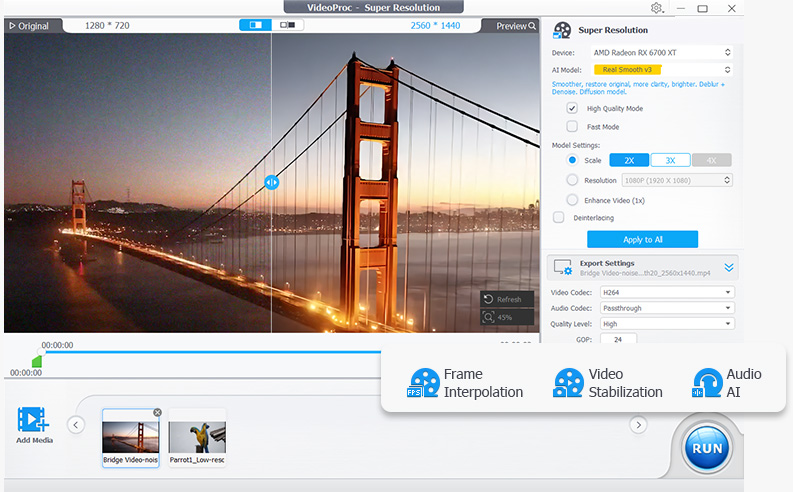
VideoProc Converter AI is an all-in-one video and image tool from Digiarty Software that combines format conversion with AI enhancement. It converts across 420+ output formats, uses AI super resolution to upscale low-resolution video up to 4K and images up to 8K, and applies frame interpolation, stabilization, and noise reduction to raw footage. The software also compresses files by more than 90 percent, includes screen and webcam recording, and downloads video from over 1,000 sites. Processing is accelerated through Level-3 hardware acceleration across NVIDIA, AMD, Intel, and Apple Silicon GPUs, aiming to make demanding AI tasks run at practical speeds on consumer hardware.
- All-in-one AI suite for video, photo, audio, and format conversion.
- Dramatically speeds up restoration and enhancement tasks, cutting manual work from weeks to hours.
- High user trust with 4.7 Trustpilot rating and 7.3M+ users worldwide.
- Real-time voice changer with 200+ voices and under 0.3s latency for live streaming.
- Very broad format support for input and output
- GPU acceleration makes conversion significantly faster
- AI upscaling and stabilization go beyond basic conversion
- Lifetime license option avoids ongoing subscription cost
- Full pricing and free-tier details are not disclosed on the landing page.
- The reviewed page focuses on desktop-style workflows and does not mention a mobile app.
- As a proprietary product, it is not open source and offers limited customizability.
- Heavy AI enhancement tasks may require a reasonably powerful computer for the fastest results.
- Free trial is limited by file size and duration restrictions
- Interface bundles many tools which can feel overwhelming for simple conversions
- AI enhancement features require capable GPU hardware for best speed
More alternatives & similar tools
Alternatives to HitPaw
View all →
Long-running video conversion tool supporting 1000+ formats with AI upscaling and compression.
Alternatives to VideoProc Converter AI
View all →Long-running video conversion tool supporting 1000+ formats with AI upscaling and compression.
The Verdict
AI-generated from listing dataVideoProc Converter AI offers a one‑time paid, GPU‑accelerated video‑conversion focus; HitPaw provides a broader AI media suite but with undisclosed pricing.
Key differences
- •Pricing model: VideoProc is a known one‑time purchase; HitPaw’s cost is not disclosed.
- •Core focus: VideoProc specializes in video conversion, upscaling, and stabilization; HitPaw bundles video, photo, audio, and translation tools.
- •Performance claims: VideoProc emphasizes Level‑3 hardware acceleration; HitPaw claims 170× faster conversion but without hardware details.
- •User‑base evidence: HitPaw cites 7.3M+ users and Trustpilot rating; VideoProc provides no user‑base metrics.
Pricing & value
VideoProc states a one‑time paid license; HitPaw’s pricing is unknown, making cost comparison impossible.
Ease of use / learning curve
Both tools bundle many features; VideoProc may feel overwhelming, HitPaw also offers an all‑in‑one suite.
Features & depth
HitPaw includes video, photo, audio, voice‑changing, translation and dubbing; VideoProc focuses on video conversion and enhancement.
Integrations & ecosystem
No integration details are provided for either product.
Collaboration
Neither product mentions collaboration or multi‑user features.
Scalability
Both are desktop‑only applications with no cloud scaling information.
Support
Support channels or SLA details are not specified for either tool.
Choose HitPaw if…
Creators who want an all‑in‑one AI suite for video, photo, audio, and multilingual translation, and can tolerate unknown pricing.
Choose VideoProc Converter AI if…
Creators needing fast, GPU‑accelerated video conversion/upscaling with a known one‑time cost.
Common questions
What is the cost of each product?
VideoProc offers a one‑time paid license; HitPaw does not disclose pricing on its landing page.
Do I need a powerful GPU to use the AI features?
VideoProc notes AI upscaling and stabilization run fastest on capable NVIDIA/AMD GPUs; HitPaw states heavy AI tasks require a reasonably powerful computer.
Which tool covers more media types?
HitPaw includes video, photo, audio cleaning, voice changing, translation and dubbing; VideoProc is limited to video/audio conversion and enhancement.