


HitPaw VikPea vs VideoProc Converter AI
Side-by-side comparison of features, pricing, ratings, and alternatives.
HitPaw VikPea is an AI-powered video enhancer and upscaler that upgrades videos to 4K/8K, removes noise, fixes blurry footage, stabilizes shaky videos, restores old/damaged clips, and enhances AI-generated videos from tools like Kling, Sora, Veo, and Seedance.
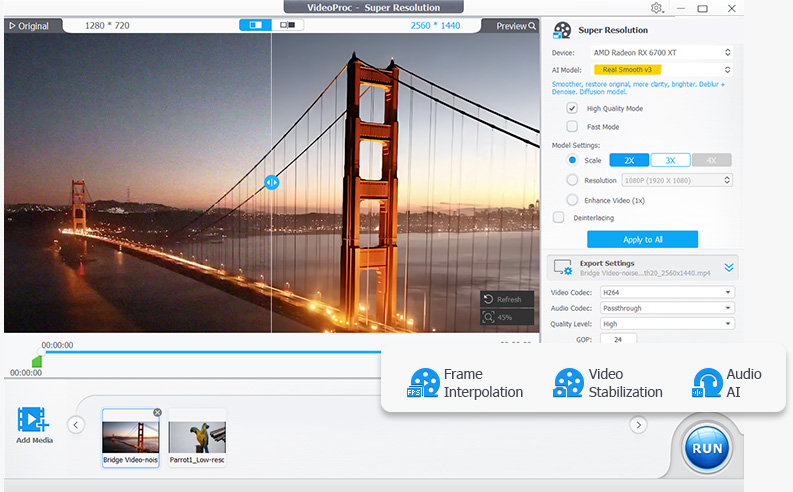
VideoProc Converter AI is an all-in-one video and image tool from Digiarty Software that combines format conversion with AI enhancement. It converts across 420+ output formats, uses AI super resolution to upscale low-resolution video up to 4K and images up to 8K, and applies frame interpolation, stabilization, and noise reduction to raw footage. The software also compresses files by more than 90 percent, includes screen and webcam recording, and downloads video from over 1,000 sites. Processing is accelerated through Level-3 hardware acceleration across NVIDIA, AMD, Intel, and Apple Silicon GPUs, aiming to make demanding AI tasks run at practical speeds on consumer hardware.
No specific pricing, plans, or dollar amounts are explicitly stated in the provided content.
- One-click AI enhancement workflow
- Multiple specialized AI models for different video types
- Cloud GPU accelerated rendering for faster processing
- Supports 4K/8K upscaling, stabilization, frame interpolation, colorization, and repair
- Very broad format support for input and output
- GPU acceleration makes conversion significantly faster
- AI upscaling and stabilization go beyond basic conversion
- Lifetime license option avoids ongoing subscription cost
- Not free; requires purchase or subscription after trial
- Desktop app only
- Cloud rendering may require internet and raise privacy considerations
- Exact pricing is not clearly listed on the page
- Free trial is limited by file size and duration restrictions
- Interface bundles many tools which can feel overwhelming for simple conversions
- AI enhancement features require capable GPU hardware for best speed
More alternatives & similar tools
Alternatives to HitPaw VikPea
View all →

Alternatives to VideoProc Converter AI
View all →Turn blurry videos and photos into brilliant, high-quality content with AI-powered enhancement, conversion, and voice tools.

Long-running video conversion tool supporting 1000+ formats with AI upscaling and compression.
The Verdict
AI-generated from listing dataVideoProc Converter AI is the safer default for a one-time purchase focused on format conversion, compression, and upscaling on a desktop. HitPaw VikPea is stronger for specialized AI enhancement and restoration, but it is subscription-based with unclear pricing and relies on cloud rendering for speed.
Key differences
- •Pricing model: VideoProc offers a one-time paid license with a lifetime option, while HitPaw VikPea is a paid subscription after a free trial with no clearly listed prices.
- •Core focus: VideoProc emphasizes conversion across 420+ output formats, screen recording, and downloading from 1,000+ sites, whereas HitPaw emphasizes AI enhancement, restoration, and colorization.
- •AI model breadth: HitPaw lists scene-specific models (underwater, animation, landscape) and restoration of damaged or over-compressed video; VideoProc lists AI upscaling to 4K, frame interpolation to 480fps, and stabilization.
- •Acceleration approach: VideoProc uses local GPU acceleration across NVIDIA, AMD, and Intel hardware, while HitPaw uses cloud GPU rendering that may require internet and raises privacy considerations.
- •Platform and hardware: VideoProc's listed platform and RAM requirements are not specified; HitPaw lists Windows 10/11, macOS 10.15+, 8GB minimum RAM, and 16GB recommended.
Pricing & value
VideoProc offers a one-time license with a lifetime option; HitPaw requires an ongoing subscription with unclear pricing.
Ease of use / learning curve
HitPaw advertises a one-click AI enhancement workflow, while VideoProc's bundled many-tool interface can feel overwhelming.
Features & depth
VideoProc leads in format breadth and recording; HitPaw leads in AI restoration, colorization, and scene-specific models.
Integrations & ecosystem
HitPaw offers API access for developers and supports AI-generated video from Kling, Sora, Veo, and Seedance.
Collaboration
Collaboration features are not specified for either product.
Scalability
HitPaw's cloud GPU rendering and API access suggest scaling beyond a single machine, though this is not fully specified.
Support
Support channels and service levels are not specified for either product.
Security & privacy
VideoProc is a desktop app with local processing; HitPaw's cloud rendering raises privacy considerations.
Migration / lock-in
VideoProc's one-time license avoids ongoing subscription lock-in; HitPaw's subscription model creates continuing dependence.
Choose HitPaw VikPea if…
Editor restoring damaged or AI-generated footage who accepts a subscription and cloud rendering.
Choose VideoProc Converter AI if…
Solo creator who converts, compresses, and upscales footage locally and wants one-time cost.
Common questions
Which is cheaper over time?
VideoProc offers a one-time paid license with a lifetime option. HitPaw is a subscription with pricing not clearly listed, though discounts up to 35% are advertised.
Which is easier for a beginner?
HitPaw advertises a one-click AI enhancement workflow. VideoProc bundles many tools, which can feel overwhelming for simple conversions.
Can I process video without uploading it to the cloud?
VideoProc is a desktop app with GPU acceleration on local hardware. HitPaw's cloud rendering may require internet access and raises privacy considerations.