


VideoProc Converter AI
AI-powered video converter with upscaling and GPU acceleration
Best for
Users who want AI upscaling and stabilization bundled with broad-format video conversion.
Skip if
You only need a simple, free format converter without AI enhancement.
What is VideoProc Converter AI?
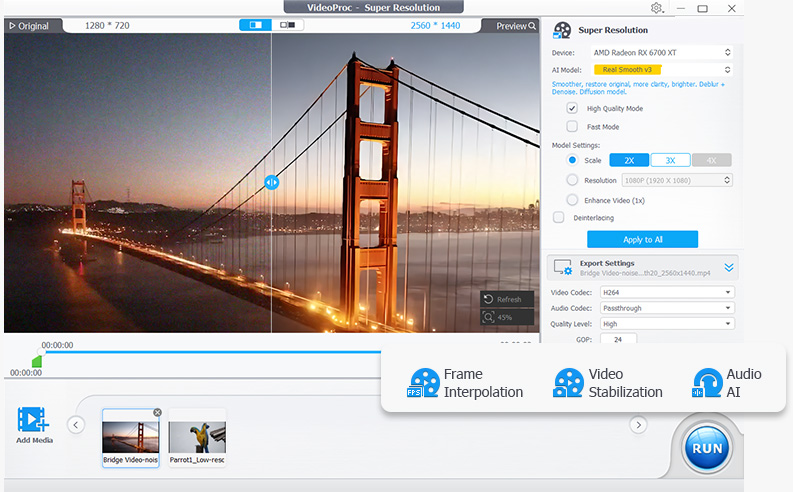
VideoProc Converter AI is an all-in-one video and image tool from Digiarty Software that combines format conversion with AI enhancement. It converts across 420+ output formats, uses AI super resolution to upscale low-resolution video up to 4K and images up to 8K, and applies frame interpolation, stabilization, and noise reduction to raw footage. The software also compresses files by more than 90 percent, includes screen and webcam recording, and downloads video from over 1,000 sites. Processing is accelerated through Level-3 hardware acceleration across NVIDIA, AMD, Intel, and Apple Silicon GPUs, aiming to make demanding AI tasks run at practical speeds on consumer hardware.
SpecificationsAI-estimated
Key Features of VideoProc Converter AI
Use Cases for VideoProc Converter AI
Converting camera footage for editing
A videographer converts footage from a DSLR or drone into an editing-friendly format before importing into an NLE.
Upscaling old low-resolution video
Users restore old home videos or low-res downloads by upscaling them to 4K with AI super resolution.
Compressing large video files for sharing
Content creators shrink large 4K video files by over 90 percent before uploading or emailing them.
Stabilizing action camera footage
Someone editing GoPro or drone footage runs AI stabilization to remove shake before publishing.
Pros & Cons of VideoProc Converter AI
Pros
- Very broad format support for input and output
- GPU acceleration makes conversion significantly faster
- AI upscaling and stabilization go beyond basic conversion
- Lifetime license option avoids ongoing subscription cost
Cons
- Free trial is limited by file size and duration restrictions
- Interface bundles many tools which can feel overwhelming for simple conversions
- AI enhancement features require capable GPU hardware for best speed
Frequently Asked Questions
How much does VideoProc Converter AI cost?
It costs $39.95 for a 1-year license or $65.95 for a lifetime license covering 3 to 5 PCs.
Does VideoProc Converter AI have a free trial?
Yes, a free trial is available with file size and duration restrictions.
What platforms does it support?
It runs on Windows 7 and later, and macOS 10.13 and later.
Does it use GPU acceleration?
Yes, it supports Level-3 hardware acceleration across NVIDIA, AMD, Intel, and Apple Silicon GPUs.
Pricing Overview
View full pricing →Reviews & Ratings0.0
No reviews yet. Be the first to write one!
Top Alternatives & Similar Software
View all alternatives & similar software→
People also viewed

Best For
Related searches
About the Product
Is this your tool?
Claim this page to update details, reply to user reviews, and drive more traffic to your product.
Claim this Product →
Tags
Keep up with VideoProc Converter AI alternatives
New alternatives, pricing changes and the week's biggest movers - one email every Tuesday.