


CapCut vs VideoProc Converter AI
Side-by-side comparison of features, pricing, ratings, and alternatives.

CapCut is a free, beginner-friendly video editor built for short-form social content, with templates, auto-captions, and one-tap effects. Owned by ByteDance, it integrates tightly with TikTok-style vertical video workflows.
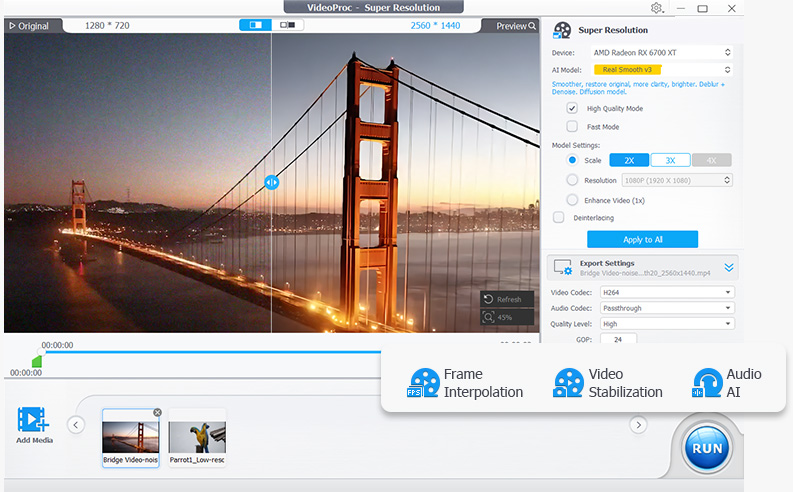
VideoProc Converter AI is an all-in-one video and image tool from Digiarty Software that combines format conversion with AI enhancement. It converts across 420+ output formats, uses AI super resolution to upscale low-resolution video up to 4K and images up to 8K, and applies frame interpolation, stabilization, and noise reduction to raw footage. The software also compresses files by more than 90 percent, includes screen and webcam recording, and downloads video from over 1,000 sites. Processing is accelerated through Level-3 hardware acceleration across NVIDIA, AMD, Intel, and Apple Silicon GPUs, aiming to make demanding AI tasks run at practical speeds on consumer hardware.
Free with a paid CapCut Pro tier for premium effects and assets.
- Very easy for beginners
- Great templates for social
- Free with generous features
- Fast auto-captions
- Very broad format support for input and output
- GPU acceleration makes conversion significantly faster
- AI upscaling and stabilization go beyond basic conversion
- Lifetime license option avoids ongoing subscription cost
- Less powerful for long-form/pro work
- Some assets behind Pro
- Privacy considerations (ByteDance-owned)
- Free trial is limited by file size and duration restrictions
- Interface bundles many tools which can feel overwhelming for simple conversions
- AI enhancement features require capable GPU hardware for best speed
What reviewers say
CapCut Reviews
3.8 (4)Decent with caveats
CapCut has been part of our stack. Upside: great templates for social. Downside: privacy considerations (bytedance-owned).
Decent with caveats
CapCut has been part of our stack. Upside: free with generous features. Downside: some assets behind pro.
Recommend CapCut
Been using CapCut for a while. Free with generous features. No real complaints. Would recommend.
VideoProc Converter AI Reviews
No reviews yet.
More alternatives & similar tools
Alternatives to CapCut
View all →

%20(3).png)
Alternatives to VideoProc Converter AI
View all →Turn blurry videos and photos into brilliant, high-quality content with AI-powered enhancement, conversion, and voice tools.

Long-running video conversion tool supporting 1000+ formats with AI upscaling and compression.