


ConceptMap vs MarginNote
Side-by-side comparison of features, pricing, ratings, and alternatives.
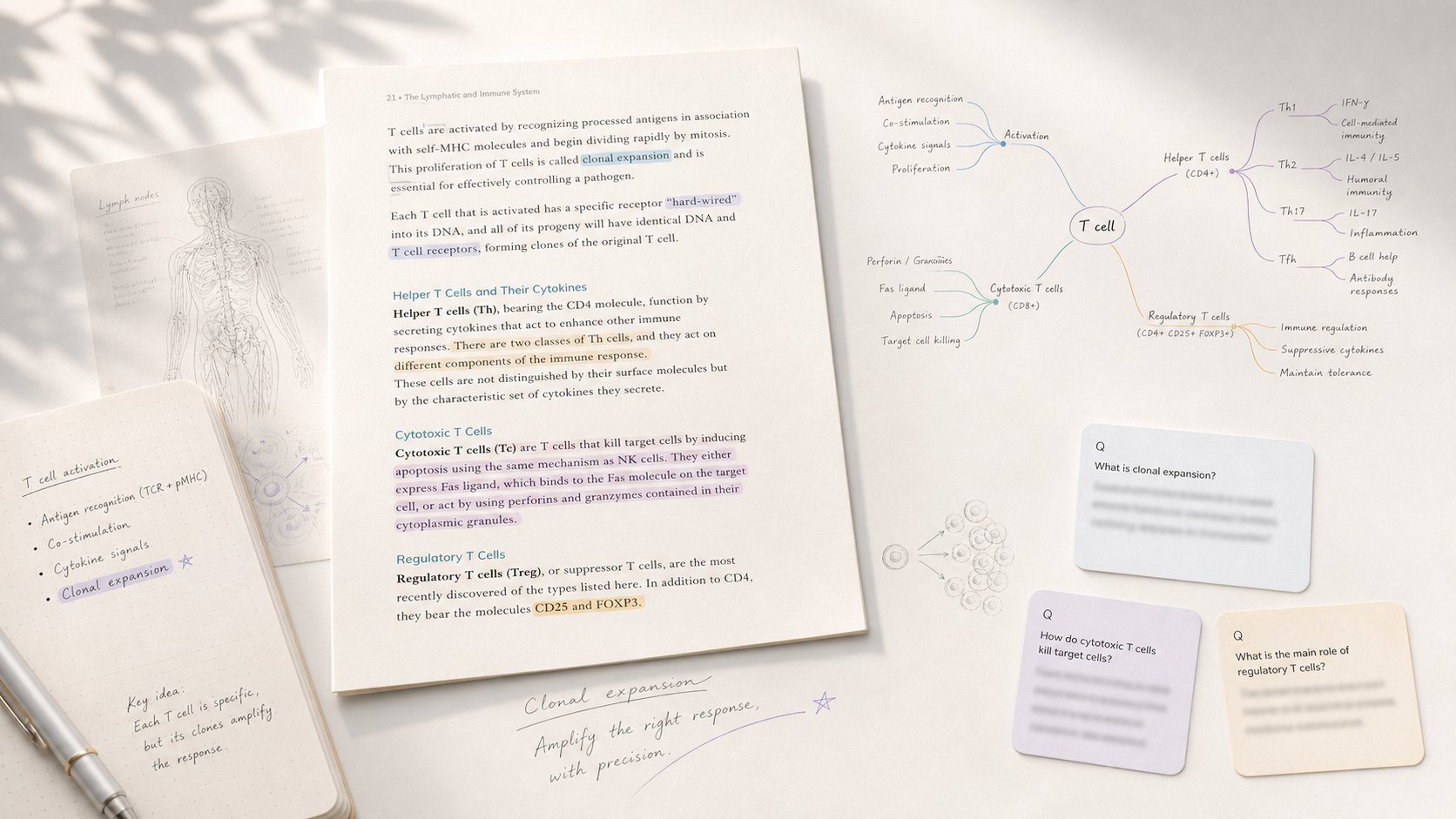
A quiet tool for thinking that transforms PDFs, lecture notes, and ChatGPT conversations into dense, teachable mindmaps. Includes a Present mode to walk through nodes linearly.
MarginNote is a study and knowledge-management app for Mac and iPad, positioned as a place 'where deep reading leaves a trace.' It integrates PDF/EPUB annotation, mind mapping, and an FSRS-based spaced-repetition flashcard system so that highlights and notes automatically become study cards across multiple linked formats.
- No signup required for 5 free maps
- AI extracts argument structure automatically
- Built-in Present mode for teaching and self-explanation
- Supports multiple languages natively
- Tightly integrates reading, mind mapping, and flashcards into one workflow
- FSRS-based spaced repetition is more efficient than legacy algorithms
- Multiple purchase options including lifetime licenses
- Popular with medical, law, and language-learning students for exam prep
- Only 5 free maps, likely paid beyond
- Limited to mindmap hierarchy, not propositional concept maps with cross-links
- No explicit offline functionality
- Not available on Windows or Android
- Lifetime plan's AI credits stop after 3 years even though the software keeps working
- Steeper learning curve due to the depth of mind-mapping and linking features
More alternatives & similar tools
Alternatives to ConceptMap
View all →
Study app that turns PDF/EPUB annotations into mind maps and spaced-repetition flashcards.

Alternatives to MarginNote
View all →
The Verdict
AI-generated from listing dataConceptMap is a web‑based, AI‑driven mind‑mapping tool focused on quick extraction and presentation, while MarginNote is a desktop‑only study suite that combines PDF annotation, rich mind‑map layouts, and spaced‑repetition flashcards.
Key differences
- •Platform: ConceptMap runs in any browser; MarginNote is a macOS/iPadOS desktop app only.
- •Core workflow: ConceptMap extracts arguments from diverse inputs and offers a built‑in presentation mode; MarginNote centers on annotating PDFs/EPUBs and turning those notes into flashcards.
- •Collaboration: ConceptMap provides public shareable links without accounts; MarginNote has no mention of sharing or collaboration features.
- •Learning tools: MarginNote includes spaced‑repetition (FSRS) and flashcards; ConceptMap does not.
- •Pricing model: ConceptMap offers 5 free maps then paid plans (pricing unknown); MarginNote uses a freemium model with optional lifetime licenses.
Pricing & value
MarginNote has a freemium tier and lifetime license options; ConceptMap only offers 5 free maps and undisclosed paid pricing.
Ease of use / learning curve
ConceptMap works in a browser with no signup and simple map creation; MarginNote’s deep linking and multiple layouts create a steeper learning curve.
Features & depth
MarginNote provides PDF/EPUB annotation, OCR, multiple mind‑map layouts, spaced‑repetition, and AI summaries; ConceptMap focuses on AI extraction and presentation only.
Integrations & ecosystem
ConceptMap accepts PDFs, notes, chats, YouTube URLs, images, and multiple languages; MarginNote is limited to macOS/iPadOS and syncs via iCloud only.
Collaboration
ConceptMap allows public link sharing and remixing without accounts; MarginNote has no stated collaboration features.
Platform availability
ConceptMap runs in any web browser (cross‑platform); MarginNote is unavailable on Windows or Android.
Support & updates
MarginNote mentions multiple purchase options and a mature user base; ConceptMap provides no details on support or update policy.
Choose ConceptMap if…
Educators or learners who need quick AI‑generated mind maps and presentation mode, using any device.
Choose MarginNote if…
Students or researchers who annotate PDFs/EPUBs, want flashcards with spaced‑repetition, and work on macOS/iPadOS.
Common questions
Can I use the tool on Windows or Android?
ConceptMap is web‑based and works on any browser; MarginNote is only available for macOS and iPadOS.
Which tool supports spaced‑repetition flashcards?
MarginNote includes FSRS‑based spaced‑repetition flashcards; ConceptMap does not offer flashcards.
Is there a free way to try each product?
ConceptMap lets you create 5 maps without signup; MarginNote offers a freemium tier with limited features.