


Tubed vs VideoProc Converter AI
Side-by-side comparison of features, pricing, ratings, and alternatives.

Tubed is a web‑based service that lets users download videos from various online platforms. It works directly in the browser, requiring no installation or additional software. Designed for people who need to save video content for offline viewing, Tubed offers a simple interface and supports multiple video formats.
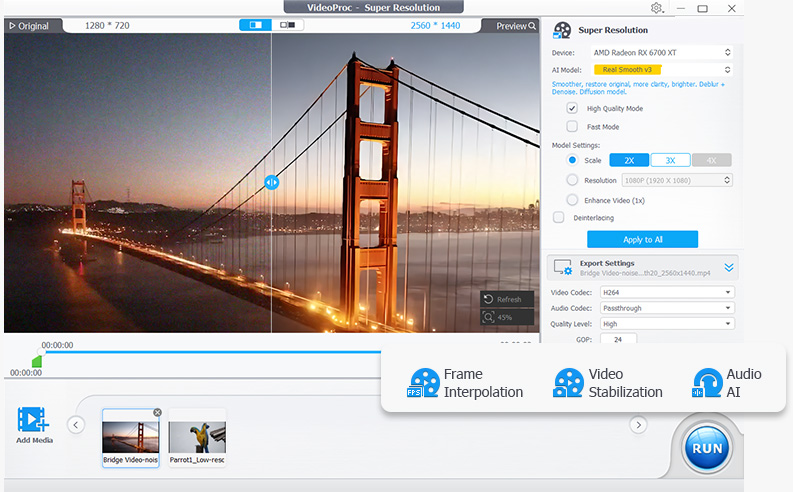
VideoProc Converter AI is an all-in-one video and image tool from Digiarty Software that combines format conversion with AI enhancement. It converts across 420+ output formats, uses AI super resolution to upscale low-resolution video up to 4K and images up to 8K, and applies frame interpolation, stabilization, and noise reduction to raw footage. The software also compresses files by more than 90 percent, includes screen and webcam recording, and downloads video from over 1,000 sites. Processing is accelerated through Level-3 hardware acceleration across NVIDIA, AMD, Intel, and Apple Silicon GPUs, aiming to make demanding AI tasks run at practical speeds on consumer hardware.
- Works entirely in the browser
- Supports several output formats
- No software installation required
- Free to use
- Very broad format support for input and output
- GPU acceleration makes conversion significantly faster
- AI upscaling and stabilization go beyond basic conversion
- Lifetime license option avoids ongoing subscription cost
- Limited to web access only
- May be restricted by site anti‑download measures
- No dedicated mobile app
- Free trial is limited by file size and duration restrictions
- Interface bundles many tools which can feel overwhelming for simple conversions
- AI enhancement features require capable GPU hardware for best speed
More alternatives & similar tools
Alternatives to Tubed
View all →Free, open-source download manager built for automating downloads from file hosts.
Free download accelerator with built-in BitTorrent support and browser integration.

Alternatives to VideoProc Converter AI
View all →Turn blurry videos and photos into brilliant, high-quality content with AI-powered enhancement, conversion, and voice tools.

Long-running video conversion tool supporting 1000+ formats with AI upscaling and compression.
The Verdict
AI-generated from listing dataTubed is a free, browser‑based video downloader for quick, simple grabs, while VideoProc Converter AI is a paid desktop app offering extensive conversion, AI upscaling, and GPU‑accelerated processing.
Key differences
- •Delivery model: Tubed runs in any modern browser, VideoProc installs as a desktop application.
- •Cost: Tubed is free; VideoProc requires a one‑time purchase.
- •Feature depth: Tubed only downloads videos; VideoProc converts, compresses, upscales, stabilizes, records screen/webcam, and more.
- •Hardware requirements: VideoProc’s AI and GPU acceleration need a capable GPU; Tubed works on any device with a browser.
- •Output flexibility: Tubed supports a few formats (MP4, MP3, WebW); VideoProc supports 420+ formats and AI‑enhanced options.
Pricing & value
Tubed is free to use, whereas VideoProc requires a paid one‑time license.
Ease of use / learning curve
Tubed works instantly in a browser with no installation; VideoProc needs download, install, and hardware setup.
Features & depth
VideoProc offers conversion, AI upscaling, stabilization, compression, recording, and 420+ formats; Tubed only downloads videos.
Security & privacy
Tubed uses HTTPS for link privacy; VideoProc provides no specified security details.
Platform flexibility
Tubed runs on any modern browser across OSes; VideoProc is limited to desktop installations.
Choose Tubed if…
Users who need a quick, free way to download videos without installing software.
Choose VideoProc Converter AI if…
Content creators needing advanced conversion, AI upscaling, and GPU‑accelerated processing.
Common questions
Is there any cost to use Tubed?
No, Tubed is offered free of charge.
Can VideoProc upscale low‑resolution video to 4K?
Yes, it uses AI super‑resolution to upscale video up to 4K.
Do I need to install anything to use Tubed?
No, Tubed runs entirely in the web browser.