


Tool.Video vs VideoProc Converter AI
Side-by-side comparison of features, pricing, ratings, and alternatives.
Tool.Video is a free, browser-based video and audio toolbox that lets users compress, trim, crop, cut, and convert files directly on their device. It emphasizes privacy by processing local files without uploads or sign-up for its core tools, and also offers AI generators and advanced tools.
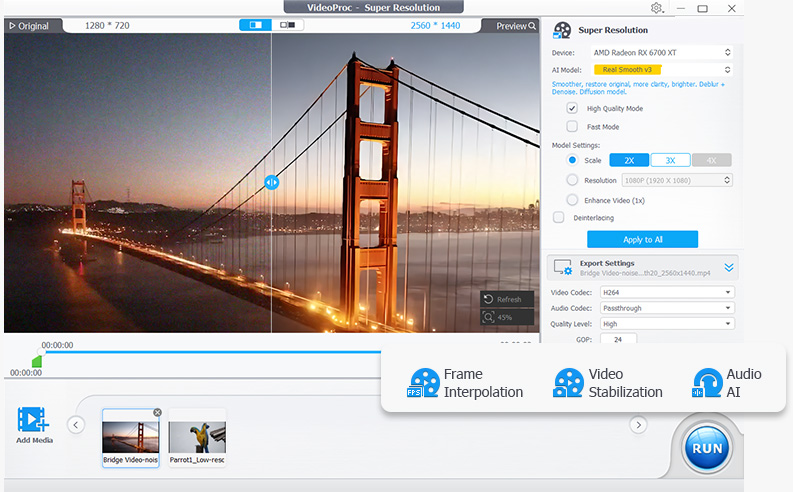
VideoProc Converter AI is an all-in-one video and image tool from Digiarty Software that combines format conversion with AI enhancement. It converts across 420+ output formats, uses AI super resolution to upscale low-resolution video up to 4K and images up to 8K, and applies frame interpolation, stabilization, and noise reduction to raw footage. The software also compresses files by more than 90 percent, includes screen and webcam recording, and downloads video from over 1,000 sites. Processing is accelerated through Level-3 hardware acceleration across NVIDIA, AMD, Intel, and Apple Silicon GPUs, aiming to make demanding AI tasks run at practical speeds on consumer hardware.
- Files are processed on-device for local tools
- No upload or sign-up required for core tools
- Free to use
- Works in browser on desktop and mobile
- Very broad format support for input and output
- GPU acceleration makes conversion significantly faster
- AI upscaling and stabilization go beyond basic conversion
- Lifetime license option avoids ongoing subscription cost
- Maximum 200 MB per file on desktop; 50 MB on mobile
- Tab must remain open during processing
- AI and advanced tools may have separate usage rules
- Not a full-featured professional video editor
- Free trial is limited by file size and duration restrictions
- Interface bundles many tools which can feel overwhelming for simple conversions
- AI enhancement features require capable GPU hardware for best speed
More alternatives & similar tools
Alternatives to Tool.Video
View all →No alternatives listed yet. Browse similar tools →
Alternatives to VideoProc Converter AI
View all →Turn blurry videos and photos into brilliant, high-quality content with AI-powered enhancement, conversion, and voice tools.

Long-running video conversion tool supporting 1000+ formats with AI upscaling and compression.
The Verdict
AI-generated from listing dataTool.Video offers a free, browser‑based, privacy‑friendly toolbox for basic video/audio tasks, while VideoProc Converter AI is a paid desktop app with extensive format support, GPU‑accelerated AI upscaling, and advanced editing features.
Key differences
- •Tool.Video runs in the browser with no uploads; VideoProc is a desktop application requiring installation.
- •Tool.Video is free with file size limits (200 MB desktop, 50 MB mobile); VideoProc requires a one‑time purchase.
- •VideoProc supports 420+ formats, AI upscaling to 4K, and GPU acceleration; Tool.Video focuses on compression, trimming, and basic AI tools.
- •Tool.Video processes files locally with no sign‑up; VideoProc’s AI features need capable GPU hardware for optimal speed.
Pricing & value
Tool.Video is free for core tools; VideoProc requires a paid license.
Ease of use / learning curve
Tool.Video works in any browser with no install; VideoProc is a desktop app with many bundled tools.
Features & depth
VideoProc offers 420+ format conversions, AI upscaling, frame interpolation, and GPU acceleration; Tool.Video provides basic compression, trimming, and limited AI.
Integrations & ecosystem
VideoProc includes screen/webcam recording and video‑site downloading; Tool.Video has no noted integrations.
Security & privacy
Tool.Video processes files locally with no uploads; VideoProc’s privacy details not specified.
Scalability
VideoProc handles large files and leverages GPU for high‑volume work; Tool.Video limited to 200 MB desktop files.
Support
VideoProc is a commercial product likely offering support; Tool.Video’s support not specified.
Choose Tool.Video if…
Casual creators needing quick, free edits on any device without installing software.
Choose VideoProc Converter AI if…
Power users or professionals needing extensive format support, AI upscaling, and fast GPU‑accelerated processing.
Common questions
Is there any cost to use Tool.Video?
No, core tools are free; other tools have their own usage rules but no price is listed.
Can VideoProc handle large video files?
Yes, it is a desktop app with no stated file‑size limit and supports GPU acceleration for large files.
Which tool offers better privacy for my media?
Tool.Video processes files locally with no uploads, providing stronger privacy; VideoProc’s privacy details are not specified.