



Sleek
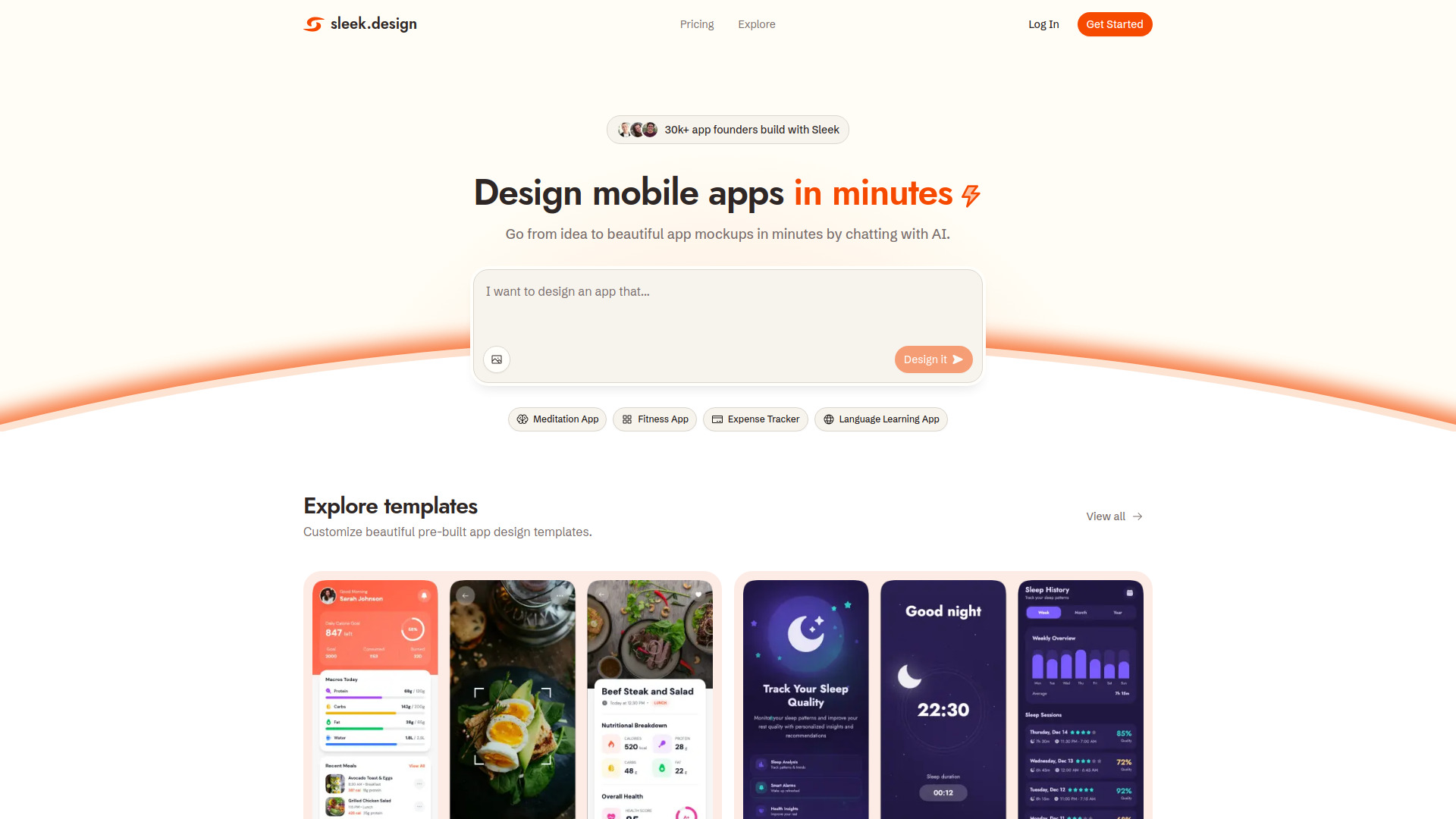
Design mobile apps in minutes


What is Sleek?
Sleek is an AI-powered mobile app designer that lets users go from idea to polished iOS and Android app designs in minutes by chatting with AI. It generates complete screens with layout, components, copy, and styling, and offers visual editing, templates, and one-click export to Figma or code (HTML/React with Tailwind CSS). It also provides an API and agent skill for use with AI coding agents like Claude Code, Codex, or Cursor.
SpecificationsAI-estimated
Key Features of Sleek
Use Cases for Sleek
Non-technical founders validating app ideas
Quickly create realistic mobile app designs to test with real users without hiring a designer or waiting weeks for revisions.
Startup founders preparing investor demos
Generate professional-looking screens that impress investors and convey a polished product vision.
Developers building apps with AI coding agents
Let Claude Code, Codex, or Cursor drive Sleek to generate designs and pull back Figma layers or React code as part of the build process.
Designers accelerating early exploration
Skip the blank canvas and start with high-fidelity drafts that can be refined in Figma as native, editable layers.
Product managers and marketers prototyping concepts
Describe an app concept and get visual screens for stakeholder reviews, marketing assets, or product documentation.
How to use Sleek?
Describe your app idea
Type a plain-language description of the app you want to design, or upload a reference image.
AI generates screens
Sleek's AI creates complete mobile screens including layout, components, copy, and styling following mobile design conventions.
Edit and refine visually
Use the visual editor to iterate on the design, adjust components, and make it match your vision.
Export to Figma or code
One-click export to Figma as native editable layers, or export to HTML/React with Tailwind CSS to hand off to development.
Integrate with AI coding agents (optional)
Use Sleek's API and agent skill to let Claude Code, Codex, Cursor, or other agents create projects and pull designs directly into your workflow.
Pros & Cons of Sleek
Pros
- No design experience required; built for founders, PMs, marketers, and developers
- Generates complete, high-fidelity mobile app screens from a simple text prompt or reference image
- Mobile-specific design conventions (iOS HIG, Material Design, native navigation, accurate device dimensions)
- Visually edit and iterate designs quickly without needing Figma skills
- One-click export to Figma as native, editable layers (no plugin required)
- Export to HTML or React with Tailwind CSS for development handoff
- Works with AI coding agents like Claude Code, Codex, and Cursor via API and agent skill
- Free plan available with 60 one-time credits, 1 project, and 3 screens
- Hand-picked reference designs and templates to fork or use as inspiration
- Saves time and money compared to hiring freelance designers or waiting for revisions
Cons
- Free plan is very limited (60 one-time credits, 1 project, 3 screens)
- Paid plans are subscription-based and may be costly for casual users ($39-$99/month or $240-$490/year)
- AI-generated designs may still require manual refinement for complex or highly custom needs
- Primarily focused on mobile app design, not suitable for web or desktop UI design
- Dependent on AI quality; may not fully replace a professional designer for brand-defining work
- Credits system may be confusing or limiting for heavy users
Frequently Asked Questions
What is Sleek?
Sleek is an AI mobile app designer. Describe your app idea or attach a reference image, and the AI generates iOS and Android designs you can edit and export to Figma or code.
How much does Sleek cost?
Free is $0 (60 one-time credits). Starter is $39/month or $240/year (3,000 credits a month). Pro is $69/month or $360/year (20,000 credits a month). Team is $99 per seat/month or $490 per seat/year (30,000 credits per seat a month).
How does AI mobile app design work?
Describe your app idea in plain language, or upload a reference image. Sleek's AI generates complete mobile screens, including layout, components, copy, and styling. You can edit any of it visually and export when you're ready.
Is Sleek free to use?
Yes. The free plan includes 60 one-time credits, 1 project, and 3 screens. Figma and code export are included. Paid plans add more projects, monthly credits, and team features.
Can I export Sleek designs to Figma or code?
Yes. Every plan includes one-click export to Figma, where designs paste in as native, editable layers (no plugin required). You can also export to HTML or React with Tailwind CSS.
Can I use Sleek with AI coding agents like Claude Code, Codex, or Cursor?
Yes, with any of them. Sleek has an API, and its agent skill is a set of instructions that teaches an AI agent how to use it. So Claude Code, Codex, Cursor, or any other agent can drive Sleek directly: it creates a project, generates the mobile screens from your prompt, and pulls the result back as Figma layers or React code.
Do I need design experience to use Sleek?
No. Sleek is built for founders, product managers, marketers, and developers who need mobile app designs without spending hours in Figma. Describe what you want, and the AI handles the layout, hierarchy, and styling.
Can designers use Sleek to speed up their workflow?
Yes. Designers use Sleek to skip the early exploration phase and start with a high-fidelity design. Exported screens land in Figma as native, editable layers, so you can refine or restyle without losing work. Sleek doesn't replace Figma; it gets you a fast first draft you can build on.
What kinds of apps can I design with Sleek?
Any mobile app concept: fintech, social, e-commerce, productivity, wellness, AI tools, and more. Browse the templates library to start from an existing layout, or generate something custom from a single prompt.
Why use Sleek instead of a generic AI design tool?
Sleek is built specifically for mobile app design, not a general-purpose AI UI generator that also covers mobile. Every layout, component, and interaction pattern follows mobile conventions: iOS Human Interface Guidelines, Material Design, native navigation, accurate device dimensions, and tap-target sizing. The result looks like a real app instead of a website cropped to phone width.
How is Sleek different from Figma?
Figma is a manual design tool. Sleek generates complete app screens for you, then lets you refine them visually. You own the output and can move it to Figma or your codebase anytime.
Pricing Overview
View full pricing →Sleek offers a free plan with 60 one-time credits, plus paid subscription plans starting at $39/month for Starter, $69/month for Pro, and $99 per seat/month for Team, with annual billing options available.
Reviews & Ratings0.0
No reviews yet. Be the first to write one!
Top Alternatives & Similar Software
View all alternatives & similar software→No alternatives available yet.
People also viewed




Related searches
Is this your tool?
Claim this page to update details, reply to user reviews, and drive more traffic to your product.
Claim this Product →
Tags
Keep up with Sleek alternatives
New alternatives, pricing changes and the week's biggest movers - one email every Tuesday.