



Vidnoz AI Video Translator
Translate your videos seamlessly in 140+ languages with natural voice clone and preserve authentic speaking styles.

What is Vidnoz AI Video Translator?
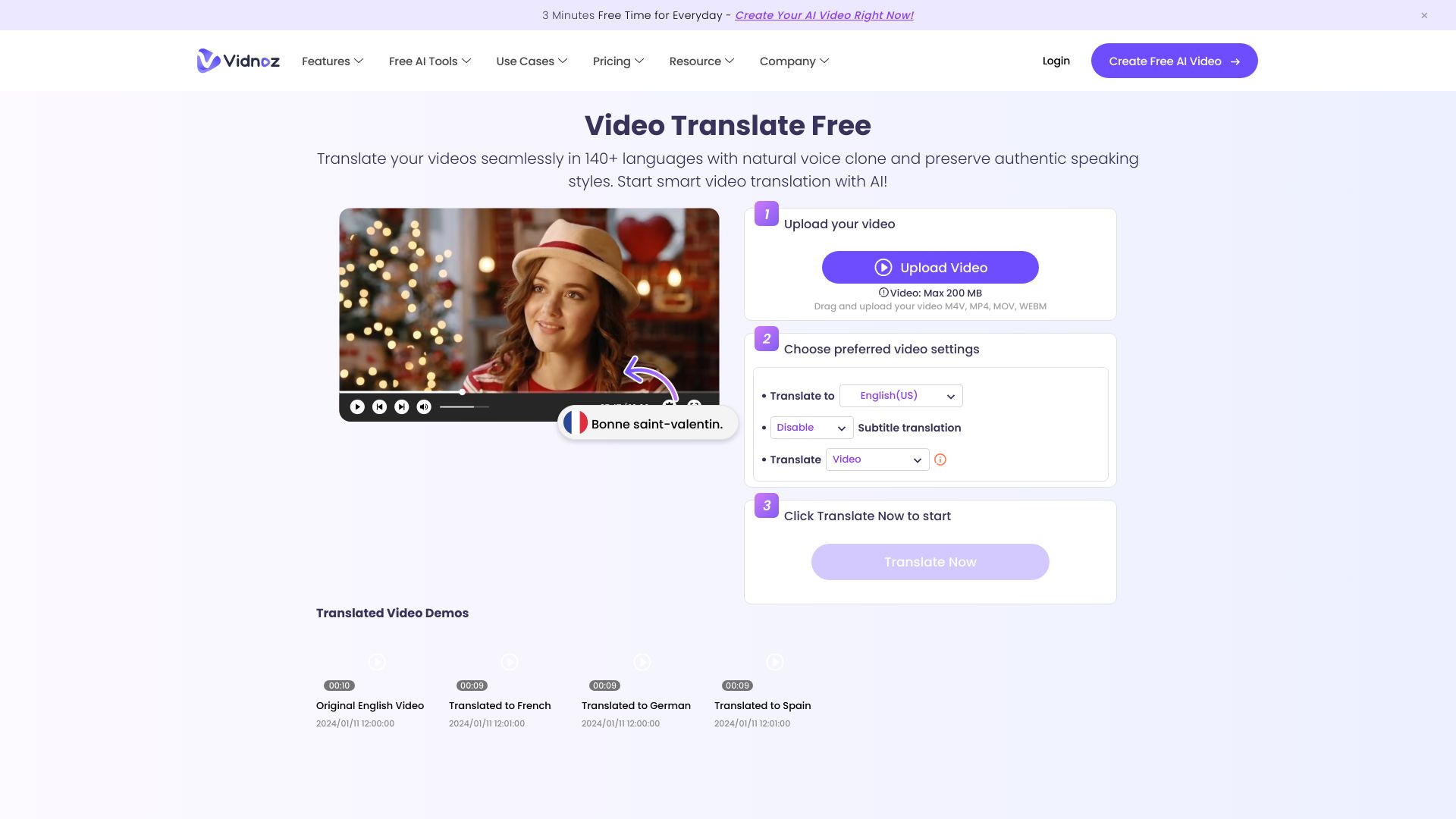
Vidnoz AI Video Translator is a free online tool that lets you translate videos into 140+ languages while keeping the original speaker's voice character. It uses AI to clone voices and adapt lipsync so translated videos feel natural and authentic — not like robotic dubbing. The workflow is entirely browser-based: you upload a video or paste a URL, choose source and target languages, enable optional features like subtitles, multi-voice detection, or accent handling, and the AI processes your file for download. Beyond simple translation, the platform includes specialized tools for content professionals: it can erase original burned-in subtitles, translate subtitle tracks alone, accept proofread SRT/ASS files for higher accuracy, and automatically detect multiple speakers so conversations in your video sound clear and distinct. Advanced options like adaptive speech rate and accent improvement further refine the output for a professional finish. Vidnoz targets content creators, educators, marketers, and media teams who need to localize videos for global audiences — whether it's a YouTube vlog, a corporate training module, or an advertising spot. The free tier is great for testing, while premium credits unlock longer translations, 4K export, watermark-free output, and faster processing.
SpecificationsAI-estimated
Key Features of Vidnoz AI Video Translator
Use Cases for Vidnoz AI Video Translator
Social media content localization
Localize YouTube, TikTok, and Instagram videos for international audiences while keeping the creator's voice style intact.
E-learning and online courses
Translate e-learning lessons and training videos into multiple languages for global students and employees.
Marketing and advertising videos
Dub marketing videos, ads, and product demos with natural AI voices and lip-sync for different markets.
Podcasts and vlogs
Translate podcasts and vlogs into other languages, automatically handling multiple speakers in conversations.
Film and video subtitling
Create multilingual subtitles or erase and replace burned-in subtitles for films, series, and documentary footage.
Corporate training and HR videos
Translate corporate training, onboarding, and instructional videos so teams across regions receive consistent information.
How to use Vidnoz AI Video Translator?
Upload your video
Click the upload area or provide a video URL, then select the file (M4V, MP4, MOV, or WEBM) that you want to translate.
Set languages
Choose the original language of the video (or leave auto-detect) and pick the target output language from 140+ available options.
Configure translation options
Toggle features like Lip-sync, Subtitles, Erase original subtitles, Multi-voice, or upload an SRT/ASS file for more accurate results.
Start the translation
Press the 'Translate Now' button and wait for the AI to process your video. This may take a few minutes depending on the video length.
Share or download
Once generation is complete, preview the result, then share it via the built-in dialog or download the translated video to your device.
Pros & Cons of Vidnoz AI Video Translator
Pros
- Accurate AI voice cloning maintains the original speaker's identity
- Huge language and regional variant coverage (140+)
- Offers advanced options like lip-sync, multi-voice, and subtitle erasure
- Works entirely in the browser — no software install needed
- Freemium model allows free translation of the first 60 seconds
Cons
- Free plan only translates the first 60 seconds of a video
- File upload size is limited to 500 MB
- Processing can take a few minutes depending on video length and complexity
- Advanced features like 4K export, faster processing, and no watermark require paid credits
Frequently Asked Questions
What is Vidnoz AI Video Translator?
Vidnoz AI Video Translator is an online AI tool that automatically translates the speech and subtitles in your videos into other languages while preserving the original voice style and options for lip-sync.
How many languages are supported?
The tool supports over 140 languages and many regional variants, such as Spanish (Spain, Mexico, Argentina), French (France, Canada, Belgium), and Chinese (CN, HK, TW).
Is there a limit on the free version?
Yes. The free usage is limited to the first 60 seconds of a video. To translate longer videos you need to get credits or subscribe to a premium plan.
What video formats can I upload?
Supported file formats are M4V, MP4, MOV, and WEBM, with a maximum file size of 500 MB.
Can I upload my own subtitles?
Yes, you can upload your own proofread SRT or ASS subtitle files to get more accurate translations.
Does the translator support multiple speakers?
The Multi-voice option automatically detects the number of speakers in the video and improves the quality of translated conversations, giving each speaker a distinct voice.
Can it erase original subtitles from my video?
Yes, the 'Erase original subtitles' option removes burned-in subtitles from your video. Note that this may slightly affect video quality.
What does the lip-sync feature do?
Lip-sync uses AI to adjust the speaker's mouth movements so they match the translated language, making the result look more natural and authentic.
Reviews & Ratings0.0
No reviews yet. Be the first to write one!
Top Alternatives & Similar Software
View all alternatives & similar software→No alternatives available yet.
People also viewed


Related searches
Is this your tool?
Claim this page to update details, reply to user reviews, and drive more traffic to your product.
Claim this Product →
Tags
Explore Related Topics
Keep up with Vidnoz AI Video Translator alternatives
New alternatives, pricing changes and the week's biggest movers - one email every Tuesday.