


HitPaw VikPea vs UniFab AI
Side-by-side comparison of features, pricing, ratings, and alternatives.

HitPaw VikPea is an AI-powered video enhancer and upscaler that upgrades videos to 4K/8K, removes noise, fixes blurry footage, stabilizes shaky videos, restores old/damaged clips, and enhances AI-generated videos from tools like Kling, Sora, Veo, and Seedance.
UniFab AI is an all-in-one AI-powered video and audio enhancement suite that elevates every frame and enriches sound. It offers tools for upscaling videos to up to 16K, denoising, colorizing black-and-white footage, enhancing facial details, upmixing audio to surround sound, and converting/editing videos in over 1000 formats.
No specific pricing, plans, or dollar amounts are explicitly stated in the provided content.
FabCloud credits are available as flexible paid subscriptions starting at $16.67 for 600 credits or $25.00 for 1,000 credits, cancel anytime.
- One-click AI enhancement workflow
- Multiple specialized AI models for different video types
- Cloud GPU accelerated rendering for faster processing
- Supports 4K/8K upscaling, stabilization, frame interpolation, colorization, and repair
- Comprehensive 26-in-1 AI toolkit
- Supports upscaling to 16K resolution
- Multiple AI models for various tasks (upscaling, denoising, colorization, face enhancement)
- AI-powered audio upmix to EAC3 5.1/DTS 7.1 for cinematic sound
- Not free; requires purchase or subscription after trial
- Desktop app only
- Cloud rendering may require internet and raise privacy considerations
- Exact pricing is not clearly listed on the page
- Requires high-end hardware for optimal AI performance (e.g., NVIDIA RTX 30 series, 16GB RAM)
- Pricing may be steep for casual users (only monthly/yearly/lifetime plans with limited refund windows)
- No explicit mention of a free tier beyond trial
- Some features may be resource-intensive during processing
More alternatives & similar tools
Alternatives to HitPaw VikPea
View all →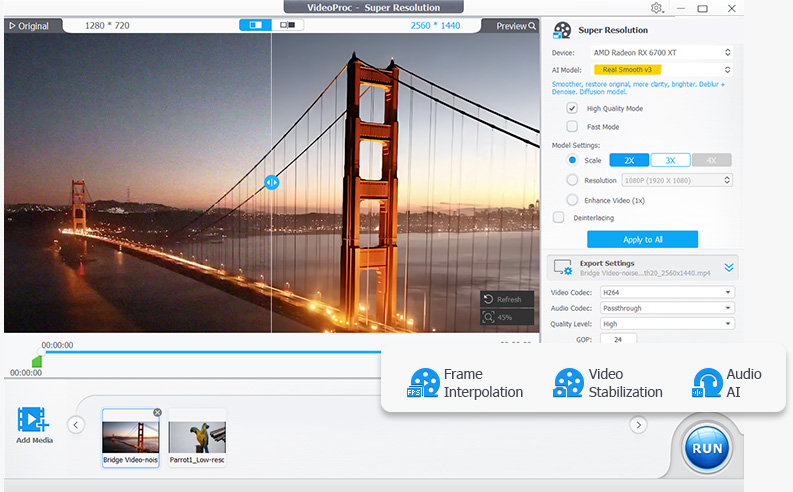

Alternatives to UniFab AI
View all →The Verdict
AI-generated from listing dataVikPea is the simpler, more focused choice: one-click AI enhancement with cloud rendering and a free trial, but pricing is undisclosed and it is Windows/macOS desktop only. UniFab AI offers a broader 26-in-1 toolkit with 16K upscaling and a 30-day full-access trial, but it demands high-end hardware and is steeper for casual users.
Key differences
- •Breadth: UniFab AI bundles 26 tools including audio upmix to EAC3 5.1/DTS 7.1 and 16K upscaling; VikPea focuses on video enhancement, stabilization, colorization, and repair, plus a few extras.
- •Hardware demands: UniFab AI recommends 16GB+ RAM and an NVIDIA RTX 30 series GPU with 8GB VRAM; VikPea lists 8GB minimum and 16GB recommended RAM.
- •Processing location: VikPea uses cloud GPU-accelerated rendering, which needs internet and raises privacy considerations; UniFab AI's stated acceleration is local hardware (NVIDIA, AMD, TensorRT, etc.).
- •Pricing transparency: VikPea does not clearly list exact pricing; UniFab AI states FabCloud credits from $16.67 for 600 credits, though plan details are incomplete.
- •Trial and free tools: UniFab AI offers a 30-day full-access trial plus free background and vocal removers; VikPea offers a free trial with paid plans afterward.
Pricing & value
VikPea's exact pricing is unstated (up to 35% off); UniFab AI lists a credit price but plan details are incomplete.
Ease of use / learning curve
VikPea advertises a one-click AI workflow; UniFab AI's 26 tools and hardware requirements suggest a steeper curve.
Features & depth
UniFab AI covers 16K upscaling, audio upmix, face enhancement, and 1,000+ format conversions, far broader than VikPea.
Integrations & ecosystem
VikPea provides API access for developers and supports Kling, Sora, Veo, and Seedance AI-generated video; UniFab AI's integrations are not specified.
Collaboration
Collaboration features are not specified for either product.
Scalability
VikPea's cloud rendering and API access suggest scaling options; UniFab AI's scaling depends on local hardware, which is not specified as a scaling path.
Support
UniFab AI is described as having responsive tech support and trust among media professionals; VikPea's support is not specified.
Security & privacy
UniFab AI's local hardware acceleration avoids the cloud-rendering privacy concerns noted for VikPea.
Migration / lock-in
Migration terms and lock-in details are not specified for either product.
Choose HitPaw VikPea if…
A creator who wants quick one-click enhancement and cloud rendering on a modest PC, and can accept unclear pricing.
Choose UniFab AI if…
A YouTuber or restorer with a high-end RTX GPU who needs 4K/8K/16K upscaling plus audio upmixing in one toolkit.
Common questions
Which is cheaper?
Neither price is fully clear: VikPea's exact pricing isn't listed, while UniFab AI's FabCloud credits start at $16.67 for 600 credits, with full plan details incomplete.
Which is easier to learn?
VikPea emphasizes a one-click AI workflow, whereas UniFab AI's 26 tools and demanding hardware requirements suggest a steeper learning curve.
Can I try them before paying?
Yes, both offer free trials: VikPea has a free trial, and UniFab AI includes a 30-day trial with full access.